Great agencies are built around great, working tools
There's a pattern that emerges when you look at the agencies that scale well, retain clients, and deliver consistently: they don't compete on effort alone. They compete on systems. And at the heart of those systems are tools that actually work, not just in demos, but day in and day out, across dozens of clients, under real delivery pressure.
This isn't a coincidence. The best SaaS platforms themselves operate this way. Rather than building every capability from scratch, they compose their stacks from best-in-class components, each one chosen because it does its job better than anything else available. The most effective agencies apply the same thinking: they curate tools that complement each other, close blind spots, and multiply what their team is capable of.
Agencies don't need more dashboards. They need fewer browser tabs, fewer missed issues, and fewer conversations explaining why a client's site broke on a Tuesday morning. The challenge isn't finding software — it's finding software that actually fits how agencies work: across dozens of clients, with tight delivery timelines, and zero margin for blind spots.
This guide covers what the best agency tools get right in 2026, and what to look for before you commit.
What are agency tools?
Agency tools are software built for service businesses managing many client sites at once, not a single brand's website. Commercial tools optimize for “one company, one setup.” Agencies need “one team, many setups.”
That sounds like semantics until your “simple workflow” becomes 48 browser tabs, five sets of logins, and a weekly ritual of copying screenshots into decks.
Agency tools solve three portfolio realities:
They centralize multi-site operations into one control plane - updates, monitoring, reporting, QA, so you’re not logging in site by site.
They make collaboration safe through team access controls and permissions, so you’re not passing passwords around.
They productize ongoing value through white-label reporting and alerts, so clients don’t feel like “nothing happened this month.”
Agency tools aren’t a nice-to-have. They’re the infrastructure that makes retaining, scaling, and delivering consistently possible.
The importance of using the right tools as an agency
The cost of the wrong tools rarely shows up as a dramatic failure. It shows up as:
Slower delivery because context lives in too many places
Missed issues because monitoring is “sometimes” instead of “always”
Hard client conversations because you can’t explain impact clearly
Churn because clients don’t feel proactively covered
A big part of that is tool sprawl. Asana reports that the average employee uses 10 apps per day, which goes a long way toward explaining why teams lose so much time to “work about work.” Constant context-switching isn’t free; every interruption carries a reorientation cost that chips away at actual output.
None of these feel catastrophic in isolation. A missed alert here, a delayed report there, a client question your team can’t answer quickly. But together, they quietly erode the trust and efficiency that agency growth depends on.
That’s why tool selection is a strategic decision, not just an operational one. The right platform doesn’t just make individual tasks easier, it changes what your team is capable of delivering at scale.
So what does the right tool actually look like? Here are the six features that separate genuinely agency-grade software from everything else.
Feature 1: Team and multi-site management
A real agency-friendly tool should make portfolio management feel natural, not like a workaround. That means one place to onboard and oversee multiple sites, clear access levels for team members, and a setup that doesn’t require shared passwords or messy parallel processes.
If a platform is built with agencies in mind, it should help your team manage work collectively, not force each person to operate as a solo freelancer.
Bulk portfolio onboarding is a must. Tools like Uxify let agencies paste a list of URLs and add up to 100 websites at a time - the right approach for agency onboarding speed.
Quick demo test: Ask the vendor to show you how long it takes to onboard 20 sites, invite two team members, and produce a client-ready report. If the answer is “We’ll need to set up accounts one by one,” you have your answer.
Feature 2: Custom alerts and always-on monitoring
Most agencies already know how to run audits. The problem is that clients don’t pay retainers for audits, they pay for confidence.
That confidence comes from knowing that if something breaks, slows down, or behaves unexpectedly, your team catches it before it becomes a client escalation. This is why always-on monitoring is a critical selection criterion. A tool shouldn’t just show you what happened last month, it should actively help you stay ahead of what’s happening now.
“Alerts” shouldn’t mean a handful of generic notifications. Different clients have different priorities, risk tolerances, and traffic patterns. What’s urgent for an ecommerce store may be irrelevant for a B2B brochure site.
The real question when evaluating a tool: “Can it support your way of monitoring?” Can you define what matters per client and route alerts to the right people, without drowning your team in noise?
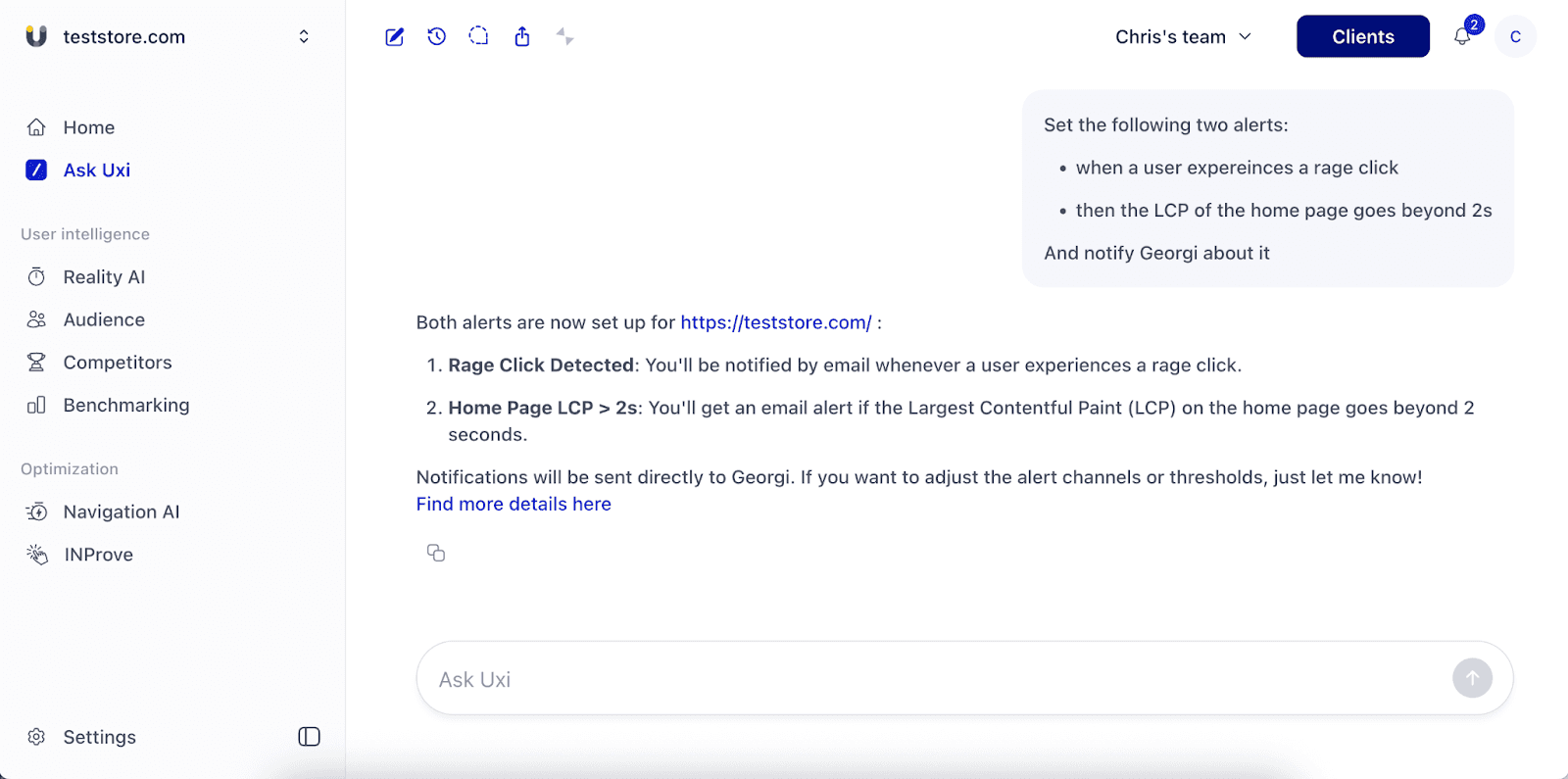
Question to ask your vendor: Do they offer agentic AI assistants (such as Uxi) that can help configure alerts and ensure notifications reach just the right people, rather than the whole team?
Feature 3: The ability to spot problems and opportunities - and act on them in context
This is one of the most important decision-making factors, and one of the easiest to underestimate.
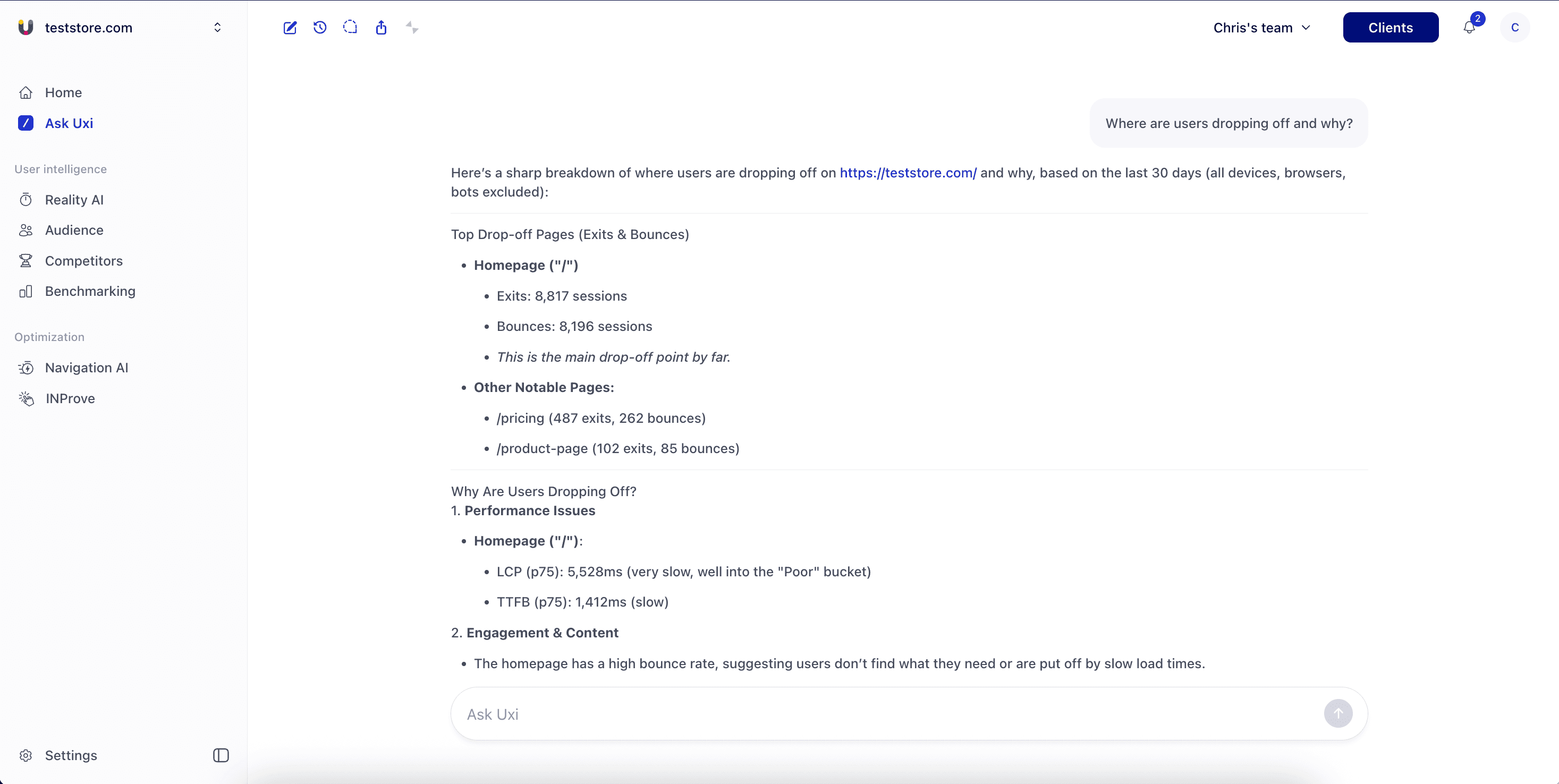
Many tools are good at detecting something. Far fewer help you understand it in context. And even fewer help you move from diagnosis to action without jumping across three other tools and manually stitching the story together.
That fragmentation is expensive. It creates delays, weakens decision-making, and pushes agencies into reporting mode instead of improvement mode.
A stronger agency tool should help your team answer three questions quickly:
What changed?
Why did it change?
What should we do next?
This applies to opportunities as much as problems. If a user journey is performing better on one device, a page variation is driving more engagement, or a performance change improved behavior — the tool should surface that, not just log it.
Feature 4: AI nativity - not AI as patchwork
In 2026, many tools are AI-enabled. But there’s an important distinction.
An AI-enabled tool adds AI on top of an existing workflow: a summary feature, a chatbot, an assistance layer. It may speed up individual steps, but your team still does most of the coordination work.
An AI-native tool goes further. AI is built into the product logic and the day-to-day workflow, connecting the dots for you, not just answering questions after you’ve already found the dots yourself.
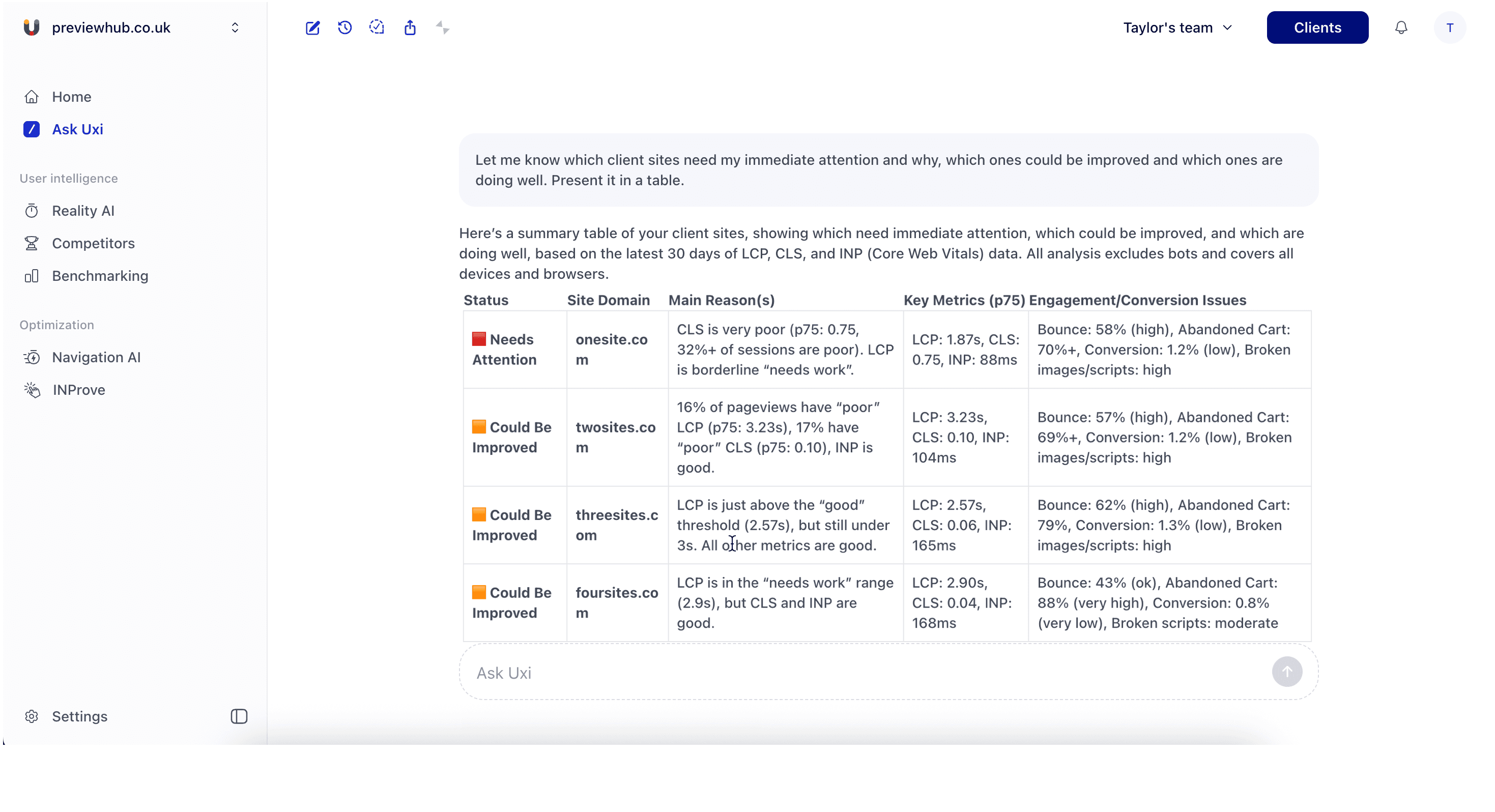
AI assistants like Uxi are already replacing hours of manual work: entering values into spreadsheets, plotting graphs, building MoM reports, and converting them into presentation-ready decks. With Uxi’s power prompts, that entire process becomes a single question.
Feature 5: Tying problems to business outcomes
If a platform can tell you a metric is bad but can’t help you explain why it matters to the client’s business, it leaves the hardest part of the work to your team and that’s usually the part that determines whether a client sees you as a vendor or a strategic partner.
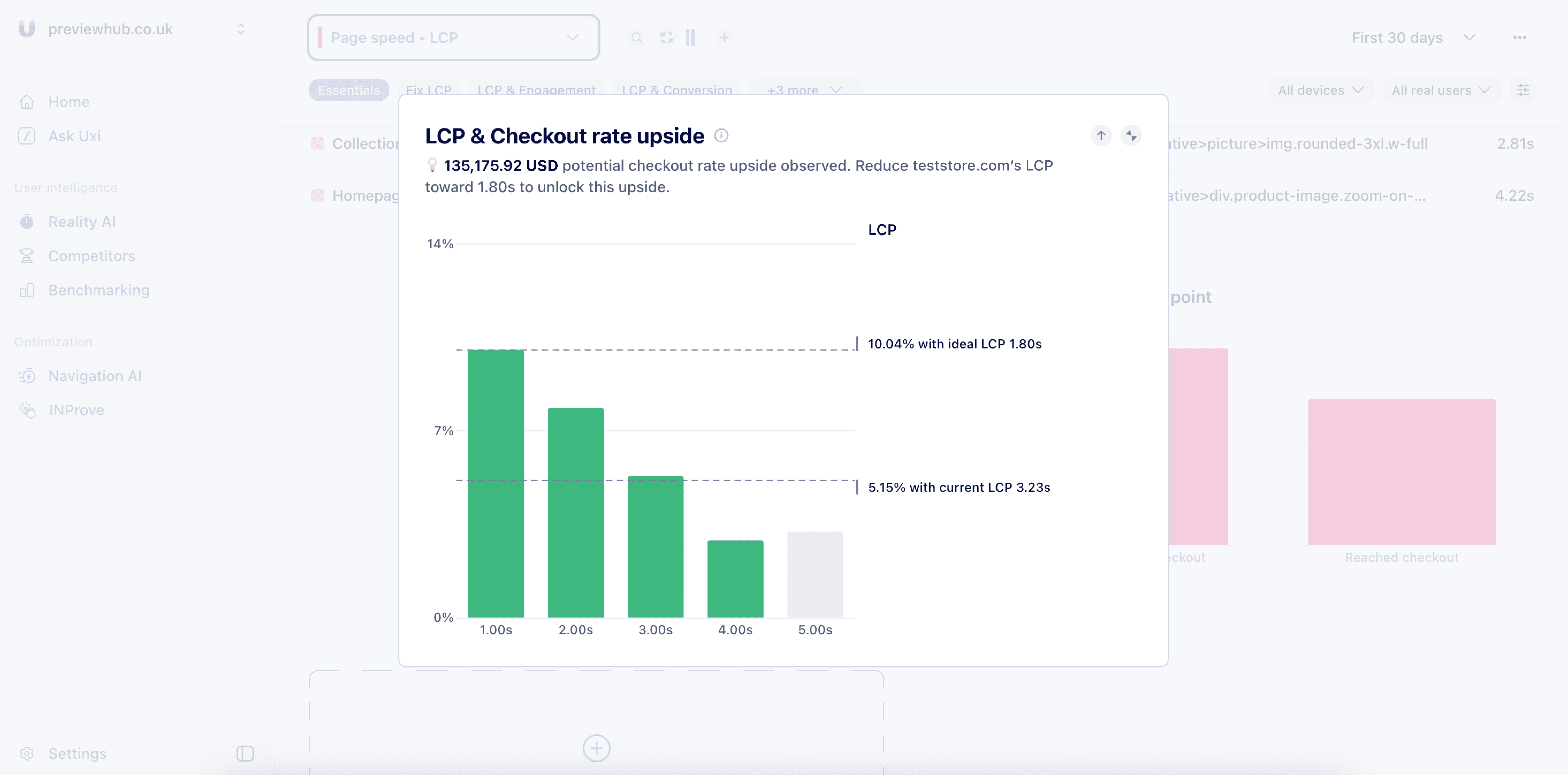
Agencies don’t just need to spot technical issues. They need to translate them into business impact: conversion risk, user friction, abandoned sessions, slower pages that cost revenue, missed opportunities.
That translation is what makes recommendations easier to approve. A client may resist “fixing LCP” as an abstract technical task. They respond very differently when they understand the likely effect on conversion rate, user experience, or average order value.
Feature 6: Look for a partner, not just a service provider
Software features matter. But for agencies, vendor behavior matters almost as much.
Even a strong product becomes a poor fit if onboarding is slow, support is hard to reach, pricing is rigid, or requests disappear into a ticket queue. Agencies operate on client time and your tooling partners need to be responsive when timing matters.
“Partner fit” should be part of the evaluation, not an afterthought once you’ve signed. In practice, that means looking for:
Flexible pricing that works for both agency-owned and client-owned setups
Onboarding support that gets your team productive quickly
Responsive communication on implementation questions and feature requests
A genuine understanding of how agencies sell, deliver, and retain clients
The right platform should feel like it was built for how agencies actually operate, not simply adapted from a single-business product.
Great agencies aren’t built on software alone
The pattern is consistent: the agencies growing fastest aren’t necessarily the ones with the most tools. They’re the ones who’ve been deliberate about which tools they use, how those tools connect, and what their stack enables their team to do.
The same logic applies to the tools themselves. The best platforms don’t try to do everything in-house, they integrate with and build on top of other best-in-class products. A great agency stack and a great SaaS product have this in common: they’re composed of components that genuinely work, rather than cobbled together out of convenience.
The right tools save your team time, reduce blind spots, and make your work easier to prove. But tools alone don’t make an agency successful.
The agencies that keep growing combine the right tooling with strong process, clear communication, sharp prioritization, and the ability to translate technical work into business outcomes clients understand.
That’s the bigger conversation — and it’s one we had live
The WP Legends session brings together leaders building agency-first tools to share practical lessons on scaling delivery, improving outcomes, and building stronger agency systems in real life, not just in product demos.
Frequently Asked Questions
Is Uxify an agency tool?
Yes and what makes it relevant isn’t any single feature. It’s the combination.
Uxify supports the multi-site, team-based workflows agencies need. It enables ongoing monitoring and alerting rather than one-off testing. It combines performance monitoring with user and engagement analytics, so agencies can see not just what’s slow, but how that affects real user journeys, drop-offs, and conversions, making it far easier to connect technical issues to business impact.
This becomes even more practical with Uxi, Uxify’s AI assistant. Agencies can still use dashboards in detail, but Uxi shortens the path to a useful TL;DR: identifying issues, explaining them in plain language, and suggesting next steps. It also speeds up reporting by turning tracked data into client-friendly summaries, saving real delivery time and making monthly communication easier.
Uxify doesn’t stop at analysis either. Features like Navigation AI and INProve add an optimization layer that helps improve perceived speed and responsiveness. Useful when standard best practices are already in place but the site still needs an extra push. For agencies, that combination of diagnosis, business context, AI assistance, and practical improvement is what makes a tool genuinely useful day to day.
Can a tool be suitable for both agencies and commercial businesses?
A tool can absolutely serve both. The core functionality (such as performance monitoring, reporting or analytics) is often relevant regardless of whether you’re managing one site or a hundred. A commercial business and an agency might use the same tool and get genuine value from it.
The better question to ask any vendor isn’t “can agencies use this?”, it’s “was this designed with agencies in mind?” The answer will show up in the details: how they handle multi-site onboarding, whether white-label reporting is a native feature or a workaround, and whether their pricing model actually makes sense for a business billing clients rather than managing its own properties.
If you’re running an agency, you want a tool where your use case was the design intention, not an afterthought.

" height="200.00000219726564px" id="j9Mmwfnw8" transform="translate(143.5 0)" width="479.5329973144531px"/><path d="M 0 15.944 C 0 7.139 7.154 0 15.98 0 C 24.804 0 31.959 7.138 31.959 15.943 L 31.959 59.637 C 31.959 68.442 39.113 75.58 47.938 75.58 C 56.763 75.58 63.917 68.442 63.917 59.637 L 63.917 15.944 C 63.917 7.139 71.071 0.001 79.897 0.001 C 88.721 0.001 95.875 7.139 95.875 15.944 L 95.875 56.095 C 95.875 82.51 74.413 103.923 47.938 103.923 C 21.462 103.923 0 82.51 0 56.095 Z" fill="rgb(59, 63, 91)" height="103.923px" id="KJCDMITFE" transform="translate(0 53)" width="95.875px"/><path d="M 0 15.943 C 0 7.138 7.154 0 15.979 0 C 24.804 0 31.958 7.138 31.958 15.943 C 31.958 24.748 24.804 31.886 15.979 31.886 C 7.154 31.886 0 24.748 0 15.943 Z" fill="rgb(252, 200, 0)" height="31.885999999999996px" id="q2K9EYOvZ" transform="translate(0 53)" width="31.95799999999963px"/><path d="M 0 15.943 C 0 7.138 7.154 0 15.979 0 C 24.804 0 31.958 7.138 31.958 15.943 C 31.958 24.748 24.804 31.886 15.979 31.886 C 7.154 31.886 0 24.748 0 15.943 Z" fill="rgb(63, 184, 126)" height="31.885999999999996px" id="bBya7XCj7" transform="translate(64 53)" width="31.95799999999963px"/><path d="M 0 14.171 C 0 6.344 6.359 0 14.204 0 C 22.048 0 28.407 6.344 28.407 14.171 C 28.407 21.997 22.048 28.342 14.204 28.342 C 6.359 28.342 0 21.997 0 14.171 Z" fill="rgb(229, 0, 106)" height="28.341999999999985px" id="WNzwBFOi7" transform="translate(34.5 128.5)" width="28.407000000000153px"/></g></svg>)