
When people visit your site, they want to see your content right away. Otherwise, waiting for a slow page might make them leave before they even see what you have to offer. Fixing your site speed is the best way to keep your visitors engaged while they browse your website.
Why Website Speed Matters More Than Ever
Search engines look closely at how quickly a page shows up for visitors, which often makes slow pages drop down the search results list. Furthermore, poor site speed hurts how people feel about your brand because no one likes waiting for a blank screen to change.
When you make pages load faster, people are much more likely to buy your products or fill out your forms, as the navigation within your website becomes smoother and more convenient. Research shows that websites loading in one second see conversion rates around 2%, while sites taking five seconds to load drop to roughly 1%. That’s a twofold difference just from speed alone. For ecommerce websites, anything above 2 seconds of page load time is considered sub-optimal, with users losing patience and abandoning stores at precisely the 2.75s mark.
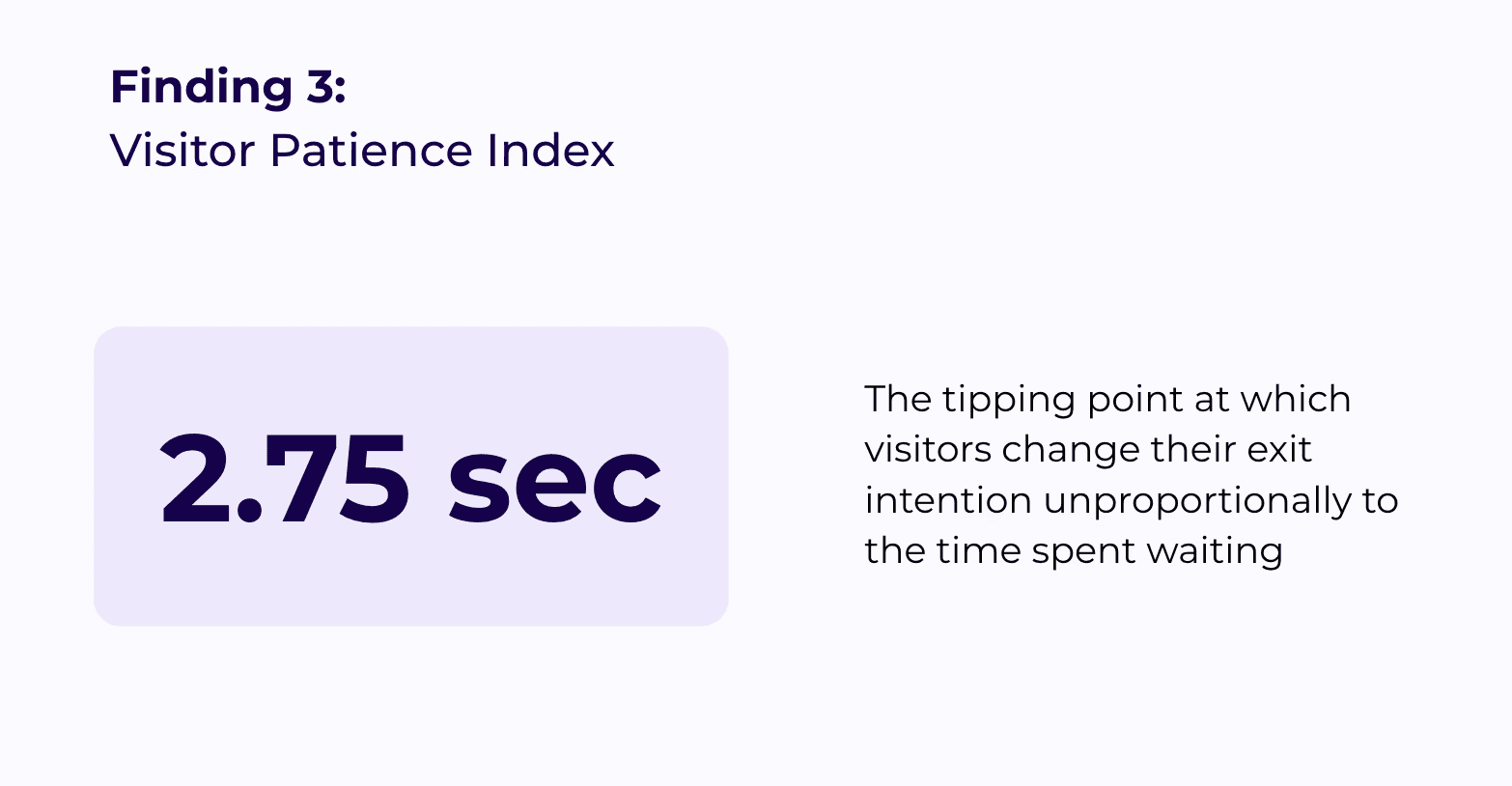
The financial impact is significant: if your online store earns $10 million a year and you improve load time by just two seconds, the resulting conversion lift could mean an extra $400,000 in annual revenue. On top of that, 79% of shoppers who experience poor site performance say they’re less likely to buy from the same store again, which means slow speeds don’t just cost you one sale, they cost you repeat customers.
Measure Your Website Speed First
Before you change anything, you must measure your website's performance so that you know exactly what needs fixing. Specifically, you should check your Core Web Vitals, which include:
Largest Contentful Paint (LCP)
Cumulative Layout Shift (CLS)
If you don’t have enough technical knowledge to understand how Core Web Vitals impact site speed, you can use simplified website speed testing tools like Google PageSpeed Insights or GTmetrix.
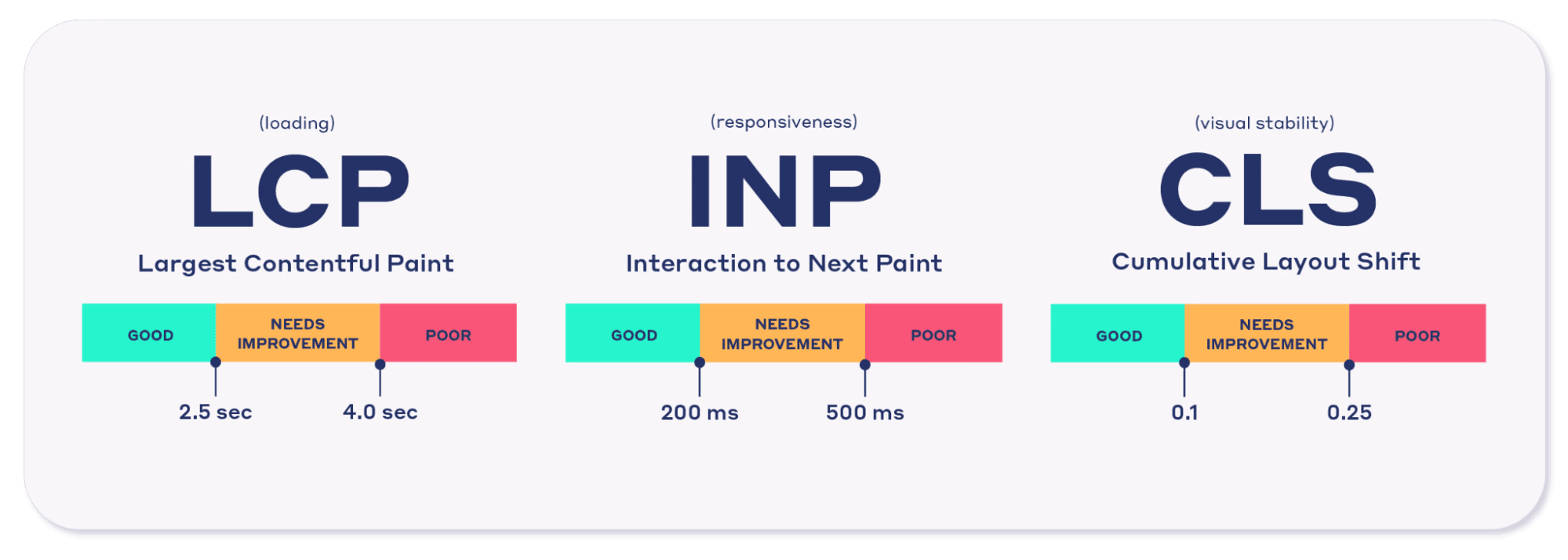
All of these metrics help with more than just SEO and user experience. Load speed has been shown to directly impact user engagement and bounce rates. For example, as page load time goes up to 5 seconds, the probability of a bounce increases by 90%. What makes this even more urgent is that over 54% of websites still fail to meet the “good” threshold for all three Core Web Vitals, meaning most of your competitors are also struggling which gives you a real opportunity to stand out by fixing yours first.
10 Proven Ways to Increase Website Speed
If your website turns out slower than you want it to be, there are many methods you can try to get it up to speed.
Use Uxify
Instead of guessing what to fix, you can use Uxify to improve website speed based on how real people actually experience your site. Uxify combines real user monitoring with AI-powered optimization, so it helps you spot where visitors run into slow pages, frustrating clicks, layout shifts, or broken browsing flows. That makes it easier to focus on the issues that affect both Core Web Vitals and business results, rather than wasting time on random technical tweaks.
Uxify also helps improve website speed in practical ways, not just in reports. Navigation AI by Uxify predicts the next page a visitor is likely to open and prepares it in advance, which helps pages load faster and browsing feel smoother. While INProve reduces delays caused by heavy scripts and unresponsive page elements, helping improve interaction speed across the site. For teams that want to increase website speed without relying fully on developers, Uxify offers a simpler way to improve load times, user experience, and conversion-focused journeys in one place.

Optimize Images Properly
Images are often the heaviest files on any page and one of the most common reasons for a poor LCP score, so getting this right has a huge impact.
Here is a practical list of how you can improve your images:
Resize images to match their actual display size - uploading a 4000px-wide photo for an 800px-wide slot is pure wasted bandwidth.
Convert images to modern formats like WebP or AVIF - these are typically 25–34% smaller than JPEGs at the same visual quality.
Add
loading="lazy"to any image below the fold - this tells the browser to only load those images when a visitor scrolls near them, dramatically reducing initial page weight.Use tools like TinyIMG to cut the size of the image.
NOTE: Keep lazy loading off your hero image or main banner — that's your LCP element and needs to load immediately.

Learning to properly optimize images ensures visitors can see your visual content quickly without waiting for it to load.
Minify CSS, JavaScript & HTML
Removing extra spaces and hidden notes from your code makes the files much smaller, which speeds up the whole page-loading process. Furthermore, smaller code files take less time for a visitor’s web browser to download and process, thereby speeding up your website’s load time.
Beyond minification, scan your stylesheets for unused CSS. Most websites load entire CSS files when only a fraction of the rules actually apply to any given page. Tools like PurgeCSS or Chrome DevTools’ Coverage tab can show you exactly which CSS lines are never used, so you can remove them. Minification alone typically reduces file sizes by 10–20%, but removing unused code on top of that can cut CSS payloads by 50% or more.
So make sure you minimize your CSS files and other scripts to give your visitors a better experience.
Enable Browser Caching
When you turn on browser caching, people who visit your page a second time will see everything appear much more quickly. It saves important files on the visitor's computer, which means their browser doesn’t have to download everything again. Here are some quick tips:
Enable browser caching - returning visitors will see your pages load much faster because their browser already has your files saved locally.
Set a one-year expiry for static assets like images and fonts, since these rarely change.
Set a one-month expiry for CSS and JavaScript files - long enough to benefit returning visitors, short enough to push updates through reasonably quickly.
Use no-cache or a very short expiry for HTML pages - this ensures visitors always see your latest content rather than a stale version.
Use a cache warmup strategy - this pre-builds a cached version of your pages so that even first-time visitors get a fast load, instead of waiting for the server to generate the page from scratch.
Use a CDN
A Content Delivery Network puts your site data on computers located all around the world, which allows visitors to always download files from a nearby location. Furthermore, using a Content Delivery Network takes the workload off your main server, keeping things running smoothly. The global network design guarantees better performance for everyone, no matter where they live.
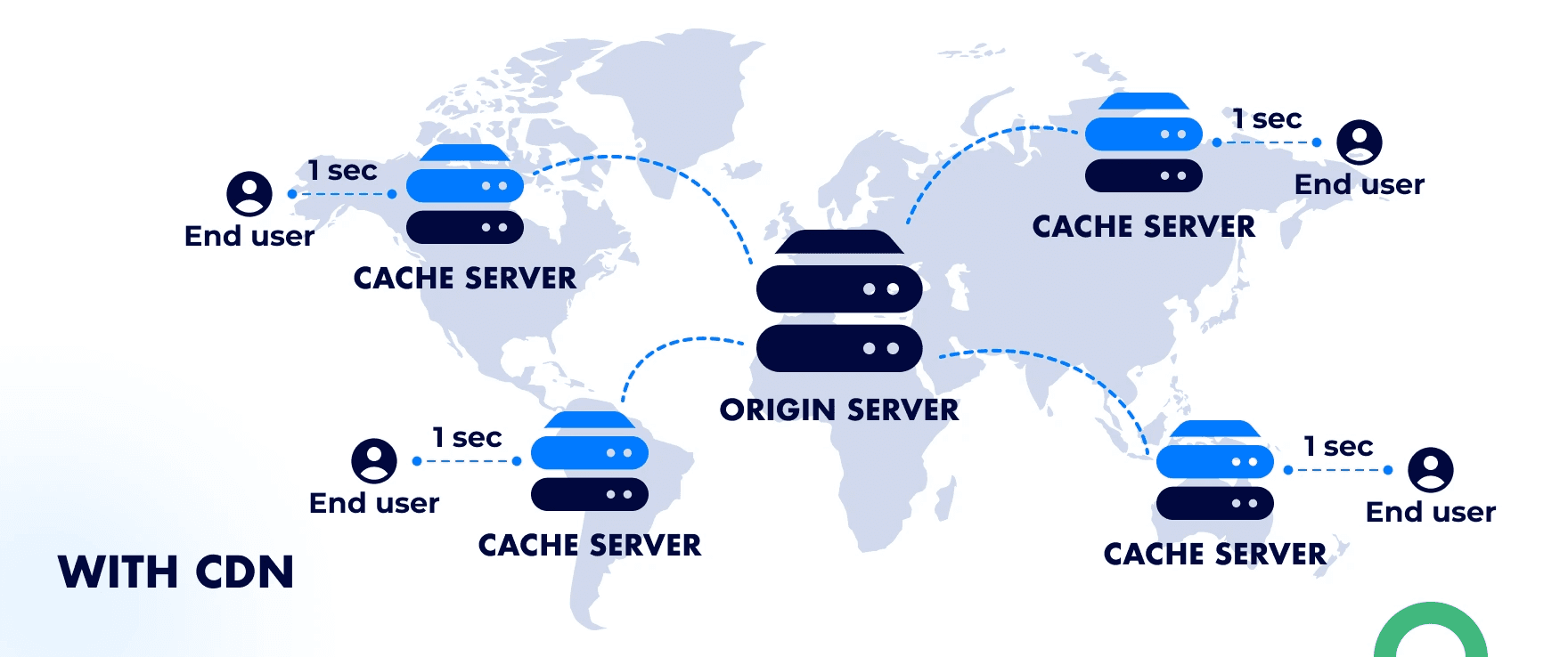
CDNs can reduce latency by up to 60% and improve overall load times by an average of 50%. Most CDN providers (such as Cloudflare, Bunny, or KeyCDN) offer a free tier that’s powerful enough for small-to-medium sites. Once set up, the CDN automatically serves your images, scripts, and stylesheets from whichever server is closest to each visitor, so someone in Tokyo isn’t waiting for files to travel from a server in New York.
Improve Server Response Time
Your server is responsible for preparing your website before it's shown to visitors. If it's slow, your site will still take time to load even if everything else is optimized. The metric to watch here is Time to First Byte (TTFB). It measures how long it takes your server to send back the very first piece of data after a visitor requests a page.
Aim for a TTFB under 200 milliseconds: anything above 600ms will noticeably drag down your entire page speed, regardless of your other optimizations.
Check your TTFB with Uxify: Uxify’s Reality captures TTFB from actual visitor sessions across all browsers and devices, so you can see how your server is really performing, not just in a one-off lab test. Alternatively, you can check CrUX field data in the Performance panel of Chrome DevTools.
Upgrade from shared hosting to a VPS or managed hosting plan if your TTFB is consistently too high: this is often the single biggest speed improvement you can make, with no code changes required.
Enable server-side caching so your server delivers a pre-built version of each page instead of rebuilding it from scratch every time someone visits.
Reduce HTTP Requests
Every picture and script on your page sends a separate request to your server, and having too many of them makes the whole loading process take much longer. While modern servers can handle multiple requests at once, cutting out anything unnecessary keeps your server focused on what actually matters and helps your site stay fast even under heavy traffic. Here's how to bring your request count down:
Audit what your page actually loads: Open Chrome DevTools, go to the Network tab, and reload your page. Count how many requests fire. A good target to aim for is under 50 requests per page.
Combine multiple CSS files into one, and do the same for JavaScript. Fewer files means fewer round trips to the server.
Use CSS sprites for small icons: This merges multiple icon files into a single image, replacing several requests with just one.
Confirm your server supports HTTP/2: HTTP/2 lets the browser download multiple files simultaneously over a single connection, instead of queuing them one by one. Most modern hosting providers support it by default, but it's worth checking in your server settings.
Remove completely unnecessary images and scripts: If something isn't actively contributing to the page, it's just wasted bandwidth slowing your visitors down.
Enable GZIP or Brotli Compression
Compressing your website's files reduces their size so they load much faster. This works for all text-based files, including HTML, CSS, and JavaScript. Brotli compression is generally 15–20% more efficient than GZIP, and most modern browsers and servers now support it out of the box. Here is how to check and enable it:
Run a test on WebPageTest.org and look at the compression grade in the results to see if compression is active on your site.
Check the Content-Encoding header in Chrome DevTools' Network tab. It should say "br" for Brotli or "gzip" for GZIP. If you see neither, compression is not active.
Enable Brotli first as your primary option, since it delivers better compression than GZIP. Most hosting control panels have a one-click option to turn it on.
Fall back to GZIP for any older browsers or servers that do not support Brotli, so all your visitors still benefit from compressed files.
If neither option is available via your control panel, you can enable compression by adding a few lines to your server configuration file. Your hosting provider's documentation will have the exact lines needed for your setup.
Eliminate Render-Blocking Resources
Sometimes heavy scripts stop the top part of your page from showing up. Using code attributes like defer or async lets them load quietly in the background instead, so your page can start appearing for visitors right away.
Defer vs. Async: what's the difference?
Use
deferfor most scripts. It downloads the script in the background and waits until the page is fully loaded before running it, so nothing gets in the way of your content appearing.Use
asyncfor independent scripts like analytics. It downloads and runs the script as soon as it's ready, without waiting for the rest of the page.
Other ways to clear render-blocking issues:
Inline your critical CSS. For the styles that control how the top of your page looks, paste them directly into the HTML rather than loading them from an external file. This lets the browser start painting your page without waiting for a separate stylesheet to download.
Add
fetchpriority="high"to your hero image or main banner. This tells the browser to load that image before anything else. In real-world tests, this one small change has improved LCP from 2.7 seconds down to 1.2 seconds.
Clearing out these blockages can make a significant difference to your overall performance score, and it is especially important for your LCP. If you want a deeper look at how to diagnose and fix these issues, this LCP optimization guide walks you through it step by step.
Reduce Third-Party Scripts
Adding too many tracking tools or extra buttons forces your page to wait for answers. Moreover, cleaning up these external resources stops your page from freezing when another company fails to send data quickly. Removing unneeded external resources can help protect your website's performance.
Open Chrome DevTools and go to the Network tab. Reload your page and filter the results by "3rd-party" to see every external script your page is loading.
Go through each script and ask: is this actively being used? If a tracker is no longer connected to a live campaign or active use, remove it entirely.
Add the
deferattribute to any essential scripts you decide to keep, such as analytics or chat widgets. This prevents them from blocking your page while it loads.Add resource hints for the external domains you keep. Use
dns-prefetchorpreconnectto tell the browser to start the connection early, which can shave hundreds of milliseconds off load time.Repeat this audit every quarter. Third-party scripts have a habit of accumulating quietly over time, so a regular check keeps things from getting out of hand.
Manual Optimization vs Using Uxify
Doing all the work by yourself takes time, whereas using Uxify finishes the job automatically with little effort. Also, fixing things manually often requires advanced coding skills, but our platform handles all the hard parts for you, ensuring complete error-free results. Many website owners underestimate the challenges of web performance optimization. What seems like a simple fix can sometimes break other parts of your site or introduce new issues.
Here’s a table that shows why our tool is the best choice for increasing your site speed:
Feature | Manual optimization | Using Uxify |
|---|---|---|
Time | Takes weeks of hard work | Takes only a few minutes to install |
Tools | Needs many tools, connectivity between them can be complex | Everything is in one place |
Implementation | Requires careful code changes by hand | Applies predictive changes automatically |
Risks | High chance of breaking your site layout | Safe changes that protect your design |
Maintenance | Needs constant monitoring and re-optimization as your site changes | Continuously adapts to your traffic patterns using AI |
Common Website Speed Mistakes
We’ve covered what you need to do to increase your website speed, but here’s a list of things you should avoid that may impact your site’s performance:
Using oversized images. These take forever to show up on the screen, which slows down your load times.
Too many plugins. They add heavy database queries and extra external scripts that drag down your server's response time and overall performance.
Cheap hosting. It usually comes with low-quality backend systems that impact the speed of your site.
Ignoring Core Web Vitals. These metrics show exactly where things are lagging behind, so ignoring them is not a good idea.
Not testing mobile performance. A lot of people browse on their phones, so it’s just as important to ensure mobile responsiveness and performance.
Skipping regular audits. Website performance degrades over time as you add new content, plugins, and features. Schedule quarterly speed checks to catch issues before they pile up.
Avoiding these mistakes will ensure you’re on the right track to having a high-speed website that users enjoy navigating.
How Fast Should Your Website Be in 2026?
In 2026, visitors expect a page to show up in less than two seconds, so you must prioritize your website's performance. Furthermore, passing the tests for your Core Web Vitals is the absolute minimum standard required by search engines today.
Keep in mind that over 65% of web traffic now comes from mobile devices, and mobile users tend to be even less patient than desktop users. Around 53% of mobile visitors will leave a page that takes longer than three seconds to load. At any rate, you should always aim for lightning-fast load times to keep your visitors completely satisfied if you want them to buy from you.
At any rate, you should always aim for lightning-fast load times to keep your visitors completely satisfied if you want them to buy from you.
Frequently Asked Questions
Why is my website speed so slow?
Your pages might be slow because you have too many large pictures, messy code, or a very weak server hosting your files. Keep in mind that failing to use browser caching makes returning visitors download heavy files repeatedly, which ruins your website's performance. Checking these common issues is the first step toward better load times for everyone.
What affects website speed the most?
The sizes of your files and the quality of your web hosting server usually have the biggest impact on your total speed. Additionally, having too many complicated scripts running at once will dramatically lower your site speed and frustrate your users. Keeping your files small and your server strong is highly recommended.
How can I increase my website speed quickly?
You can boost site speed quickly by squishing your pictures and turning on a tool that compresses your text files. Following basic speed optimization tips, like turning on caching, will make your pages load faster almost immediately.
What is a good speed for a website in 2026?
A great goal for 2026 is having your main content appear in under two seconds, though Google's Core Web Vitals officially considers anything under 2.5 seconds a passing grade. Achieving the benchmark guarantees faster loading that keeps visitors engaged with your products instead of leaving, so make sure you keep measuring your load times against the two-second rule.
Can I improve website speed without coding?
Yes, you can easily raise your website's performance by using automated tools like Uxify that handle the complicated work for you. You can also use simple plugins to shrink pictures, which is one of the best speed optimization tips for beginners without tech skills. Using the right tools, anyone can achieve excellent site speed without ever writing a single line of code.

" height="200.00000219726564px" id="j9Mmwfnw8" transform="translate(143.5 0)" width="479.5329973144531px"/><path d="M 0 15.944 C 0 7.139 7.154 0 15.98 0 C 24.804 0 31.959 7.138 31.959 15.943 L 31.959 59.637 C 31.959 68.442 39.113 75.58 47.938 75.58 C 56.763 75.58 63.917 68.442 63.917 59.637 L 63.917 15.944 C 63.917 7.139 71.071 0.001 79.897 0.001 C 88.721 0.001 95.875 7.139 95.875 15.944 L 95.875 56.095 C 95.875 82.51 74.413 103.923 47.938 103.923 C 21.462 103.923 0 82.51 0 56.095 Z" fill="rgb(59, 63, 91)" height="103.923px" id="KJCDMITFE" transform="translate(0 53)" width="95.875px"/><path d="M 0 15.943 C 0 7.138 7.154 0 15.979 0 C 24.804 0 31.958 7.138 31.958 15.943 C 31.958 24.748 24.804 31.886 15.979 31.886 C 7.154 31.886 0 24.748 0 15.943 Z" fill="rgb(252, 200, 0)" height="31.885999999999996px" id="q2K9EYOvZ" transform="translate(0 53)" width="31.95799999999963px"/><path d="M 0 15.943 C 0 7.138 7.154 0 15.979 0 C 24.804 0 31.958 7.138 31.958 15.943 C 31.958 24.748 24.804 31.886 15.979 31.886 C 7.154 31.886 0 24.748 0 15.943 Z" fill="rgb(63, 184, 126)" height="31.885999999999996px" id="bBya7XCj7" transform="translate(64 53)" width="31.95799999999963px"/><path d="M 0 14.171 C 0 6.344 6.359 0 14.204 0 C 22.048 0 28.407 6.344 28.407 14.171 C 28.407 21.997 22.048 28.342 14.204 28.342 C 6.359 28.342 0 21.997 0 14.171 Z" fill="rgb(229, 0, 106)" height="28.341999999999985px" id="WNzwBFOi7" transform="translate(34.5 128.5)" width="28.407000000000153px"/></g></svg>)