
In the past few months alone we’ve been bombarded with daily AI releases coming from every part of the world. We wake up to them, we go to bed with them. Every day we optimize for something new, trying to keep up. And that’s not an exaggeration - it’s the reality we live in.
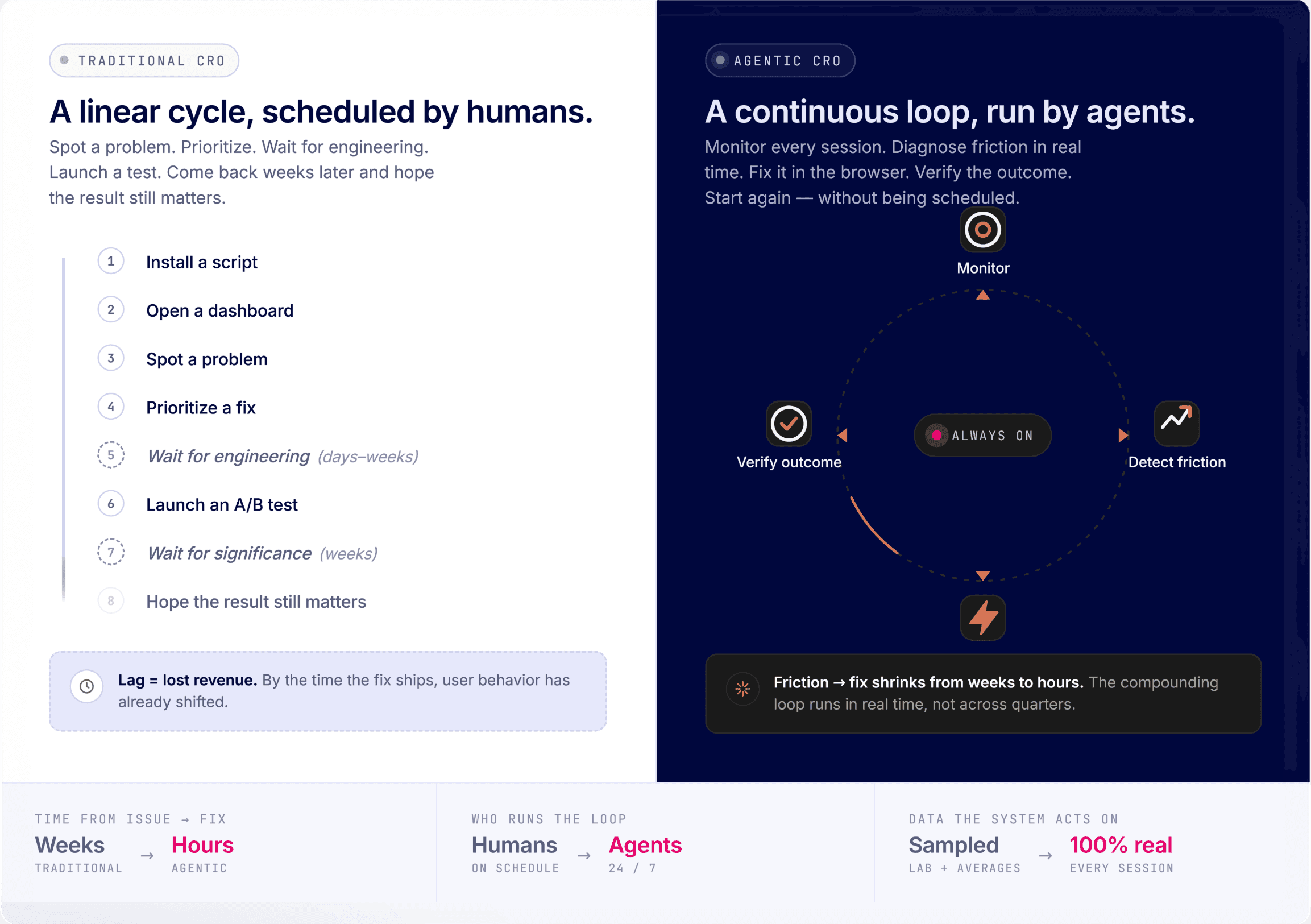
Traditional conversion rate optimization (CRO) wasn’t built for the world we live in today. You install a script. Open a dashboard. Spot a problem. Prioritize a fix. Wait for engineering. Launch a test. Come back weeks later and hope the result still matters.
That approach has a structural problem and if you want the full breakdown of why, we've covered it in detail. But in a nutshell - this entire model is bound to break (and we’re already seeing it happen) once websites start changing faster than teams can react. And that’s today.
Uxify was built around a different assumption: conversion optimization shouldn’t happen in campaigns or testing cycles. It should happen continuously. Instead of giving teams dashboards and recommendations, Uxify deploys AI agents that actively monitor your site, detect friction, fix issues, optimize interactions, and verify outcomes automatically across performance, UX, engagement, and conversion paths. Then starts again, without waiting to be scheduled.
This isn’t traditional CRO with AI features layered on top. It’s a new category of optimization software where the platform itself becomes an active participant in improving the website experience.
Every product inside Uxify either feeds that optimization loop with better real-user data or acts inside the loop autonomously. This article breaks down exactly how the system works, what each product does, and why ecommerce brands, agencies, and SaaS teams are starting to adopt agentic CRO as the next evolution of website optimization.
What makes a platform "Agentic CRO"?
Before going into how Uxify works, one framing point: agentic CRO is not just a faster version of traditional optimization. It's a different architecture entirely.
Agentic CRO is conversion optimization performed continuously by AI agents rather than periodically by humans. At its core, CRO is the discipline of removing the gap between traffic and revenue. Traditional CRO tries to identify what stops visitors from converting, but by the time a test surfaces the friction and the fix ships, user behavior may have shifted. Agentic CRO closes that lag: an AI system observes every session, diagnoses friction in real time, and acts on it without waiting for a human to schedule the response. You stop measuring optimization in test cycles and start measuring it in resolved issues per day.
To put it in simpler terms: traditional CRO is like going to the doctor for occasional checkups and prescriptions. Agentic CRO is like wearing a health monitor that constantly detects issues and adjusts your treatment in real time. You're no longer waiting on dashboards, tickets, or test cycles. The system sees an issue, fixes it, and moves on to the next one.
That's the standard Uxify is built to - a website optimization system that's always running, always improving, without needing to be prompted.
The data layer: three lenses agents need to act with confidence
Agents depend entirely on the data they operate on. If your monitoring is built on sampled sessions, synthetic tests, or browser coverage that misses Safari, the agents working from that data are making decisions based on partial information. And even perfect first-party data has a blind spot: it tells you what's happening on your site, but not whether it's good or bad relative to the market you're in.
Uxify's data layer addresses this by combining three real-user data products: Reality (40+ behavioral signals across every browser including Safari), Competitors (daily ranking against named rivals), and Benchmarking (100M+ pageviews across 41 metrics, segmented by industry, category, platform, and market). Together they give agents three lenses: site, rivals, and category.
Reality: what's happening on your site
Reality is Uxify's real-user monitoring and engagement suite and the reason Uxify's agents can act with confidence rather than approximation.
It captures the full set of real user sessions, across every browser, device, and geography, including Safari, which is often a blind spot for many monitoring tools. Instead of relying on sampled data, synthetic traffic, or lab simulations, it reflects actual user behavior as it happens. What shows up in Reality is simply what your visitors experienced.
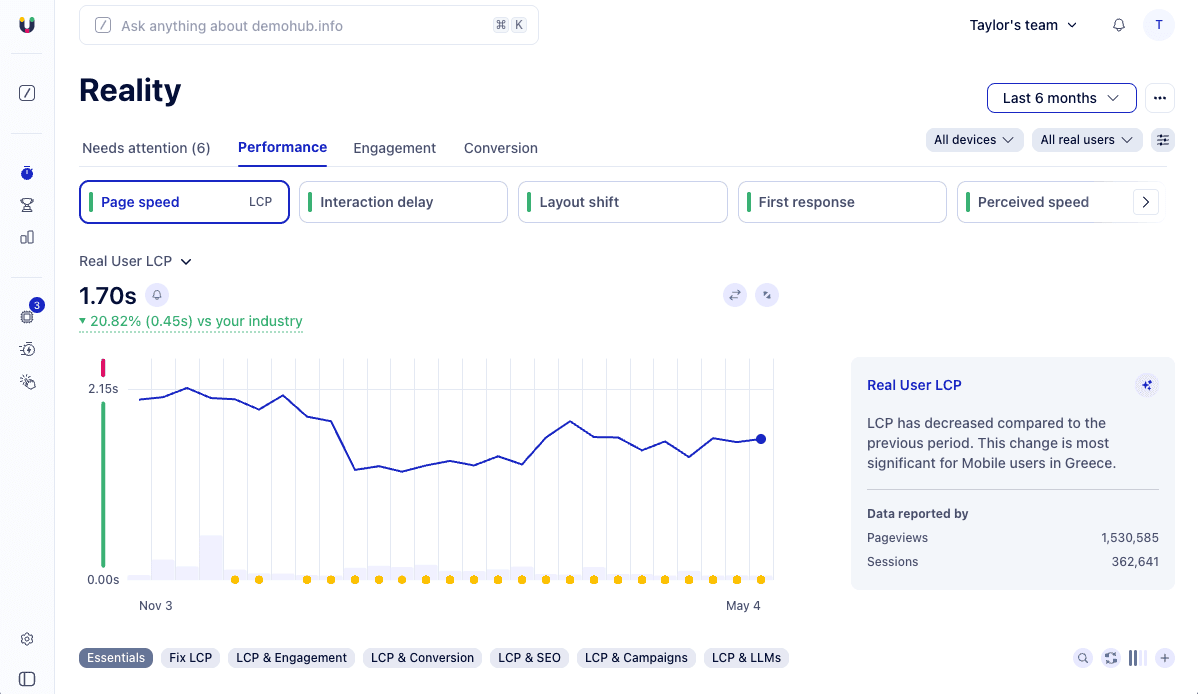
What it tracks simultaneously across every session:
Core Web Vitals: LCP, INP, CLS, and TTFB, measured on real users rather than lab conditions, following the standard established by Google’s Chrome UX report - the dataset behind Search Console's CWV ranking signal.
Perceived Load Speed: how fast the page feels to load, which correlates more directly with conversion behavior than raw technical metrics.
40+ behavioral and engagement signals, including clicks, scrolls, engagement time, bounce rates, U-turns, dead clicks, rage clicks, and form interactions.
JavaScript errors and broken interactions, detected in real time, before users have had time to abandon and complain.
Revenue outcomes: conversions, average order value, and sales tied directly to the performance and engagement data above.
This is what makes Uxify a CRO platform in the truest sense and not just a performance monitoring tool. CRO requires understanding why users don't convert, not just that they don't. Reality gives you that understanding at the level of individual sessions and individual interactions: which page caused a U-turn, which button triggered a dead click, which load delay preceded an exit. That's the diagnostic foundation that separates optimization with a clear target from optimization by guesswork.
Competitors: the sites you're directly losing to
Reality tells the agents how your users are behaving. Competitors tells them how the same users would behave somewhere else.
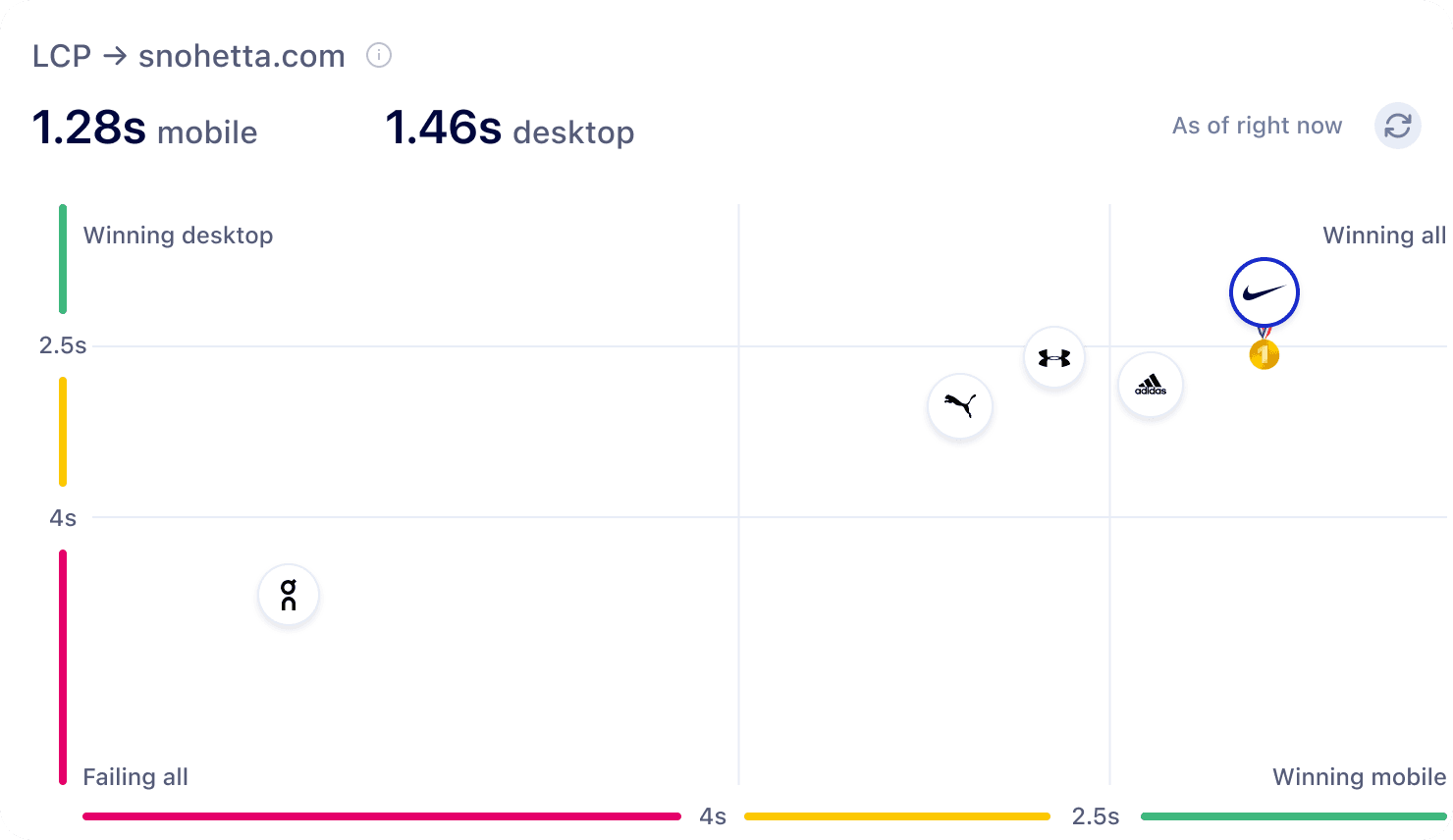
That distinction matters because CRO without external reference points will inevitably hit a wall. Why? Because you can keep improving against your own baseline forever, but still leave revenue on the table if your closest rivals are improving faster. Competitors ensures you focus your optimization efforts where it counts.
The first thing the product does is figure out who those alternatives are. Uxi scans search engines and LLMs for your offerings and surfaces the sites genuinely competing for your traffic, including the ones you wouldn't have flagged yourself. From there, it tracks each competitor's Experience scores, CWV, engagement, and top pages every day, generates daily ranks, and alerts you when a rival starts pulling ahead or when your own position starts slipping.
The agents take all of that as input and make optimization responsive to the market in real time, not just to your own historical baseline.
Benchmarking: where you stand against your whole industry
Where Competitors zooms in on the rivals you're directly trading visitors with, Benchmarking zooms out to your entire category.
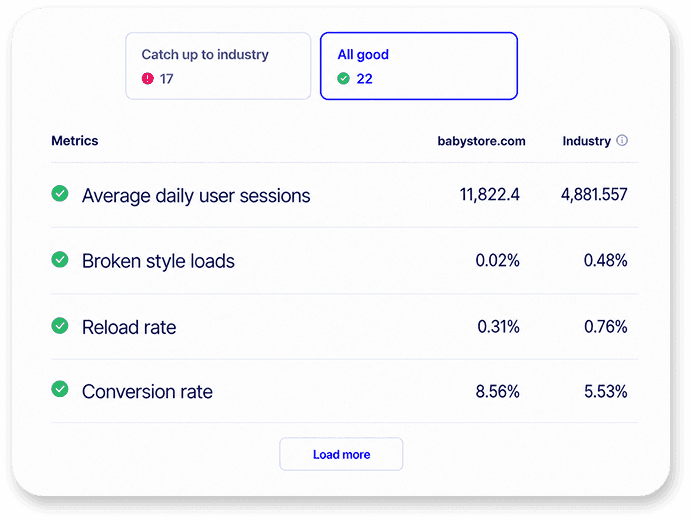
The difference is the scope. A site can be beating its three closest competitors and still be sitting in the bottom of its category (or vice versa). Benchmarking sets the floor and the ceiling of what "good" actually means in your space, so the agents know whether a 200ms improvement is a meaningful gain or a rearranging of deck chairs.
Benchmarking pulls from 100M+ pageviews across 41 metrics, with segmentation by industry, category, platform, and market so the businesses you're being compared to actually look like yours. Daily rolling updates keep the reference points relevant because category averages drift as the whole field improves, and a benchmark from six months ago is already misleading.
For the agents, this is the third lens. Reality tells them what's broken on your site. Competitors tells them which rivals are pulling ahead and on which dimensions. Benchmarking tells them which of those problems are urgent because the rest of your category is already past them, and which can wait because the whole field is still figuring them out. Without it, every issue looks equally important. With it, prioritization reflects market reality.
Meet the agents: the team that runs your CRO loop
Reality, Competitors, and Benchmarking give the platform its eyes. The agents give it hands.
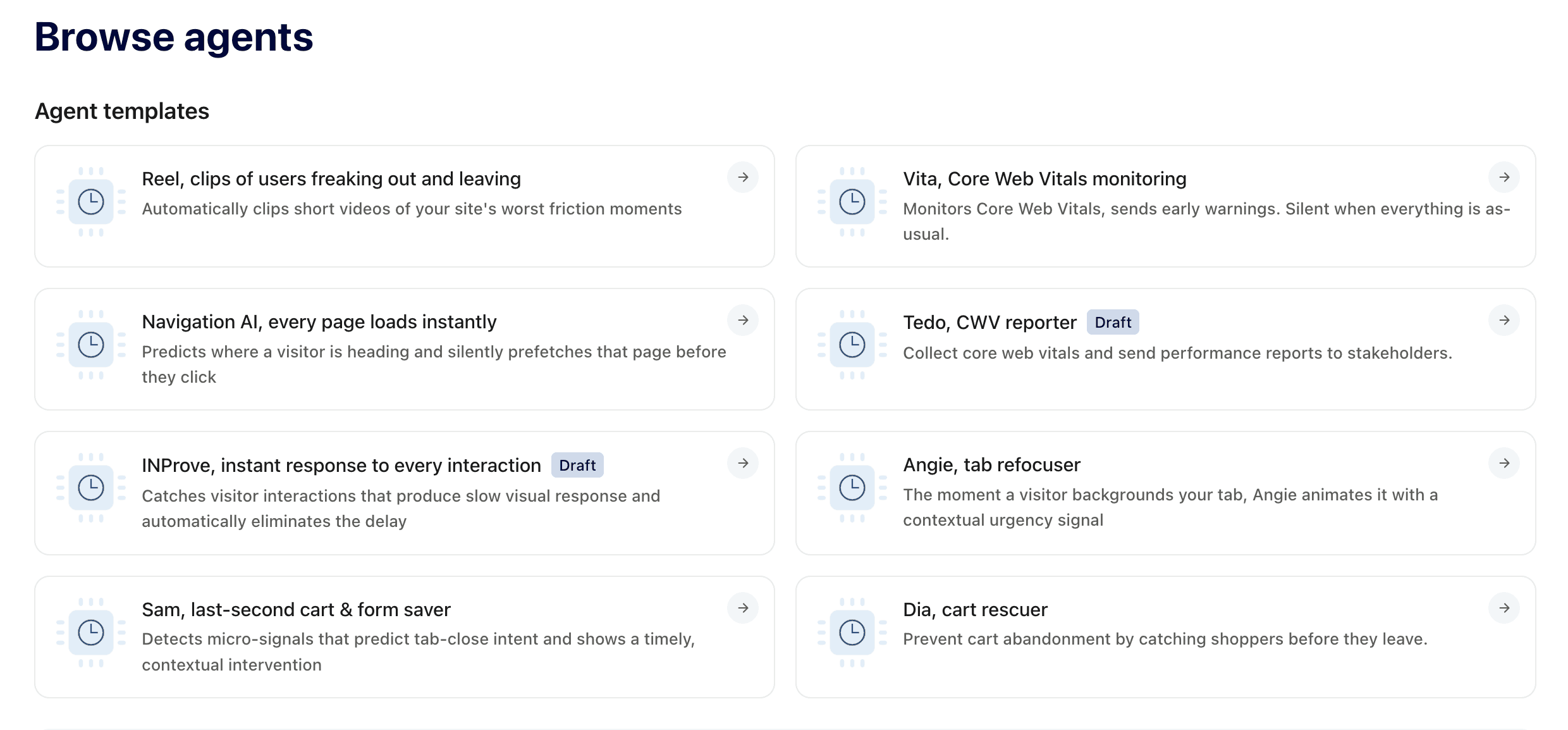
Uxify launches with eight AI agents. Each one runs continuously, autonomously, in the background, monitoring some dimension of the performance-to-conversion loop and acting on what it finds. Together they cover every stage from page load to checkout, and each one replaces a role or a tool that most teams currently pay for separately, or don't have at all.
Here's what each agent does.
Navigation AI: the agent that makes every click feel instant
Navigation AI is Uxify's AI-powered speculative preloading engine. It analyzes real behavioral patterns from your actual visitors to predict which page each user is most likely to visit next. Then it preloads it before they click, making the experience feel immediate.
The mechanism is important: this isn't something you configure, and it isn't a static model trained once on industry averages. Navigation AI learns from your users specifically. It looks at which journeys they take, which products they browse toward, which paths lead to purchase and updates its predictions continuously as behavior changes. If a seasonal campaign shifts how visitors navigate your catalogue, Navigation AI adapts without anyone touching a setting.
The result is navigation that feels instant. No load spinner between a category page and a product page. No hesitation at the step before add-to-cart. The friction that makes users give up on a journey disappears.
For one Shopify Plus brand in the Australian premium gifting niche, the effect of deploying Navigation AI proved to be measurable at every stage of the funnel:
The LCP reduction (38%, from 1.73s to 1.08s) put more users onto product pages.
More product pages visited produced more add-to-cart behavior.
A higher pool of buyers with fewer checkout interruptions drove both higher order values and lower abandonment.
The continuous optimization loop reinforced itself at every stage.
INProve: the agent that fixes interactions without a developer
Interaction to Next Paint (INP) is the Core Web Vitals metric that measures how quickly a page responds when a user interacts with it. Google defines a "good" INP as under 200 milliseconds at the 75th percentile of real users. Poor INP means users feel the hesitation. And that hesitation often leads to an abandoned page.
INProve detects and resolves these interaction delays automatically and keeps doing it. It's not a one-off scan. It works across every page, every device, and every browser, every day. And because it measures INP on real users rather than lab conditions, it catches the delays that synthetic testing misses: the button that works instantly on your laptop, but takes a second to respond on someone’s older phone on a slow connection.
The main winning point is that INProve doesn’t just point out INP issues and leave them sitting in a dashboard - it actually fixes them, so things keep moving without waiting on engineering time. Before anything goes live, it can also simulate the impact of a change, giving a clear sense of how interaction latency will improve. That way, teams can see what they’re getting upfront and feel more confident about making the change.
Ask Uxi: the agentic AI trained on your data
Ask Uxi is not an AI assistant that knows about web performance in general. It's an agentic AI trained on 100% of your real-user data and directly draws insights from your performance, engagement signals, and competitive benchmarks.
The distinction from generic AI tools is what makes it useful in an agentic context. When you ask "what's causing the bounce rate increase on mobile this week?", Uxi isn't drawing on industry averages or generic best practices. It's working from your actual session data, your specific LCP trends on mobile, and your competitive position in your market. The answer is about your site, not a site like yours.
Uxi draws on performance, behavior, and competitive intelligence simultaneously, which means it surfaces connections that separate dashboards never would. A bounce rate increase that correlates with an INP regression introduced by a specific third-party script, concentrated on Android devices in a particular geography, is the kind of diagnosis that would take an analyst hours to construct. Uxi produces it in seconds and not just when asked. Like every other agent, it runs continuously: drawing on the latest data every time, executing scheduled workflows, and chaining steps together to investigate issues end to end.
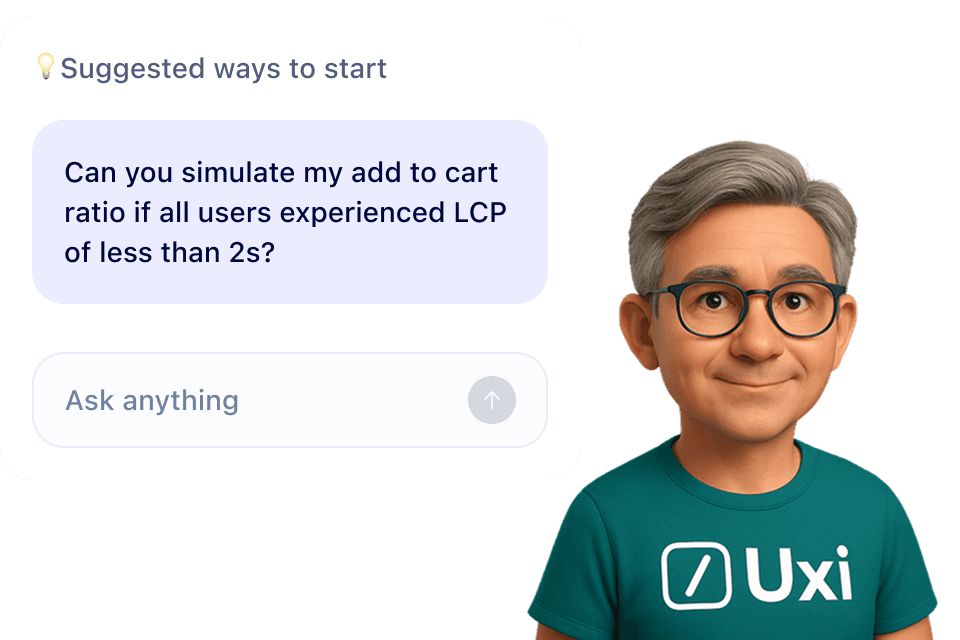
Here are some of the questions users actually ask Uxi:
"Investigate this performance change and explain it in a short, engaging way for a website owner. Focus on what changed, what's causing it, what should they do about it."
"Let me know which sites need my immediate attention and why, which ones could be improved and which are doing well. Present it in a table ordered by status with red/yellow/green differentiation. Look at reasons beyond performance, including abnormal bounce rates, cart abandonment, and drops in conversions."
"Perform a comprehensive review of my Shopify store's performance from the last 30 days. Identify the top 3 pages where Perceived Load Speed is causing the highest bounce rates. Provide a Revenue Leak summary to answer how much potential revenue we are losing due to these friction points."
"Could the bots read this slow TTFB and slow LCP as 404s in Google Search Console?"
"Where are my users dropping off visually?"
These aren't edge cases. They're the questions a performance-focused team needs to answer every week, without a dedicated analyst on standby. And Uxi is there wherever your team already works, no context switch required.
Core Web Vitals Monitoring Agent
Vita watches Core Web Vitals across every route on your site, around the clock. The moment a metric starts drifting toward failure, but well before users notice anything wrong, Vita sends an early warning. When everything's healthy, it stays silent. No noise, no false alarms.
Tab Re-engagement Agent
The moment a visitor switches away from your site, Retab works to bring them back. It deploys contextual urgency signals — session timers, dynamic favicons, stock alerts — and continuously A/B tests which signals actually recover attention versus which annoy users and get dismissed. Underperformers are swapped out automatically.
Missed-Tap Recovery Agent
Tapper learns which buttons users keep fat-fingering and quietly expands the catch zone around each CTA based on real tap behavior without any design changes or the need to log in an engineering ticket. Every day it sees more traffic, it gets more accurate in its placement choice.
Cart Abandonment Agent
Carty catches shoppers who are about to close the tab mid-cart and gives them a moment to finish before they lose what's in it. It learns the difference between real abandonment and normal browsing behavior, and only interrupts when the probability of saving the cart is high enough to be worth it. False positives drop over time as the learning loop matures.
Form abandonment agent
Draft does for forms what Carty does for carts. It watches which fields lose people, identifies the signals that predict genuine abandonment, and intervenes at the right moment. Without disrupting users who are still engaged of course. Over time it builds a field-level map of where form friction lives on your site.
Friction clip agent
Reel automatically detects friction patterns across your sessions and surfaces short video clips of your site's worst moments. Those are ready-to-share snippets that eliminate the need for a person to spend hours watching recordings, when they can know in minutes what broke and identify the issue. It prioritises the clips that matter most for conversion, not just the ones with the most activity.
The result of all 8 agents working together is that your site is being actively monitored and improved around the clock, not just when someone has time to open a dashboard.
How it works for each team?
The agencies and brands getting the most from Uxify's agents are using them not just for performance monitoring, but as the connective tissue between Uxify's real-user data and the rest of their tool stack. A workflow that detects an INP regression, logs it to a project tracker, drafts a client-facing summary, and posts it to Slack, without a human coordinating each step, is the kind of leverage that changes what a small team can deliver at scale.
Every team using Uxify is after the same thing - more conversions from existing traffic, regardless of what represents a conversion per business case. What differs is where the friction happens and which agents do the most work.
Ecommerce brands
AI in ecommerce matters primarily if it moves revenue per visitor. For in-house teams running Shopify, WooCommerce, or headless stores, traffic volume and benchmark scores are means to an end: the commercial outcome from the audience you're already paying to acquire is what the optimization stack has to deliver.
That framing (revenue per visitor, not conversion rate in isolation) is important. Conversion rate is a ratio and as such it can improve while revenue per visitor stays flat, if what you're converting people to is lower-value purchases. Agentic CRO optimizes the full picture: more visitors completing purchases, larger baskets, and fewer drop-offs at the steps with the highest abandonment cost. Uxify's Reality suite connects every performance and engagement signal directly to AOV and revenue, so optimization is always pointed at the outcome that matters commercially.
Navigation AI and INProve run continuously across the full funnel: category pages, product pages, the path to checkout. Reality connects every performance and engagement signal to actual conversion and revenue data, so you can see what a 200ms LCP improvement on a product page is worth in add-to-cart behavior, not just as a theoretical multiplier, but as a number derived from your users.
Ask Uxi handles the diagnostic questions that would otherwise require an analyst: "What's causing the early exit rate above the fold on the homepage? What steps should I take to reduce it?" The full agent set runs the monitoring loop overnight and sends your team a prioritised summary in the morning.
Agencies
For agencies managing multiple client stores, the challenge is scale. Delivering a meaningful performance programme to every client simultaneously requires infrastructure that runs independently of human scheduling.
The CRO brief an agency takes on is more complex than it looks. It's not just running tests - it's identifying which problems are worth testing, distinguishing performance issues from UX issues from content issues, connecting findings to revenue impact, and communicating all of it to clients who need business context, not metric definitions. That's a lot of analytical surface area per client. Agentic infrastructure doesn't replace the strategic judgment that makes a great agency - but it removes the operational burden that limits how many clients that judgment can serve simultaneously.
Uxify gives agencies a single view across their entire client portfolio: performance, engagement, competitive benchmarks, and commercial metrics for every site, updated continuously. Ask Uxi answers portfolio-level questions in seconds. The agents monitor every site overnight and surface which ones need attention, and why, before the morning standup.
SaaS and digital businesses
For SaaS teams, INP is the metric with the most direct product impact. Interaction delays in dashboards, modals, and filters don't show up clearly in traditional performance audits, but they show up in trial-to-paid conversion rates and in the qualitative sense that a product feels slow.
The CRO challenge in SaaS is that the conversion funnel is longer and the friction points are less visible than in ecommerce. A checkout abandonment is obvious. A user who silently downgrades their intent - from "I'll explore this feature" to "I'll come back to this later" - because a menu opened slowly three times in a row, is not. Those micro-decisions accumulate into churn and into trial-to-paid rates that could be interpreted as pricing problems, when the root cause is interaction quality. INProve addresses that root cause directly, automatically, without requiring the SaaS team to first connect the performance data to the commercial outcome themselves.
Agentic CRO is the new standard. Uxify is how you run it.
Most platforms help you understand what went wrong after the fact. Uxify is built to reduce how long problems stay unresolved in the first place.Everything in the platform is connected around that goal.
Reality, Competitors, and Benchmarking give the agents the full picture of your site, your rivals, and your category. The eight agents on top of that data layer each own a stage of the loop and run it continuously, making every transition feel instant, resolving interaction delays, answering questions in seconds, and catching friction at every other stage of the funnel.
The important part is that none of these products operate in isolation. They reinforce each other to deliver you a website that has the power to self-optimize itself.
Better monitoring leads to better diagnoses. Better diagnoses lead to faster fixes. Faster fixes improve engagement and conversion data, which gives the system more context to optimize the next layer of friction.
That's what an agentic CRO platform looks like when every product in the stack is built around continuous improvement rather than periodic attention.
Frequently Asked Questions
What products does Uxify include?
Uxify is built around two layers. The data layer combines Reality (real-user monitoring and engagement), Competitors (head-to-head intelligence on your named rivals), and Benchmarking (your standing against your whole industry). The execution layer is eight AI agents that run on top of it. The data layer gives the agents the three lenses they need; the agents monitor, fix, and optimize continuously.
Does Uxify require a developer to operate?
No. INProve resolves interaction delays automatically without code changes. Navigation AI learns and adapts without manual configuration. The full set of agents monitor and act continuously without developer involvement. Ask Uxi answers performance and engagement questions in plain language. The platform installs via a single JavaScript snippet, setup takes minutes, and real-user data begins flowing immediately.
How does Uxify's AI differ from other analytics platforms?
Uxi, Uxify's agentic AI, is trained on 100% of your real-user data across performance, behavior, and competitive intelligence simultaneously. It's not trained on sampled data or industry averages, so its answers are specific to your site, your audience, and your market. Unlike analytics platforms that stop at the insight, Uxify acts: INProve fixes issues automatically, Navigation AI optimizes in real time, and AI Agents execute across your tool stack without manual intervention.
How does Uxify use AI in ecommerce optimization?
Uxify applies AI to ecommerce in two distinct layers. The first is diagnostic: Reality and Ask Uxi use AI to analyze 100% of real-user sessions and surface why visitors aren't converting, down to the individual interaction. The second is autonomous execution: Navigation AI preloads the next page each visitor is likely to click, INProve resolves interaction delays in the browser, and the other AI agents continuously monitor and fix friction across category pages, product pages, cart, and checkout.
Which platforms does Uxify support?
Uxify works on any platform (Shopify, WooCommerce, WordPress, headless builds, or custom stacks) via a single JavaScript snippet. It integrates with GA/GTM, consent management tools, and ad platforms, and connects to Slack, Make.com, n8n, and MCP for workflow automation. Ask Uxi is also available directly inside Claude, ChatGPT, and Gemini via MCP.

" height="200.00000219726564px" id="j9Mmwfnw8" transform="translate(143.5 0)" width="479.5329973144531px"/><path d="M 0 15.944 C 0 7.139 7.154 0 15.98 0 C 24.804 0 31.959 7.138 31.959 15.943 L 31.959 59.637 C 31.959 68.442 39.113 75.58 47.938 75.58 C 56.763 75.58 63.917 68.442 63.917 59.637 L 63.917 15.944 C 63.917 7.139 71.071 0.001 79.897 0.001 C 88.721 0.001 95.875 7.139 95.875 15.944 L 95.875 56.095 C 95.875 82.51 74.413 103.923 47.938 103.923 C 21.462 103.923 0 82.51 0 56.095 Z" fill="rgb(59, 63, 91)" height="103.923px" id="KJCDMITFE" transform="translate(0 53)" width="95.875px"/><path d="M 0 15.943 C 0 7.138 7.154 0 15.979 0 C 24.804 0 31.958 7.138 31.958 15.943 C 31.958 24.748 24.804 31.886 15.979 31.886 C 7.154 31.886 0 24.748 0 15.943 Z" fill="rgb(252, 200, 0)" height="31.885999999999996px" id="q2K9EYOvZ" transform="translate(0 53)" width="31.95799999999963px"/><path d="M 0 15.943 C 0 7.138 7.154 0 15.979 0 C 24.804 0 31.958 7.138 31.958 15.943 C 31.958 24.748 24.804 31.886 15.979 31.886 C 7.154 31.886 0 24.748 0 15.943 Z" fill="rgb(63, 184, 126)" height="31.885999999999996px" id="bBya7XCj7" transform="translate(64 53)" width="31.95799999999963px"/><path d="M 0 14.171 C 0 6.344 6.359 0 14.204 0 C 22.048 0 28.407 6.344 28.407 14.171 C 28.407 21.997 22.048 28.342 14.204 28.342 C 6.359 28.342 0 21.997 0 14.171 Z" fill="rgb(229, 0, 106)" height="28.341999999999985px" id="WNzwBFOi7" transform="translate(34.5 128.5)" width="28.407000000000153px"/></g></svg>)