

Key takeaways:
- AI-attributed orders on Shopify grew 15x between January 2025 and January 2026.
- Every Shopify AI feature covered here (Sidekick, Magic, Flow AI, Agentic Storefronts) is free and included with all Shopify plans.
- The Agentic Plan lets brands on any platform sell through AI channels like ChatGPT without migrating to Shopify.
- Start with Agentic Storefronts and Shopify Magic today. Those two require zero technical effort and deliver immediate value.
- SimGym, the AI Toolkit, and the Universal Commerce Protocol represent the next wave and reward merchants who prepare early.
Your LinkedIn feed is full of people sharing Claude hacks and ChatGPT workflows. Meanwhile, WordPress users are stitching together AI plugins that break after every update. BigCommerce merchants are waiting for features that still sit in beta. And Shopify? Shopify rewrote the playbook entirely.
In April 2025, Shopify CEO Tobi Lutke sent an internal memo that got leaked (and later posted publicly) declaring that AI usage is now a “fundamental expectation” for every employee at the company. AI competency became a formal part of performance reviews. That was not a press release. It was a cultural shift that explains everything Shopify has shipped since.
The Winter ‘26 “RenAIssance” Edition delivered over 150 AI-powered product updates in a single release cycle. Shopify is no longer a platform that added some AI features. It is becoming the commerce infrastructure layer for an AI-native internet. And that distinction matters for every merchant reading this.
This guide covers every major Shopify AI feature available today, explains what each one does in simple terms, tells you how to activate it, and gives you a clear prioritization framework so you know where to start. No hype. Only verified features with real activation steps.
Which Shopify AI features should you prioritize?
With over a dozen AI features now available, the natural question is: where do I start? The answer depends on your role, your technical comfort level, and what your store needs most right now.
The features below are grouped by what they do for your business: getting your products discovered by AI agents, running your store more efficiently, creating the assets that sell your products, and optimizing your store.
Discovery and transactions — Getting your products found and purchased across AI surfaces.
| Feature | What it does | Best for | Effort to activate | Impact |
|---|---|---|---|---|
| Agentic Storefronts | Surfaces products in ChatGPT, Copilot, Google AI Mode, Gemini | All merchants | Low (enable in admin) | Very High |
| Universal Commerce Protocol | Open standard powering checkout inside AI conversations | All merchants (automatic) | None (built in with Agentic Storefronts) | High |
| Semantic Search | Intent-based product search using concepts, not just keywords | Stores with 50+ products | Low (enable in Search & Discovery) | Medium |
| Agentic Plan | Sell on AI channels without a Shopify store | Brands on other platforms | Medium (product upload) | High |
Store operations — Managing your business with AI instead of clicking through dashboards.
| Feature | What it does | Best for | Effort to activate | Impact |
|---|---|---|---|---|
| Sidekick | AI coworker for analytics, workflows, app generation | All merchants | None (built in) | High |
| Sidekick Pulse | Proactive business intelligence and growth recommendations | Store owners, operators | Low (enable Network Intelligence) | High |
| Shopify Flow AI | Builds automations from chat descriptions | Operations managers | Low (describe workflows) | High |
Asset creation — Producing the content and creative that sells your products.
| Feature | What it does | Best for | Effort to activate | Impact |
|---|---|---|---|---|
| Shopify Magic | Generates product descriptions, email copy, blog posts, image edits | All merchants | None (built in) | High |
| Tinker | 100+ AI creative tools for images, videos, logos, brand assets | Brand builders, solopreneurs | Low (free app download) | Medium-High |
Optimization and scaling — Testing, iterating, and managing at scale with technical tools.
| Feature | What it does | Best for | Effort to activate | Impact |
|---|---|---|---|---|
| SimGym | Tests store changes with AI shoppers before going live | CRO-focused merchants | Medium (install app, run tests) | Medium-High |
| AI Toolkit | Connects coding agents (Claude Code, Cursor, etc.) to your store | Developers, agencies | Medium (2-min install per tool) | Very High |
Before we begin: why agentic-ready product data is the foundation
AI agents rely on structured data fields to understand what you sell. If key details like size, material, or color are buried in free-text descriptions rather than stored in dedicated product fields, agents can’t reliably surface your products when shoppers ask for them. The data needs to be both well-structured and accurate in real time.
What does that look like in practice? Shopify recommends the following baseline for agentic-ready product data :
- Product titles of 30+ characters that include brand, product type, and key differentiators.
- Descriptions of 500+ characters with comparison-ready specs (materials, dimensions, care instructions).
- GTINs (UPC/EAN) populated on every variant.
- A minimum of three product images per listing.
- The most specific product category possible: “men’s insulated winter boots,” not “footwear.”
- Genuine variants (color, size) grouped under a single parent product, not listed as separate items.
Why does specificity matter so much? If your product title says “Ocean Breeze” instead of “Texturizing Sea Salt Spray,” an AI agent won’t have enough context to surface it when a customer asks for hair styling recommendations. Creative names are fine for your storefront, but your structured data fields need to describe what the product actually is.
Shopify Catalog handles much of the heavy lifting here. It automatically cleans, verifies, categorizes, and syndicates your product data to AI platforms. Catalog is Shopify’s global product database that AI platforms and shopping sites query to find and display your products. If your store meets the eligibility requirements , your products are automatically included.
But even with all that automation, it still comes down to the quality of your product data. Investing in it is the single action that compounds across the entire Shopify AI stack.
Now, let’s look at what each feature does, how to activate it, and where it fits in your workflow.
What are Shopify Agentic Storefronts and why do they matter?
Shopify Agentic Storefronts , launched in March 2026 , let customers discover and purchase your products inside AI conversations on ChatGPT, Microsoft Copilot, AI Mode in Google Search, and the Gemini app. AI-driven traffic to Shopify stores grew 7x since January 2025 , while AI-attributed orders grew 15x in the same period. This isn’t a niche channel anymore. It is one of the fastest-growing sales surfaces in ecommerce history.
Here is how it works. When someone asks ChatGPT “What’s a good waterproof running jacket under $150?” or tells Google AI Mode “Find me a birthday gift for a coffee lover,” the AI agent searches the Shopify Catalog for matching products. That catalog contains billions of products from millions of merchants. Shopify uses specialized LLMs to categorize, enrich, and standardize the product data so AI agents can find exactly the right items in seconds.
The purchase experience varies by platform. On ChatGPT, users see product recommendations within the conversation and complete their purchase on your Shopify checkout (opened in-app or in a new tab). On Microsoft Copilot and Google AI Mode, if you have direct purchasing enabled, customers can complete the entire transaction inside the AI conversation without leaving the chat. That’s checkout, payment, and order confirmation, all within the conversational interface.
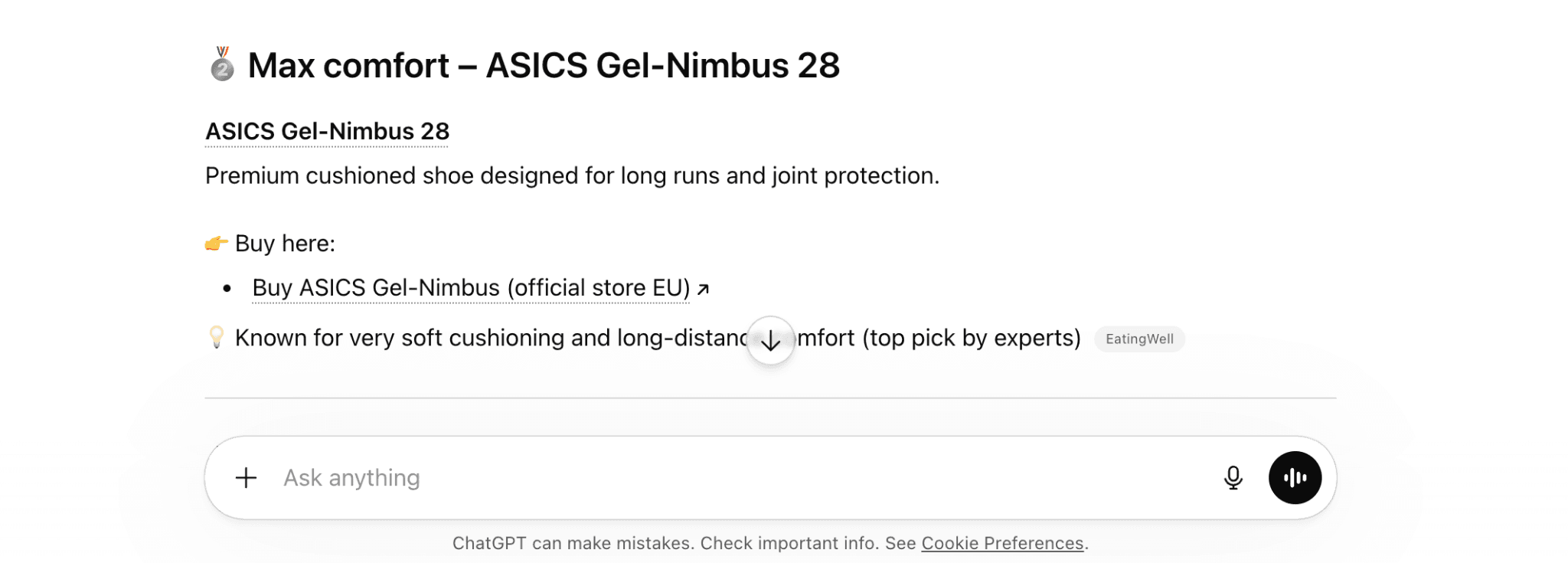
Brands like Keen Footwear and Pura Vida are already seeing results from selling through Microsoft’s Copilot Checkout. As Shopify’s own data shows, AI-attributed orders carry a higher average order value than direct traffic, likely because the AI agent is matching products to specific, high-intent requests rather than serving browse traffic.
ChatGPT agentic storefronts are available to all eligible Shopify merchants now. Microsoft Copilot and Google AI Mode are in early access and rolling out progressively.
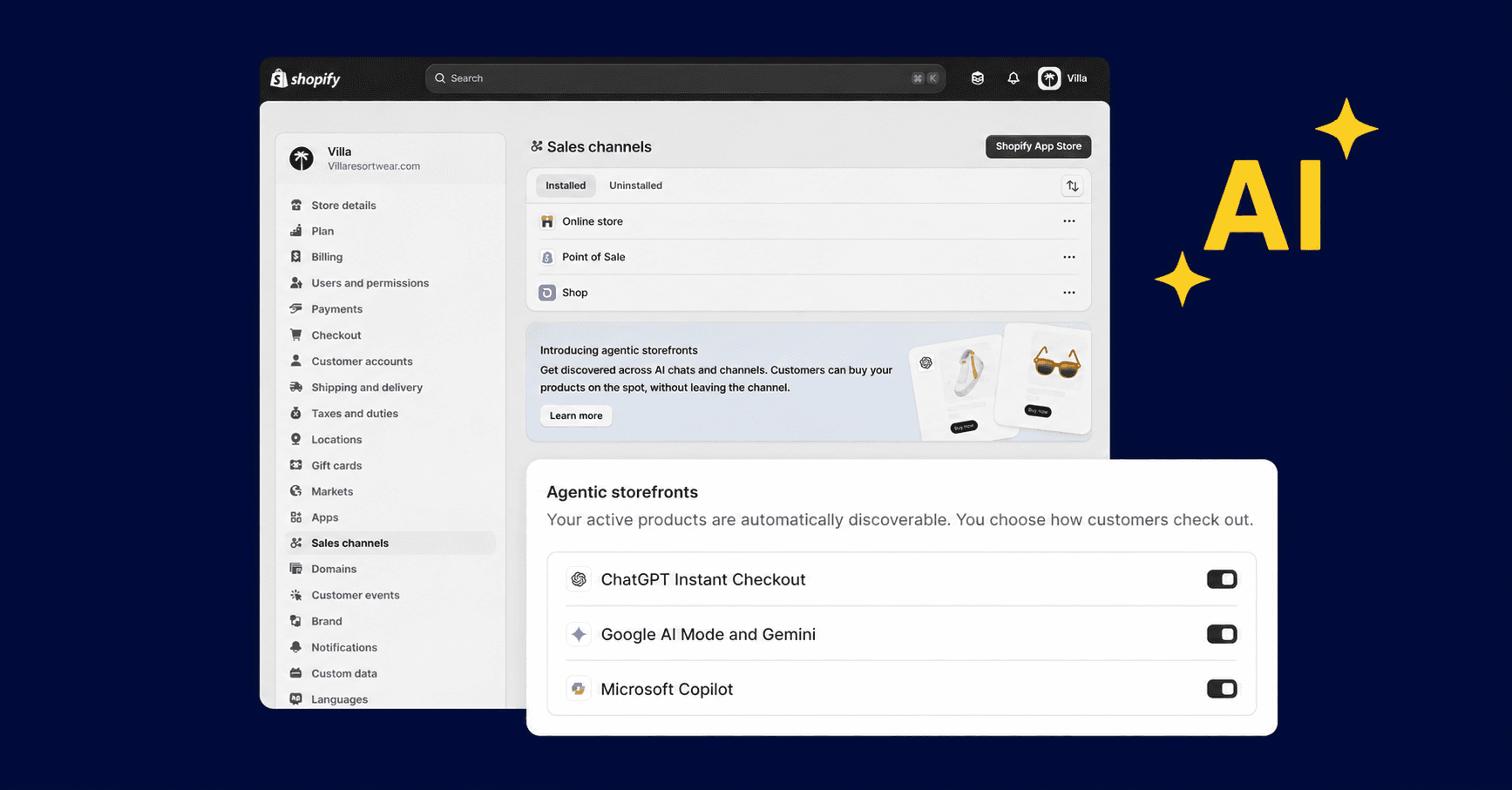
🔧 Setting up Agentic Storefronts
Setup is straightforward. You manage Agentic Storefronts from your Shopify Admin under Sales Channels . Products stay synchronized automatically with real-time inventory and pricing. There is no separate product feed to maintain. Just toggle AI platforms on or off individually to choose which channels you sell in.
The Agentic Plan: Selling on AI channels without a Shopify store
This is where things get strategically interesting for the broader market. Shopify opened the Agentic Plan to brands that don’t even use Shopify for their ecommerce operations ( Shopify , 2026).
If you run your store on Magento, Salesforce Commerce Cloud, a custom-built platform, or anything else, you can still upload your products to Shopify Catalog and distribute them through ChatGPT, Copilot, Google AI Mode, and Gemini. You keep your existing commerce infrastructure. You don’t pay additional transaction fees. Shopify Catalog automatically cleans, verifies, and syndicates your product data so AI agents can find and recommend your products.
This is a significant strategic move. Shopify is positioning itself not just as a platform for building online stores, but as the distribution infrastructure for agentic commerce, regardless of where your store actually lives. For brands that have been watching Shopify’s AI momentum from the sidelines, the Agentic Plan removes the biggest barrier to participation.
How does the Universal Commerce Protocol power AI checkout?
Shopify co-developed the Universal Commerce Protocol (UCP) with Google as an open standard that lets any AI agent connect to any merchant and complete a full purchase transaction ( Shopify Engineering , 2026). Over 20 retailers and platforms have endorsed UCP, including Target, Walmart, Wayfair, and Etsy. Google published its own technical breakdown of the protocol on the Google Developers Blog .
Why does this matter for merchants? Because UCP is the connective layer that makes agentic commerce work at scale. Without a shared standard, every AI platform would need custom integrations with every commerce platform. That does not scale. UCP solves it by defining universal primitives for checkout: how an agent discovers products, initiates a cart, handles discount codes and loyalty credentials, manages subscription billing, processes payment, and completes the order.
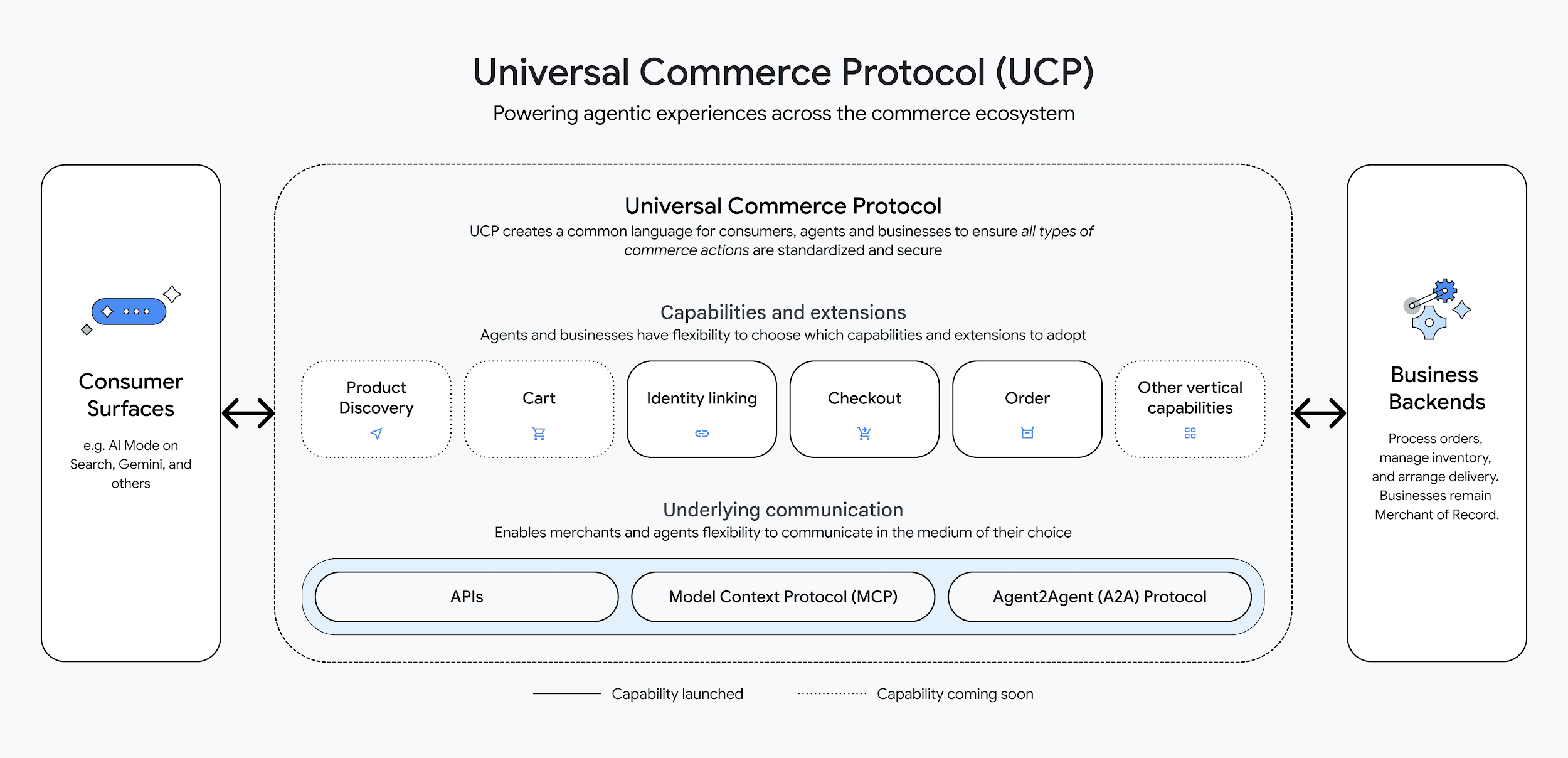
Source: Google for Developers
The protocol supports multiple technical approaches (REST, Model Context Protocol, Agent Payments Protocol, Agent2Agent) so it can work with any commerce stack. It also handles the messy real-world scenarios that pure automation cannot.
The practical implication: if you’re a Shopify merchant with Agentic Storefronts enabled, you are already participating in UCP. The protocol works behind the scenes. But understanding that it exists helps you see where this is heading. Shopify is not building a walled garden. It is building open infrastructure that makes your products discoverable and purchasable across every AI surface on the internet.
What is Semantic search and how do you activate it in Shopify?
Getting your products in front of AI agents through Agentic Storefronts is one side of discovery. The other side is what happens when a customer is already on your store and searching for something. Traditional keyword-based search has a well-known limitation: it only returns products that match the exact words a shopper types. If someone searches “cozy throw for movie night” and none of your product titles contain that phrase, they see zero results, even if you sell the perfect blanket.
Shopify’s built-in semantic search solves this by understanding intent, not just keywords. It analyzes related words, concepts, categories, and even visual attributes of your products, like colors and text within images, to surface results that match what the shopper actually wants. That “cozy throw” query now returns relevant blankets, throws, and cushions based on what those products are, not just what their titles say.
The Shop app takes this further with a ChatGPT-powered personal shopping assistant. Shoppers can describe what they’re looking for in conversational language or upload a photo to find visually similar products. If a shopper uploads a photo of a sofa they saw in a magazine, the AI analyzes the visual characteristics and shows similar products from your catalog.
🔧 Setting up Semantic search
The feature is built into the Shopify Search & Discovery app . It is currently available for stores with fewer than 200,000 products and on Grow, Advanced and Plus plans. To activate it, go to the Settings page of the Search & Discovery app . Scroll to Search relevance and activate Semantic search . You can also click Try it out and a theme preview opens with Semantic search activated.
For most merchants, activating Shopify’s built-in semantic search is the right first step. For stores that need more advanced on-site search, third-party options like Loops AI, Prefixbox, and Celebros offer deeper AI-powered search with features like conversational chat agents on your storefront, dynamic product filters, and predictive search.
So far we’ve covered how Shopify helps customers find and buy your products through AI. But what about the day-to-day work of actually running your store? That’s where the platform’s AI capabilities turn inward, from customer-facing discovery to merchant-facing operations.
What Is Shopify Sidekick and what can it actually do now?
Sidekick is Shopify’s built-in AI assistant, available to every merchant on every plan at no extra cost. Merchants using Sidekick for operational tasks report up to 40% reduction in time spent on repetitive admin work.
Previously, Sidekick answered questions when you asked them. Now it watches your store, identifies patterns, spots anomalies, and suggests actions before you even open the dashboard. The Winter ‘26 Edition positioned Sidekick as the primary interface for store management, not just a helper tool you visit occasionally.
Here is what Sidekick can do today:
Analyze your store data. Ask “What were my top-selling products last month and how does that compare to the same period last year?” and get a structured answer with trends and context. Sidekick accesses your sales, traffic, and customer data in real time.
Build automated workflows. Describe what you want in plain English. “When inventory drops below 10 units, send a Slack alert and tag the product as low-stock.” Sidekick builds the complete Shopify Flow workflow with triggers, conditions, and actions, then presents it for your review.
Generate custom apps. This is the capability that surprised most merchants. Describe the functionality you need, and Sidekick generates a working app using Polaris UI components and the Admin GraphQL API. You can visually iterate on the app, test it in your store, and install it when you’re satisfied. No developer required for straightforward admin tools.
Manage store operations. Generate discount codes, draft email campaigns, update product information, adjust theme settings, restructure collections. These tasks that used to require navigating multiple admin screens now happen through conversation.
Voice commands and mobile access. Sidekick works through the Shopify Mobile App, which means you can manage your store by speaking to it during your commute. “What’s our current inventory level for the winter collection compared to last year’s forecast?” That query works.
Sidekick Pulse: Your proactive business intelligence layer
Sidekick Pulse is the proactive layer that runs in the background and surfaces personalized recommendations based on your store’s specific patterns and broader market trends.
If Pulse detects that a particular product category is trending upward across Shopify’s network and you have relevant inventory, it tells you. If it notices a drop in conversion rate on a specific product page, it flags the issue and suggests potential fixes. If there is a seasonal opportunity approaching based on your historical sales data, Pulse reminds you in time to prepare.
Pulse also generates to-do lists and helps you execute the recommended actions, not just observe them. The distinction between “here’s what you should do” and “let me help you do it right now” is the difference between a dashboard notification and a coworker.
🔧 Setting up Sidekick and Pulse
Sidekick is built into the Shopify Admin. You access it through the search bar or the Sidekick icon in the Shopify Mobile App. No installation needed.
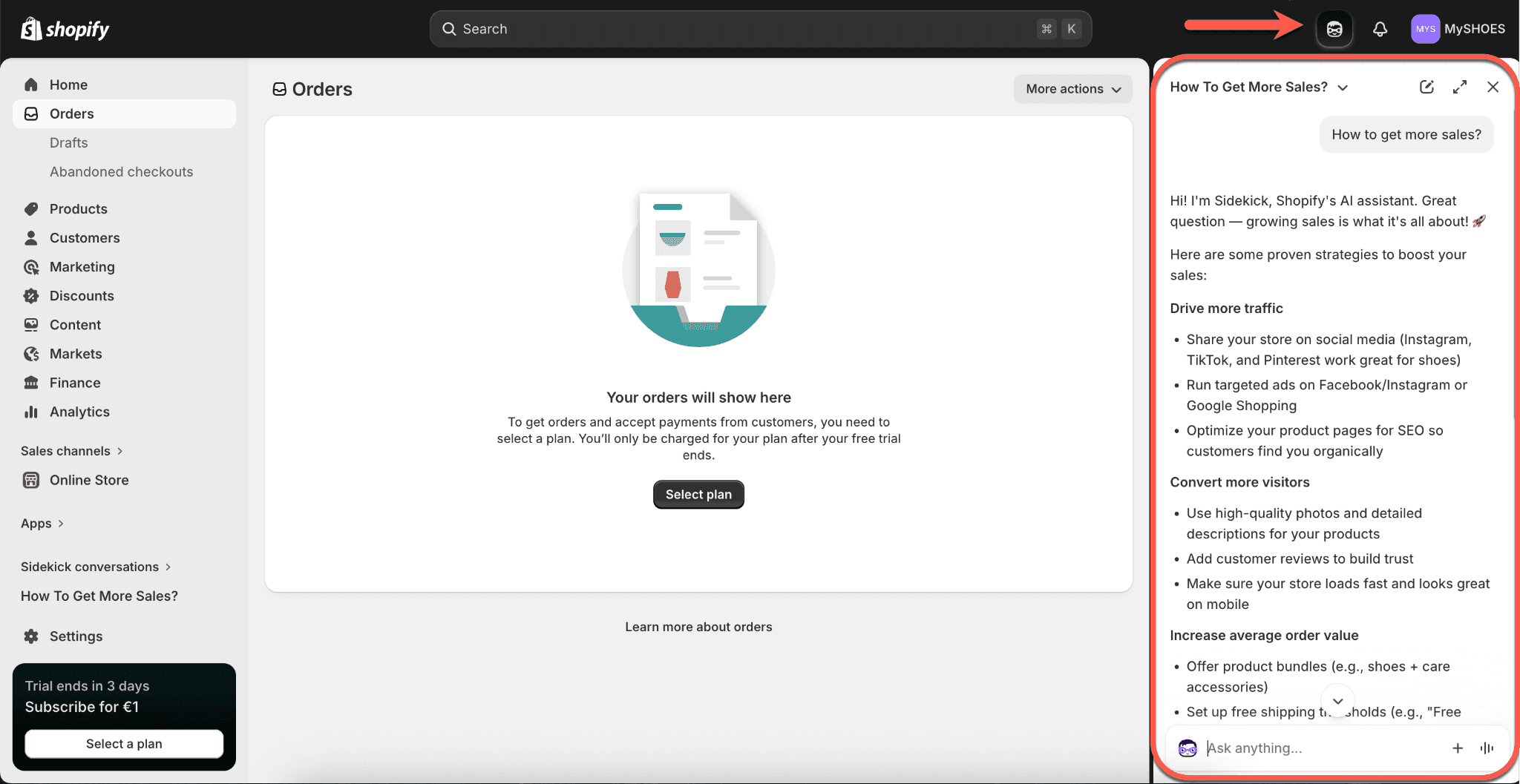
For Sidekick Pulse, one important activation detail: Pulse only appears on your Shopify admin home when it has an insight to share, and it requires Shopify Network Intelligence to be enabled in your store settings. Network Intelligence is the data-sharing layer that lets Shopify analyze aggregated, anonymized signals across its merchant network to generate those personalized recommendations. You can review the requirements and enable it under Settings > Privacy in your admin.
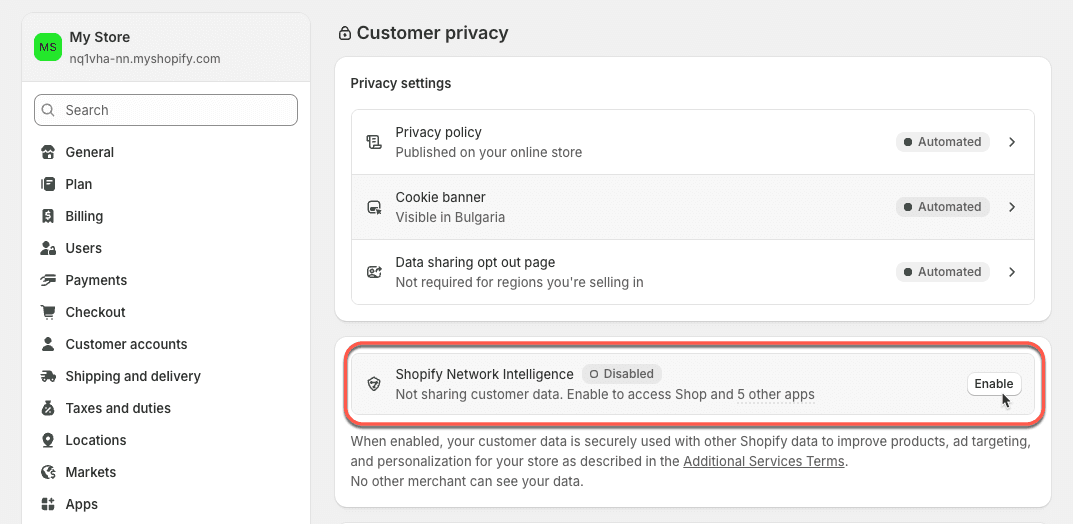
Every Sidekick feature, including Pulse, is available on all Shopify plans at no additional cost. There are no per-query limits, no premium tier, and no paywalls for advanced capabilities.
How does Shopify Flow work with AI?
Sidekick can build workflows for you in conversation, but the engine behind those automations is Shopify Flow. Flow is the platform’s free, no-code automation tool, and the 2026 updates transformed it from a visual workflow builder into a conversational one. You describe what you want automated, and Sidekick builds the complete workflow: trigger, conditions, and actions. For merchants who have been manually handling these tasks or paying for third-party automation tools, this is a significant cost and time saving. Merchants using Flow AI report saving 15 to 20 hours per week on repetitive operational tasks.
Four major updates landed in the Winter ‘26 Edition:
- AI-powered workflow generation from natural language descriptions.
- Testing mode that shows you the complete execution path without touching real data.
- Faster build times, reducing workflow creation from 30 minutes to roughly three minutes.
- Improved error handling that explains what went wrong in human-readable language rather than technical error codes.
Practical examples of what could be built with Flow AI:
- “When a customer places their third order, tag them as ‘loyal’ and send a thank-you email with a 10% discount code.”
- “When a product’s inventory drops below 5 units, send me a Slack notification, add a ‘low stock’ badge to the product page, and create a draft purchase order.” Done.
- “When a customer leaves a five-star review, add them to the VIP segment and trigger a referral program invitation email after 48 hours.” Built in under three minutes.
🔧 Setting up Flow AI
Flow is free on all Shopify plans. Install the Shopify Flow app from the Shopify App Store if it isn’t already active on your store. Once installed, you can build workflows manually through the visual editor or describe what you want to Sidekick and let it generate the automation for you.
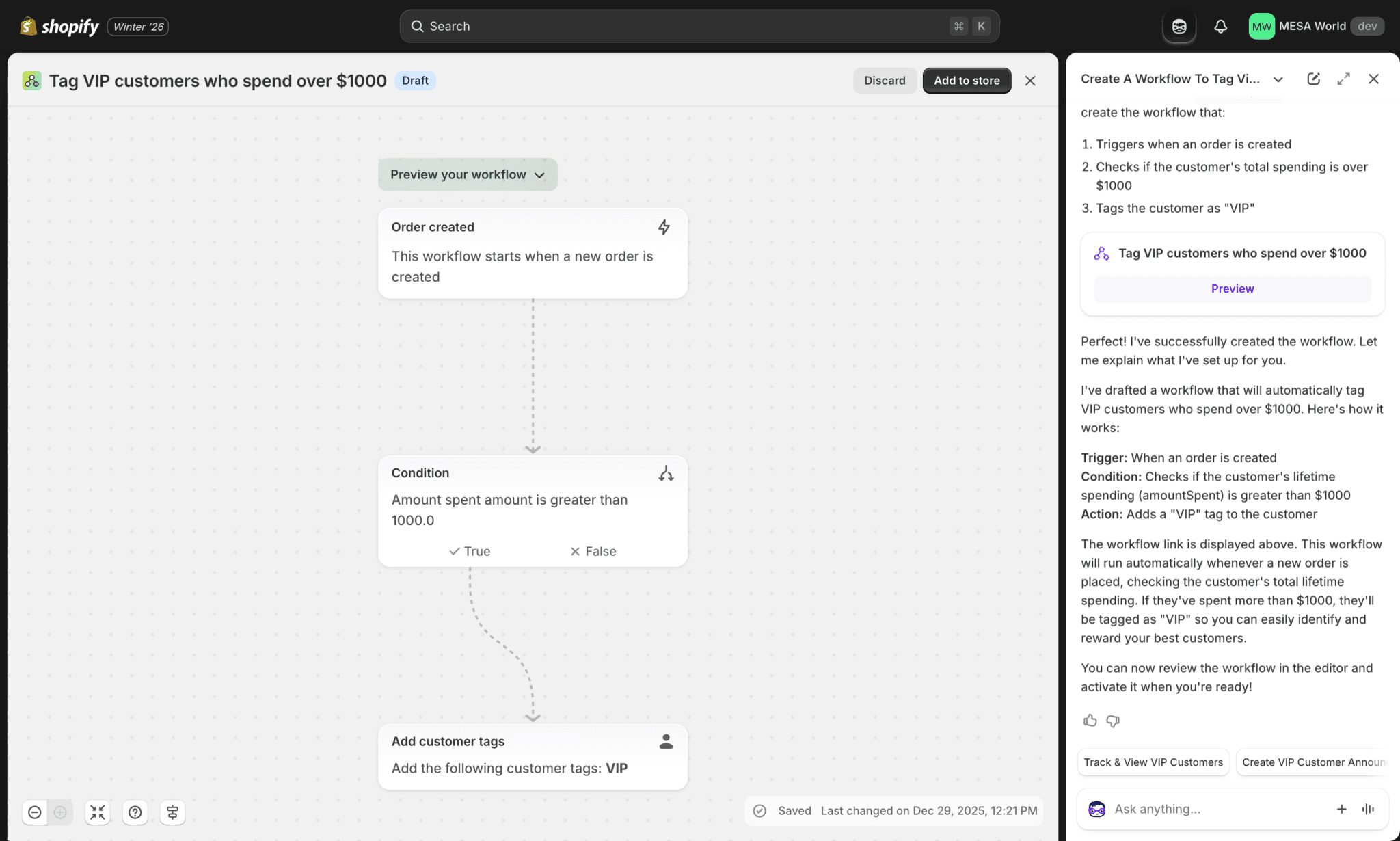
Source: Mesa
With your store operations streamlined by Sidekick and Flow, the next question is: what about all the content and creative work that eats up your week? That’s where Shopify’s asset creation tools come in, starting with Shopify Magic.
Shopify Flow AI Assistant Prompt Guide: What to Say to Build Any Workflow
The most common question merchants have after enabling Flow AI is: what do I actually type? Sidekick uses a fine-tuned tool-calling agent that turns natural language into complete Shopify Flow workflows, and Shopify’s engineering team reports it is 2.2x faster and 68% cheaper than previous approaches while outperforming closed models.
The key to getting good results is writing prompts that include a clear trigger (what starts the workflow), the conditions (when it should or shouldn’t run), and the actions (what happens). Here are prompt templates organized by common use case:
Inventory management prompts:
- “When any product variant’s inventory drops below 10 units, tag the product as ‘low-stock’, send me a Slack notification with the product name and current quantity, and create a draft purchase order.”
- “When a product goes out of stock, hide it from my online store, send an email to my operations team, and add a ‘restock needed’ tag.”
Customer loyalty and segmentation prompts:
- “When a customer places their third order, tag them as ‘loyal-customer’ and send a thank-you email with a 10% discount code for their next purchase.”
- “When a customer’s total lifetime spend passes $500, add them to the VIP segment and trigger a referral program invitation email after 48 hours.”
- “Send a win-back email with a 15% discount to any customer who hasn’t placed an order in 90 days.”
Order management and fraud prompts :
-
“When a high-risk order is placed, wait 24 hours. If the risk level is still high, cancel the order automatically and notify the customer.”
-
“When an order is fulfilled and delivered, wait 7 days and then send a review request email.”
-
“When an order contains more than 5 of the same item, tag it as ‘bulk-order’ and notify my wholesale team on Slack.”
Marketing and promotions prompts :
- “When a customer leaves a five-star review, add them to my ‘happy-customers’ email list and send them a referral code.”
- “When a new product is added to the ‘Summer Collection’, automatically publish it to all sales channels and schedule a social media post.”
Tips for writing better Flow AI prompts :
Be specific about quantities, timeframes, and channel names. “Send a Slack message” works, but “Send a Slack message to the #inventory channel” works better. Include conditional logic where needed: “only if the customer is in the US” or “only for orders over $100.” Start simple, test with the new dry-run testing mode (which shows the execution path without touching real data), and then add complexity. Make sure to prompt Sidekick to ask you clarifying questions in case something is unclear about the steps that have to be set in the Flow.
What Is Shopify Magic and how does it save you time?
Shopify Magic is the free AI content engine built into every Shopify admin. According to Shopify’s data, it saves the average merchant 15 to 20 hours per week on content creation tasks, which translates to roughly $8,700 per year in time value.
Here are some examples of how you can use Magic in your store:
Product descriptions. Give Magic a product title, a few keywords, and your preferred tone. It generates a complete product description optimized for your target audience. The 2026 update accepts more detailed inputs including competitor product links (for differentiation), target customer personas, and specific SEO keywords.
Email marketing. Magic generates subject lines and email body copy for Shopify Messaging campaigns. Provide the campaign type and product keywords, and it produces copy you can review and customize. For merchants who have been staring at blank email drafts every week, this cuts the creation time from hours to minutes.
AI image editing. Magic is built into the file editor . You can remove backgrounds from product photos automatically, replace backgrounds with custom AI-generated scenes, and transform images using natural language prompts. Products with professional-looking images see up to 10% higher conversion rates compared to generic supplier photos.
Customer support. Through Shopify Inbox, Magic generates suggested responses to common customer queries. It pulls live data from your store, including order status and tracking information, so the suggestions are contextual and accurate.
The key advantage of Magic over third-party AI tools is context. It already knows your products, your brand, your sales history, and your customer patterns. You don’t need to brief it the way you would brief ChatGPT. That built-in context produces more relevant output with less effort.
🔧 Setting up Shopify Magic
No setup required. Magic is built into the Shopify Admin by default. Look for the Magic icon wherever you create content: product pages, email campaigns, blog posts, the theme editor, and the file manager. Click it, provide a few inputs, and Magic generates the content.
Magic handles the content baked into your Shopify admin. But what about the broader creative work that happens outside it: the product mockups, social media videos, logos, and brand assets that define how your business looks to the world?
What Is Shopify Tinker and who should use it?
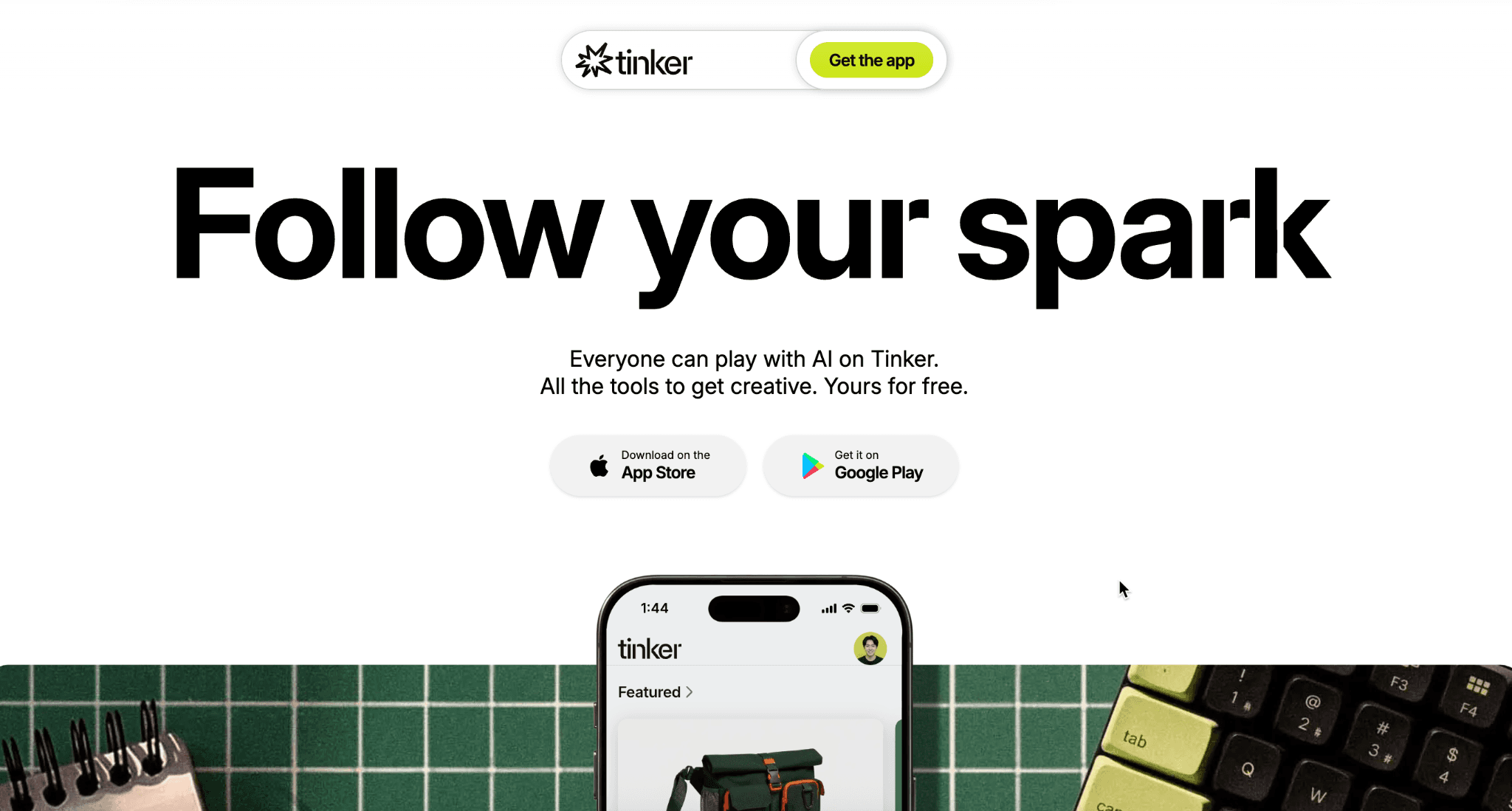
Tinker is a free mobile app that bundles over 100 specialized AI creative tools into a single interface, launched in March 2026 and available on both iOS and Android. It draws on models from OpenAI, Google, Anthropic, and other providers, but the key innovation is not the models themselves. It is how Shopify packaged them.
Most merchants face two problems with AI creative tools. First, there are too many of them. A new model drops every week, each with its own interface and learning curve. Second, each tool exists in isolation, so there is no visual consistency across what you create. Tinker solves both problems.
The tools inside Tinker are organized by what you want to create, not by which AI model powers the output. You browse by output type: product photo, logo, social media video, lifestyle image, 360-degree product view, market analysis. Select what you need, fill in a few simple fields, and Tinker handles the technical prompting in the background.
As Rousseau Kazi , Shopify’s director of product, explained in the launch announcement: the team writes “very long prompts that are optimized for quality” and then reduces them to a few simple fields for the merchant. The merchant describes their need in plain language. Tinker handles the complexity.
Because everything you create lives in one environment, the app uses context from your previous creations to maintain visual and brand continuity. If you generated a logo with specific colors and style, your next product photo or social media asset will reflect that same visual language. This consistency is difficult to achieve when using five different AI tools from five different providers.
Tinker auto-updates as new AI models and tools become available. Instead of learning a new interface every time a new model launches, you open Tinker and the new capability is already there, packaged with the same guided experience.
Who should prioritize Tinker? Solopreneurs, small teams, and brand-focused merchants who need to produce professional creative assets without hiring designers or subscribing to multiple AI tools. If you are spending $50 to $200 per month across various AI creative subscriptions, Tinker consolidates all of it into one free app.
🔧 Setting up Tinker
Download the Tinker app from the App Store (iOS) or Google Play (Android) . It’s free and doesn’t require a Shopify store to use, though connecting one lets Tinker pull in your product data for more relevant outputs.
For technical merchants: Optimization and scaling with AI
Everything covered so far is accessible to any Shopify merchant regardless of technical background. The next two features are different. SimGym and the Shopify AI Toolkit are built for merchants and teams who want deeper control: the ability to stress-test changes before they go live, and the ability to manage stores programmatically through AI coding agents. If you’re a developer, an agency, or a technically proficient store owner, this is where Shopify’s AI stack gets particularly powerful.
What is SimGym and how can you test store changes with AI shoppers?
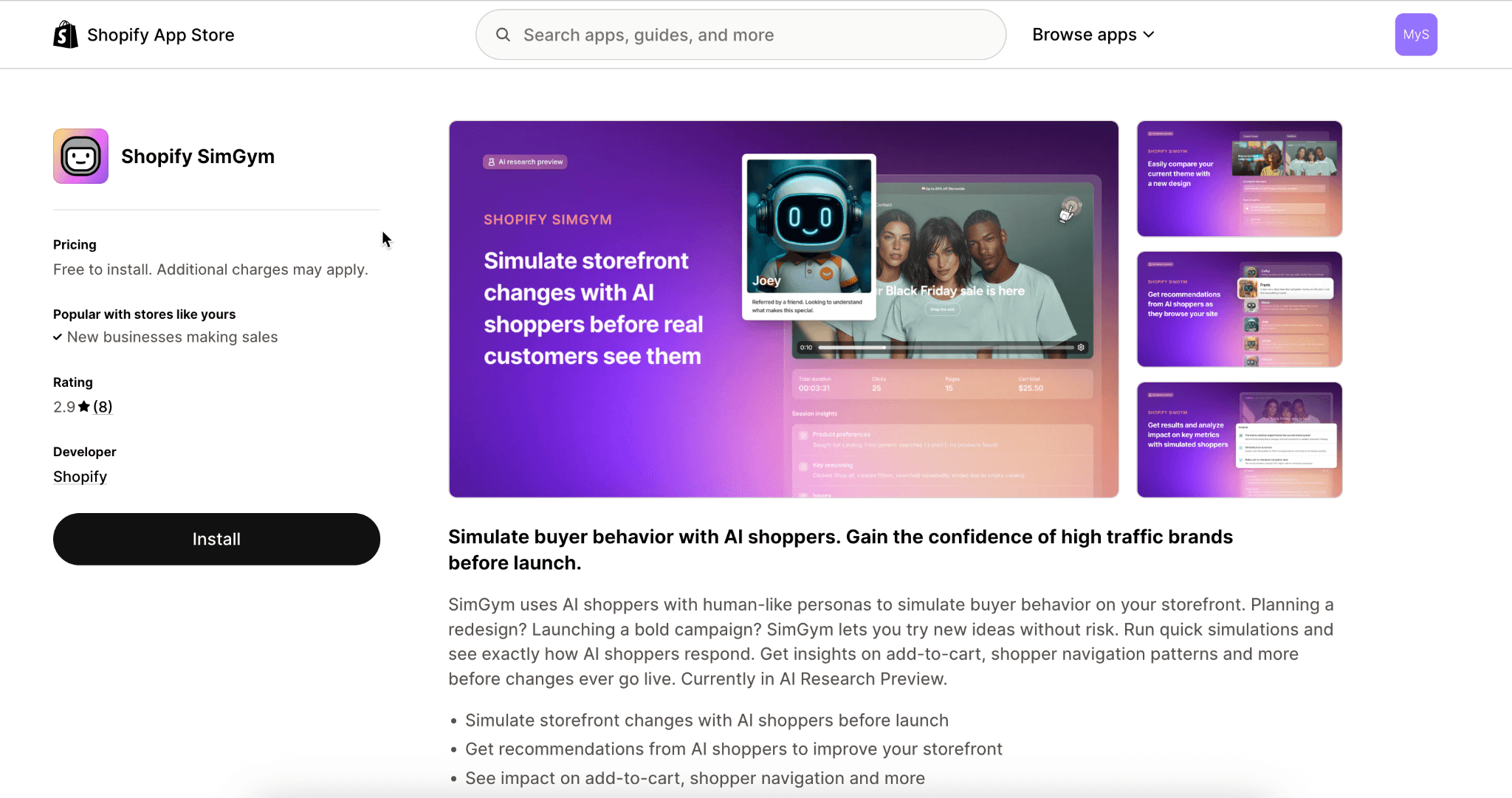
SimGym is a first-party Shopify app, built in collaboration with NVIDIA, that sends hundreds of AI-powered shoppers through your store to test changes before real customers see them. Traditional A/B testing requires 2 to 4 weeks and thousands of real visitors to reach statistical significance. SimGym delivers directional results in 4 to 10 minutes with zero real traffic.
The concept is straightforward. Shopify trained AI models on billions of real commerce sessions across its platform to create realistic shopper personas. Each simulated shopper has a persona, a budget, and a shopping intent. When you run a SimGym test, these AI shoppers browse your store in a contained environment and behave the way real customers with those characteristics would.
The infrastructure behind it is serious. Today, a cluster of NVIDIA Blackwell GPUs with custom FlashInfer kernels lets Shopify spawn 400,000 shopping sessions per day. That scale is what makes the results meaningful. You are not getting feedback from a handful of simulations. You are getting data from hundreds of realistic shopping sessions per test.
What can you test? Theme changes, pricing adjustments, product page layouts, collection restructuring, checkout flow modifications, and copy changes. Anything you would normally A/B test with real traffic, you can pre-screen with SimGym first.
What are the limitations? SimGym provides directional signals, not definitive proof. Simulated behavior approximates real customer behavior but does not replace it. Think of SimGym as a way to catch the obvious problems and low-hanging-fruit optimizations before you spend weeks waiting for real A/B test results. Use it as a pre-filter, then validate winners with real traffic.
🔧 Setting up SimGym
SimGym is available in Research Preview to all eligible merchants. There is no waitlist. Install the app from the Shopify App Store and start running simulations immediately.
What Is the Shopify AI Toolkit and how does it change store management?
The Shopify AI Toolkit was open-sourced on April 9, 2026, under an MIT license. It connects AI coding agents directly to the Shopify platform through three core capabilities: searching Shopify’s full developer documentation and API schemas, validating GraphQL queries, Liquid templates, and UI extensions in real time, and executing live store management actions through the Shopify CLI.
The Toolkit builds on Shopify’s Dev MCP Server , which shipped in December 2025. The Dev MCP Server is the foundational layer that gives AI coding tools direct access to Shopify’s documentation, API schemas, and development resources. The AI Toolkit wraps this into a more accessible package with auto-updating plugins, additional skill files, and a simpler installation path.
This is the feature that changes how technical merchants and agencies interact with Shopify stores entirely. Instead of logging into the admin dashboard, clicking through menus, navigating settings, and switching between tabs, you tell your AI agent what you need and it handles the execution.
Here is what becomes possible:
Want to update product descriptions across your entire catalog? Tell the agent. Want to analyze your conversion funnel and identify where customers are dropping off? Ask the agent. Want to adjust pricing, manage inventory, or restructure collections? The agent does it directly inside your store through the GraphQL API.
The store execute capability lets the AI agent perform operations on a live Shopify store through the Shopify CLI . This includes creating and updating products, managing metafields, modifying theme files, running bulk operations, and handling orders.
Who is this for?
The AI Toolkit is not aimed at beginner merchants. Sidekick already covers natural language store management for non-technical users. The Toolkit is built for developers, agencies managing multiple client stores, and technically proficient merchants who want maximum control and speed.
For agencies, the impact is substantial. A single developer with the AI Toolkit can perform store management tasks across multiple client stores at a pace that previously required a team. Describe the change, review the proposed action, approve the execution. That workflow replaces hours of manual admin work per client per week.
For the developer community, the MIT license means this is not a locked ecosystem. You can inspect the code, extend it, contribute to it. The GitHub repository is public at github.com/Shopify/Shopify-AI-Toolkit .
🔧 Setting up the AI Toolkit
You need Node.js 18 or higher and a supported AI tool (Claude Code, Cursor, VS Code, Gemini CLI, or OpenAI Codex). Shopify offers three ways to install: a plugin (recommended, auto-updates), individual agent skills for picking specific capabilities, or a direct connection via the Dev MCP server for teams that prefer a pure MCP setup. All three take about two minutes regardless of which AI tool you use.
How should you get started? A practical activation roadmap
The number of Shopify AI features available today can feel overwhelming. Here is the practical order that delivers the fastest return for most merchants, organized by effort level.
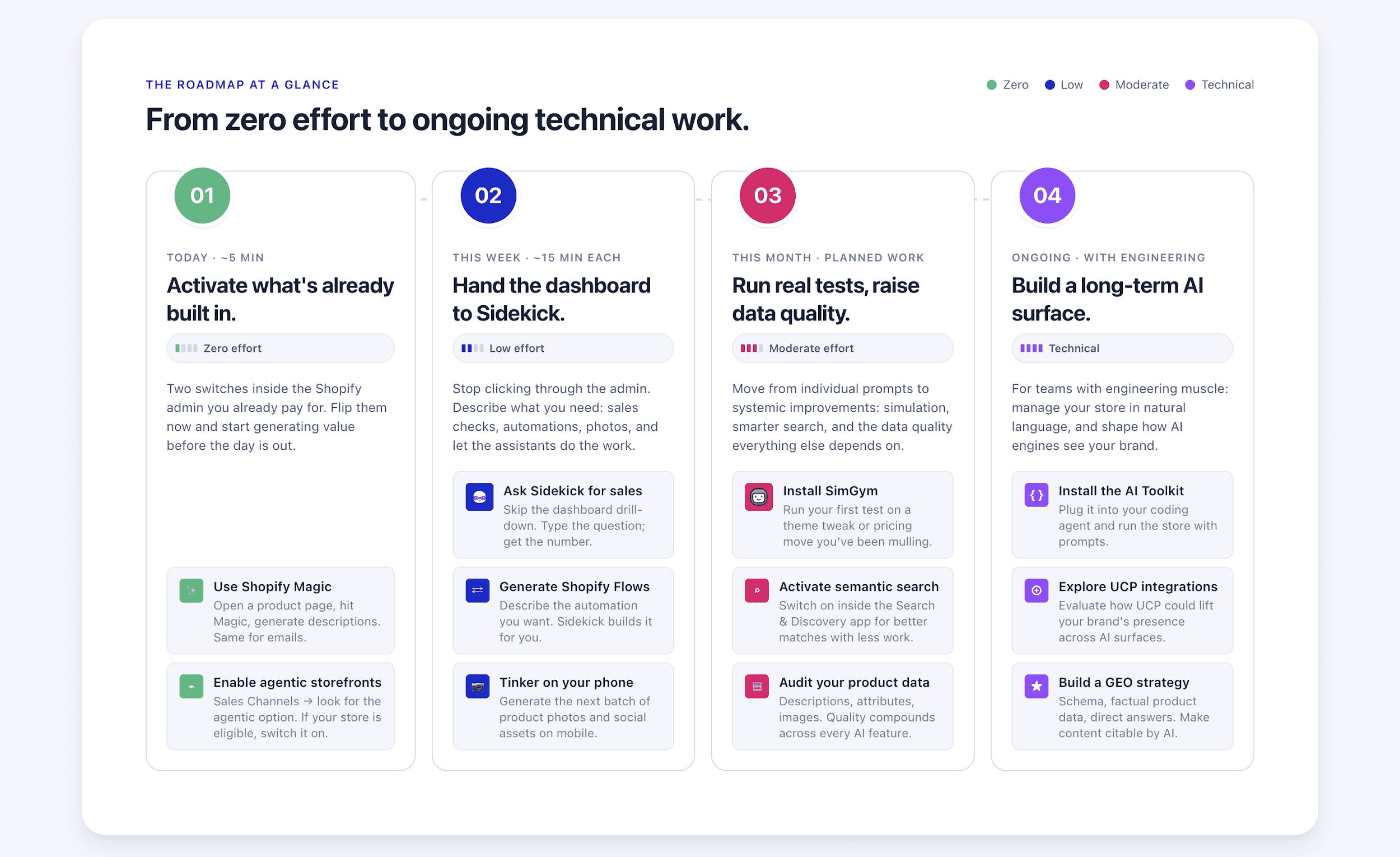
Tier 1: Activate today (Zero effort)
Start with what is already built into your Shopify admin.
- Shopify Magic is active by default. Open any product page, click the Magic icon, and generate a description. Do the same for your email campaigns.
- For Agentic Storefronts , go to your Sales Channels in the Shopify Admin and look for the agentic storefront options. If it is available for your store, enable it.
These two actions, which take a combined five minutes, put your products in front of hundreds of millions of AI users and start generating AI-powered content immediately.
Tier 2: This week (Low effort)
- Start using Sidekick for your daily operations.
- Instead of clicking through your admin dashboard to check sales, ask Sidekick.
- Instead of manually building a Shopify Flow automation, describe what you want and let Sidekick create it.
- Download Tinker on your phone and generate your next batch of product photos or social media assets.
Each of these tools has a learning curve of about 15 minutes.
Tier 3: This month (Moderate effort)
- Install SimGym from the Shopify App Store and run your first test on a theme change or pricing adjustment you’ve been considering.
- Activate semantic search in the Search & Discovery app .
- Review your product data quality , focusing on descriptions, attributes, and image quality, because better product data improves results across every AI feature on this list.
Tier 4: Ongoing (Technical)
- If you or your team have strong technical expertise, install the AI Toolkit on your preferred coding agent and start managing your store through natural language commands.
- Explore how UCP integrations might benefit your brand’s presence across AI surfaces.
- Build a GEO strategy that makes your content and products more citable by AI engines: structured FAQ schema, factual product data, and direct answers to common customer questions.
The principle behind this roadmap is simple: start with what is free and built-in. Shopify has made the highest-impact AI features available on every plan at no extra cost. The merchants who activate them now, while competitors are still reading about AI, will have a structural advantage in every channel where AI surfaces products.
Conclusion
Shopify has placed a bigger bet on AI than any other ecommerce platform, and the results back up the investment: 15x growth in AI-attributed orders, 7x increase in AI-driven traffic, and over 150 AI-powered features shipped in a single release cycle.
The most important detail for merchants is that almost everything covered in this guide is free. Shopify Magic, Sidekick, Sidekick Pulse, Shopify Flow AI, Agentic Storefronts, Tinker, and the AI Toolkit are all available at no additional cost on every Shopify plan . SimGym is free during its Research Preview. The Agentic Plan opens AI selling channels to brands that are not even on Shopify.
That combination of breadth, depth, and accessibility is what sets Shopify apart from every other platform in the market right now. WordPress merchants are assembling fragmented plugin stacks. BigCommerce is releasing individual features. Shopify shipped an entire AI-native commerce ecosystem.
The merchants who activate these tools today will compound their advantage with every month that passes. The AI commerce wave is not approaching. It arrived, and Shopify made sure its merchants are standing on the shore with surfboards in hand.
Frequently Asked Questions
Is Shopify AI free for all merchants?
Yes. Shopify Magic, Sidekick, Sidekick Pulse, Shopify Flow, and Agentic Storefronts are all included with every Shopify plan at no additional cost. Tinker is a free standalone app available on iOS and Android. SimGym is free during Research Preview. The AI Toolkit is open-source under MIT license. There are no per-query limits or premium tiers for any core AI feature.
Can I sell on ChatGPT and other AI platforms without a Shopify store?
Yes, through the Agentic Plan. Brands running on Magento, Salesforce Commerce Cloud, custom platforms, or any non-Shopify infrastructure can upload their products to Shopify Catalog and sell across ChatGPT, Microsoft Copilot, Google AI Mode, and the Gemini app. No platform migration required and no additional transaction fees.
Does the Shopify AI Toolkit require coding knowledge?
Yes. The Toolkit is designed for developers and technical users who work with tools like Claude Code, Cursor, VS Code, Gemini CLI, or OpenAI Codex. Non-technical merchants should use Sidekick, which provides similar store management capabilities through a natural language interface directly in the Shopify admin.
How accurate is SimGym compared to real A/B testing?
SimGym provides directional signals, not statistically definitive results. Shopify trained the AI shoppers on billions of real commerce sessions, so the simulated behavior approximates real customer patterns. SimGym is best used as a pre-filter: catch obvious issues in 4-10 minutes, then validate promising changes with real traffic through traditional A/B testing.
What is the difference between Shopify Magic and Sidekick?
Shopify Magic is the creative content engine that generates product descriptions, email copy, blog posts, and handles AI image editing. Sidekick is the strategic operator that handles analytics, workflow automation, custom app generation, and store management. Sidekick frequently calls on Magic to execute content tasks. Think of Magic as the writer and designer, and Sidekick as the operations manager who directs the work.
Will Shopify AI replace the need for developers?
No. The AI Toolkit and Sidekick accelerate development and automate routine tasks, but they don’t replace the architectural decisions, complex custom integrations, or strategic store builds that experienced developers provide. What’s changing is the developer’s role: less time spent on repetitive code and admin tasks, more time on system architecture and high-value customization.