Not long ago, ecommerce was heavily influenced by getting visibility and increasing traffic to your platform. Turning that traffic into your customers, or, to be precise, making each visitor a potential customer instead of just a bypasser, is what levels every business up.
You can spend thousands bringing visitors to your store, but if they don’t convert, your growth stalls. Ecommerce conversion rate optimization (CRO) is what helps you change the outcome.
Learning how to build a practical CRO strategy, which key metrics matter most, and actionable tips to boost conversions without increasing your ad spend can widen your customer base in no time.
What is ecommerce conversion rate optimization?
Ecommerce conversion rate optimization is the process of improving your online store based on behavioral data to increase the rate at which visitors take a desired action, such as making a purchase or signing up.
CRO does not increase your ecommerce traffic. You can use AI in SEO for ecommerce to increase traffic. Ecommerce CRO focuses on working with the traffic you already have and making the best value out of it by increasing how your site performs.
Calculating conversion rate
Conversion rate is expressed as a percentage of visitors who come to your store and end up purchasing an item or doing some other action that you want.
The conversion rate formula is simple:
(Number of Conversions / Total Website Visitors) × 100
For instance, if you had 7,000 visitors and 350 out of them made a purchase, your conversion rate is calculated like this: (350 / 7,000) × 100 = 5%.
The formula is the starting point of any CRO strategy. You must, however, be certain that you are measuring and communicating to your partners or stakeholders the correct conversion (signups, purchases, etc.) because the result will vary depending on which step is taken as a goal you want your visitors to achieve.
For example, you might wish to see how many customers add an item to a cart and work on this part. You will get an entirely different percentage from the one that shows how many visitors completed the purchase.
Increase revenue without increasing traffic
More traffic doesn't automatically mean more revenue, it often just means higher acquisition costs. The core principle of any CRO strategy is to get more from the visitors you already have. A visitor has already come to your store – ecommerce conversion rate optimization helps you convert that visitor into a buyer.
Instead of spending more to bring people in, you make each visit count for more. A 1% increase in conversion rate can translate into significant revenue growth, especially for stores with high traffic. That's what makes a focused CRO strategy one of the most cost-effective growth levers available.
And if you are still scaling traffic, ecommerce conversion rate optimization amplifies that investment too; every new visitor arrives at a store that's already built to convert, meaning a higher share of that traffic turns into actual revenue.
Improve customer experience
Customer experience isn't a side benefit of CRO - it's the mechanism that makes CRO work. Research done by Forrester says that investing just a single dollar in improving customer experience might give you a return of up to $100. Many factors determine such outcomes, but UX improvement is consistently among the strongest.
The reason is straightforward: every friction point between a visitor and a purchase is a place where you lose money. By simplifying the navigation and reducing steps to sign up, check out, or complete the purchase, you are removing the obstacles that cause potential customers to leave before they convert. That's why the decision to improve user experience should never be treated as a cosmetic choice, it's a structural one that affects your bottom line.
But reducing friction is only half the equation. The other half is giving visitors what they need to say yes. A 225% increase in sales is possible by just providing sufficient information about your product at the right time to your customers. Clear descriptions, transparent pricing, visible reviews - these aren't design details, they're conversion tools.
When you combine both fewer barriers and better information, UX improvement becomes a direct revenue driver. The stores that treat it that way, rather than as a design afterthought, are the ones that consistently outperform their competition in conversion rate.
How to optimize ecommerce conversion rate
The best ecommerce conversion rate optimization strategies follow a structured approach. This is often referred to as the CRO process – a cycle of data collection, hypothesis, testing, and iteration.
1. Collect user behavior data
Every CRO improvement starts with understanding what your visitors are actually doing, not what you assume they're doing. Before making any changes, you need to understand user behavior. Look at how visitors interact with your site:
Where do they click?
Where do they drop off?
How far do they scroll?
Tools like heatmaps, session recordings, and analytics dashboards reveal patterns in user behavior that highlight friction points and missed opportunities.
Tracking micro conversions, such as add-to-cart actions or newsletter signups, can also provide deeper insight.
It’s often best to use digital experience platforms like Uxify that collect data automatically instead of relying on software that’s intended to measure just a small portion of the overall user behavior, such as GA4.
2. Identify conversion barriers
Data alone doesn't fix anything, you need to translate what you've learned into specific problems worth solving. Common problems that prevent conversions include:
Slow page speed. Use tools like PageSpeed Insights, Google Search Console, or dedicated tools like Uxify’s Reality to spot pages loading too slowly. These tools can reveal users who abandon pages before they are loaded, meaning they ran out of patience before your website could be fully accessed.
Confusing navigation. Track how website visitors move through your site and at what point they decide to leave. Heatmaps can help you determine whether users struggle to find key categories or repeatedly click the wrong elements. Google Analytics Exploration reports are also useful for such tasks. If users are moving back and forth or clicking on static elements, it’s a clear sign that the navigation is causing trouble.
Weak product descriptions. Check product page engagement metrics such as time on page and scroll depth. Low engagement or high exit rates may indicate that your descriptions aren’t convincing or that your page design is not attractive. Customer feedback and reviews can also be revealing.
Lack of trust signals. High cart abandonment rates may indicate users don’t feel secure sharing payment details. Use surveys or session recordings to identify whether the absence of reviews, guarantees, or security badges is reducing trust.
These obstacles reduce your store’s conversion potential and hurt the overall user experience.
Focus on the points where users hesitate or abandon the process, especially the checkout.
3. Develop CRO hypotheses
Identifying a problem is only half the work — you also need a testable explanation for why it's happening and what might fix it. Form hypotheses based on your findings. A strong CRO hypothesis follows the logical structure whereby improving factor X, you can expect the outcome Y. You may also include reasoning such as “because the additional factor Z becomes present” when explaining your hypothesis to someone else.
Each hypothesis should be supplemented by a null hypothesis (usually, it assumes that the change will have no effect. A significance level should be defined, most commonly 0.05. If the p-value is less than the significance level, the null hypothesis can be rejected (meaning there is a change).
For example:
Reducing the steps from the product page to checkout by 2 will increase the conversion rate. A null hypothesis, on the contrary, claims that reducing these steps will have no such effect.
Changing the featured image to only showcase the product with a white background will increase conversion rates. A null hypothesis negates that there will be an increase.
Testing might show a small change, but it cannot support the hypothesis unless it passes the significance level threshold. If it doesn’t, there is no need to implement the tested changes since the effect falls into the 5% probability of being present due to chance rather than the tested changes.
4. Run experiments
Testing is the heart of conversion rate optimization. A hypothesis without a test is just an opinion - this is where you put your ideas against real user behavior. You can run A/B tests or multivariate tests to compare different variations of:
Headlines
Layouts
CTAs
Pricing displays
Landing pages
Changes will depend precisely on your hypotheses. Be careful not to change too much at once, as it will be harder to narrow down the effects. Even small changes can significantly boost conversions, so starting with minor changes is often best.
5. Analyze results and iterate
Running a test is the easy part. Knowing whether the result actually means something is what separates guesswork from strategy.After running tests, analyze performance against your key metrics based on the data collected. As a starter, good questions to ask are:
Did conversions increase?
Did the average order value change?
Did the bounce rate decrease?
It’s important to note that you can answer positively, and yet the change that occurred might not be statistically significant and could have happened due to other reasons.
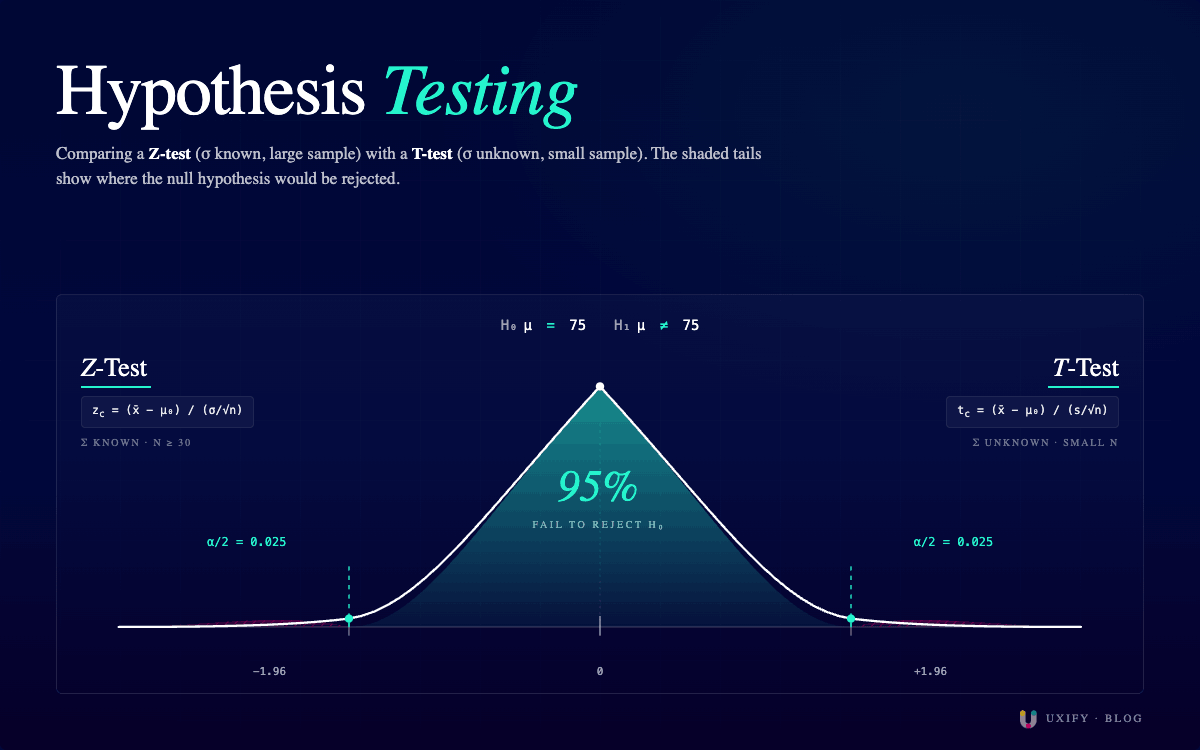
To determine the statistical significance of the change, you must use specific tests, like the Z-test for a larger sample or the T-test for a smaller one, where you calculate respective conversion rates in different tested versions of the website and compare the difference between the two results compared to normal variation.
For a Z-test at 95% confidence, the result is statistically significant if the Z-score exceeds ±1.96. For a T-test, the critical value depends on your degrees of freedom and will typically be higher than 1.96, especially with small samples. You will need to consult the appropriate T-distribution table or let your testing tool handle it.
Winning variations should be implemented, while losing tests provide insights for future experiments. CRO is a continuous process. The best-performing stores treat ecommerce conversion rate optimization as an ongoing process, not a one-time project.
Luckily, with the rise of AI, CRO testing can easily be automated with strategic CRO agents.
Key ecommerce conversion metrics to track
Knowing how to improve conversion rates starts with measuring the right things. Not all metrics are equally important, and tracking the wrong ones wastes time without moving the needle. The metrics below each point to a specific part of the funnel where revenue is either captured or lost - fix the weakest one first, and that's where your biggest conversion gains will come from.
Conversion Rate. This is the most important metric since it tells you what percentage of visitors are completing desired actions on your website, such as making a purchase. Improving this metric is the main goal of ecommerce conversion rate optimization.
Cart Abandonment Rate. It measures how many users add items to their cart but don’t complete the purchase. A high abandonment rate indicates that there are issues with checkout, pricing, or trust.
Checkout Completion Rate. This metric tracks what percentage of users who start checkout actually finish it. Optimizing this stage can significantly increase conversions.
Average Order Value (AOV). It measures how much customers spend per purchase. Increasing AOV is a powerful way to grow revenue without increasing traffic, which is a core focus of any CRO strategy.
Bounce Rate. This metric shows the percentage of visitors who leave after viewing only one page. High bounce rates usually indicate poor user experience, slow page speed, or misleading ads that lure the user to the page on which the user doesn’t see relevant content.
Customer Lifetime Value (CLV). CLV measures how much revenue a customer generates over time. While CRO often focuses on first conversions, improving retention and repeat purchases increases long-term value.
10 ecommerce Conversion Rate Optimization tips
Improve website speed
Slow page speed is one of the main reasons why users either bounce back or get frustrated in the process and never reach completion. Reduce scripts, optimize images, and use reliable hosting to ensure fast performance.
Speed has a direct effect on numerous important metrics: slower loading times cause users to bounce more often, and speed is a Google ranking factor.

Simplify the checkout process
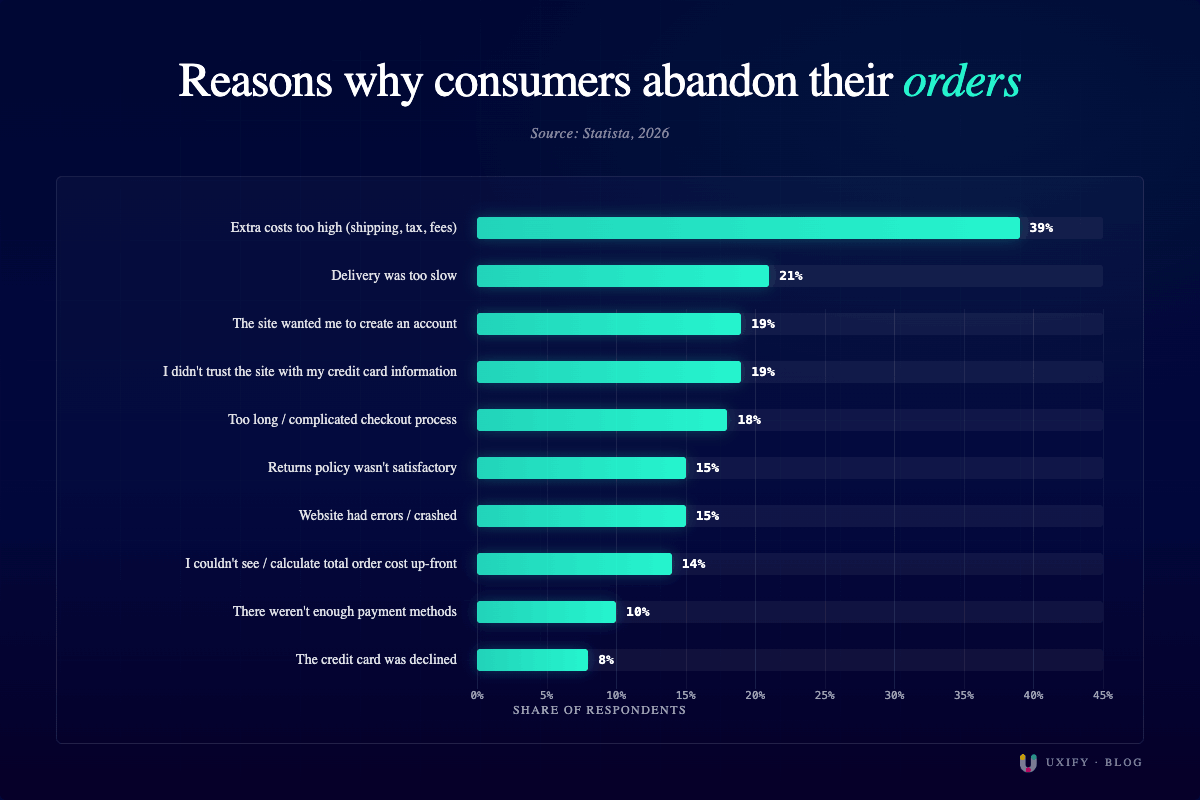
A complicated checkout kills conversions. Losing customers that are already willing to pay but get scared away by your page’s drawbacks is the highest cost that will accumulate over time into an impactful financial loss.
Reduce the number of steps, enable guest checkout, and minimize form fields to improve completion rates.
Don’t let your customers walk off simply because of the confusion that you create for them. Simplicity will make things easier for both your customers and you.
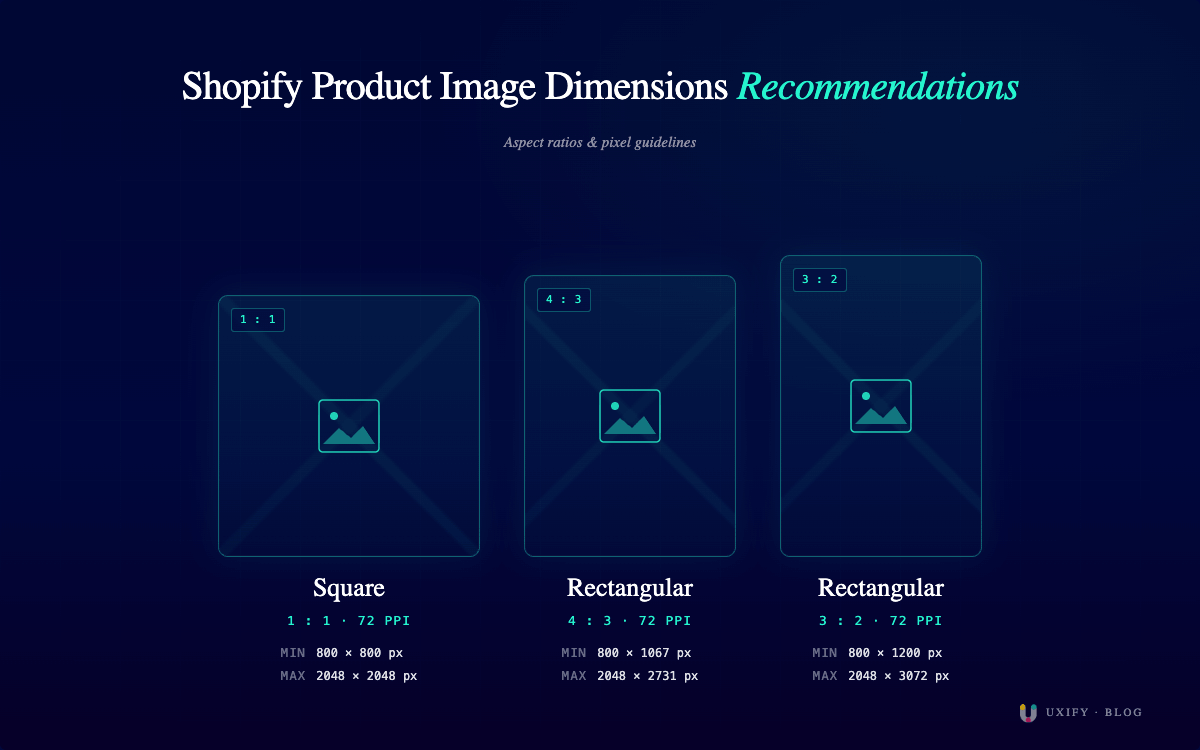
Use high-quality product images
Clear, detailed images will help customers make decisions. Nobody wants to buy an item they haven’t decently laid their eye on. Poor images will make your financial gains poor as well.
Include multiple angles, zoom features, and lifestyle photos to improve user experience. It will improve the visual appeal of your store’s webpage and will let customers get a better overview of a product that they consider purchasing.
Display trust signals
Nowadays, the internet is full of scams and low-quality surrogates of valuable items or services, so many people get very cautious before buying something without having trust in the seller.
Trust badges, reviews, and guarantees reduce hesitation.
Customers are more likely to buy when they feel secure and see a trusted source that confirms the value and quality of the product.
Optimize product pages
Strong product pages are critical. You must ensure that potential customers get the necessary info while they are inspecting your offers. Looking sketchy or avoidant in providing details is the worst impression you can create for those who can end up buying your merchandise.
To optimize product pages, focus on:
Clear descriptions
Benefits over features
Social proof
FAQs
This directly improves your conversion potential.
Offer free shipping or incentives
Free shipping, discounts, or bonuses can lure more buyers since they immediately notice the opportunity to get more than they expected. Therefore, such benefits can increase not only the conversion rate but the average order size as well.
On the other hand, unexpected costs cause abandonment. Don’t promise bonuses that will end up being just additional items at an additional price. Creating a high expectation and then not meeting it will make your potential customers bounce at a pace you have not seen before.
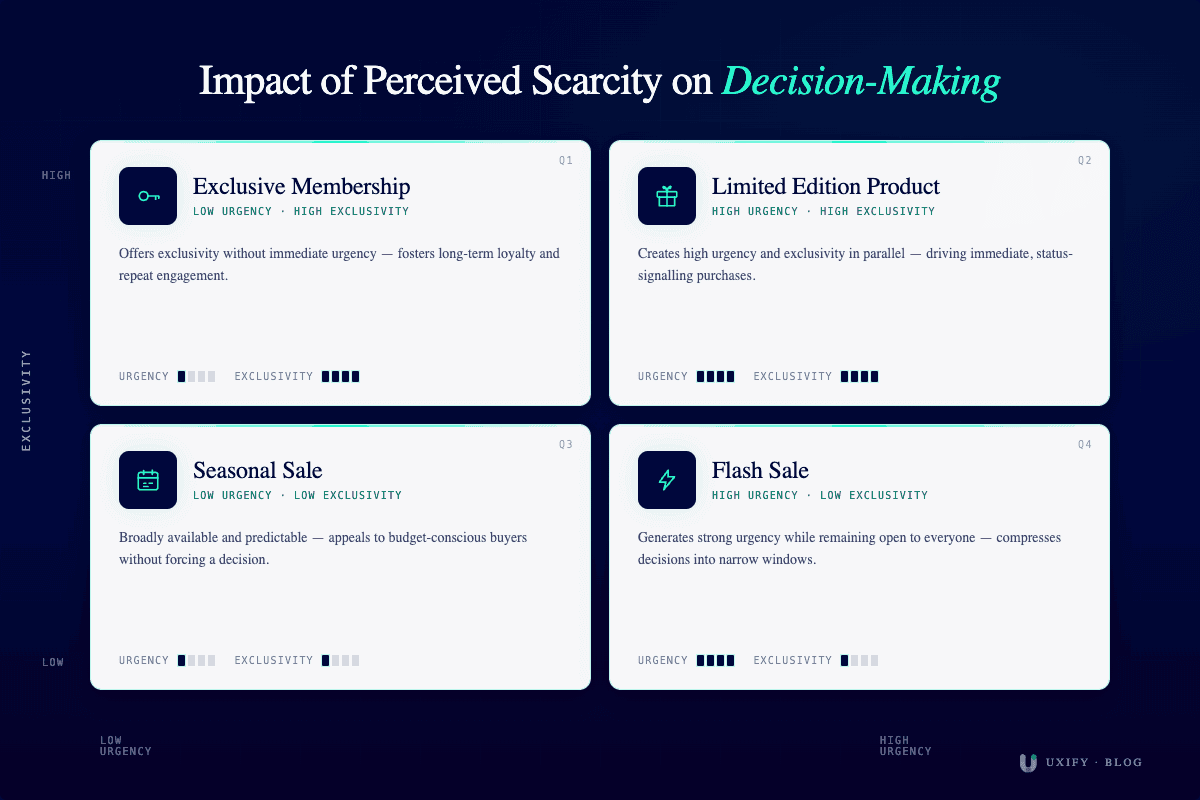
Use urgency and scarcity
Limited-time offers and low-stock alerts create urgency.
When used correctly, these tactics can significantly increase conversions. When users have a limited time to make a decision, some of those decisions will be to buy an item.
But if there are no time limits to make a decision, users might leave it for the next time, and this next time will just never happen because they might wander to another store or forget this line of thought altogether.
However, you should be careful, as overplaying such tactics can be detrimental. Customers may feel that they are being tricked into a purchase, which is never good for long-term growth.
Improve mobile experience
A large portion of website visitors shop on mobile devices. That’s why mobile optimization for ecommerce stores is essential to keep mobile users as engaged and comfortable as you do with non-mobile users.
Ensure:
Fast load times
Easy navigation
Simple checkout
A poor mobile experience leads to lost revenue.
Use personalized product recommendations
Personalization enhances the user experience.
Recommend products based on browsing history or past purchases to increase AOV. When users feel they have found an item that was created specifically for them and offered at the right time, they will not be very hesitant to buy it.
After all, offering someone an item randomly will not be met with an open wallet, since there is a good chance many of those users would never buy or look after such items if the offers are not adjusted to personal needs.
Optimize call-to-action buttons
Ensure you have enough CTAs to make your store’s webpage engaging, but don’t overdo it because your page might start looking desperate and sketchy if these buttons are present on every corner.
Your CTAs should be clear, visible, and compelling. Test different colors, wording, and placements to maximize performance.
Don’t place these buttons out of context; they must match the content of your page and lead users directly to actions related to what they were reading to encourage continuous engagement and willingness to buy.
Common ecommerce CRO mistakes
Even experienced teams make mistakes in conversion rate optimization. Make sure you avoid them to get ahead in your competition and increase your conversion rate:
Slow site speed. Poor page speed can undo all the work already done to attract more visitors. It damages conversions and creates poor associations between bad quality and your brand.
Complicated checkout. Too many steps or required fields create friction.
Unclear value proposition. If visitors don’t understand your value immediately, they leave.
Hidden shipping costs. Unexpected fees at checkout lead to abandonment.
Poor mobile UX. Ignoring mobile optimization leads to lost conversions.
Best ecommerce CRO tools
The right tools can help you understand users, test ideas, and continuously accelerate your success with ecommerce CRO. But no single tool covers everything — effective CRO stacks combine data collection, behavioral analysis, experimentation, and personalization. Here's how each category contributes to a stronger optimization process.
Analytics tools
Analytics tools are the foundation of conversion rate optimization. They answer the "what" — what's happening on your site, where visitors enter, where they drop off, and which pages drive the most revenue. Such tools, like Google Analytics (GA4), Mixpanel, or Uxify, show you what's happening on your site and how visitors move through your funnel.
These platforms track traffic sources, conversions, and key metrics, like bounce rate and revenue. They help you identify drop-off points and understand which parts of your funnel need improvement.
Behavior analytics tools
Where analytics tools show you the numbers, behavior analytics tools show you the story behind them. Hotjar, Microsoft Clarity, Crazy Egg, and other similar behavior analytics tools help explain why users act the way they do.
With features like heatmaps and session recordings, these tools reveal friction points in your user experience and highlight where users get stuck or disengage. They're especially valuable for diagnosing issues that don't show up in aggregate data — like a confusing button placement or a form field that causes hesitation.
A/B testing tools
Once you've identified a problem and formed a hypothesis, A/B testing tools let you validate it with real traffic before committing to a permanent change. Platforms like Optimizely, Visual Website Optimizer (VWO), and AB Tasty help you test different versions of landing pages, product pages, and CTAs to find what actually converts better.
Many of these platforms now support A/B testing with AI, which changes how experiments run in practice. Instead of manually setting traffic splits and waiting weeks for statistical significance, AI allocates more traffic to winning variants in real time, detects results faster, and can even suggest test variations based on your page data. This means more experiments in less time — and fewer resources spent on tests that go nowhere.
Personalization tools
Generic experiences convert at generic rates. Personalization tools close the gap between what you offer and what each visitor actually wants. Personalization tools tailor the experience to individual users. By adapting content and product recommendations based on user behavior, tools like Uxify, Dynamic Yield, or Kameleoon improve the user experience and can increase both conversion rates and average order value.
Frequently asked questions
What is a good ecommerce conversion rate?
A good rate might differ across the industries, but most ecommerce stores find themselves in the range between 2% and 4%. High-performing stores often exceed 4%.
How to increase my ecommerce conversion rate?
There is no faster path to a better conversion rate than matching or exceeding user expectations. Anything that might frustrate users will surely do it and will cost you customers.
Make sure you improve customer experience, eliminate any obstacles or unnecessary steps, make a simple and intuitive navigation, optimize the mobile version, improve your landing page, and reduce any friction that might be occurring in the way towards the purchase.
What tools are used for ecommerce CRO?
Common tools include analytics platforms, heatmap tools, A/B testing platforms, and personalization engines like Uxify, Hotjar, and Optimizely.
How can AI be used to improve CRO?
AI can analyze user behavior, personalize experiences, predict purchase intent, and automate testing, making ecommerce conversion rate optimization faster and more effective, but use it wisely because AI can’t replace advanced analytics tools and strategies.
What is A/B testing?
A/B testing compares two (A and B) versions of a page or element to determine which performs better. It’s a core part of conversion rate optimization and essential for data-driven decisions.

" height="200.00000219726564px" id="j9Mmwfnw8" transform="translate(143.5 0)" width="479.5329973144531px"/><path d="M 0 15.944 C 0 7.139 7.154 0 15.98 0 C 24.804 0 31.959 7.138 31.959 15.943 L 31.959 59.637 C 31.959 68.442 39.113 75.58 47.938 75.58 C 56.763 75.58 63.917 68.442 63.917 59.637 L 63.917 15.944 C 63.917 7.139 71.071 0.001 79.897 0.001 C 88.721 0.001 95.875 7.139 95.875 15.944 L 95.875 56.095 C 95.875 82.51 74.413 103.923 47.938 103.923 C 21.462 103.923 0 82.51 0 56.095 Z" fill="rgb(59, 63, 91)" height="103.923px" id="KJCDMITFE" transform="translate(0 53)" width="95.875px"/><path d="M 0 15.943 C 0 7.138 7.154 0 15.979 0 C 24.804 0 31.958 7.138 31.958 15.943 C 31.958 24.748 24.804 31.886 15.979 31.886 C 7.154 31.886 0 24.748 0 15.943 Z" fill="rgb(252, 200, 0)" height="31.885999999999996px" id="q2K9EYOvZ" transform="translate(0 53)" width="31.95799999999963px"/><path d="M 0 15.943 C 0 7.138 7.154 0 15.979 0 C 24.804 0 31.958 7.138 31.958 15.943 C 31.958 24.748 24.804 31.886 15.979 31.886 C 7.154 31.886 0 24.748 0 15.943 Z" fill="rgb(63, 184, 126)" height="31.885999999999996px" id="bBya7XCj7" transform="translate(64 53)" width="31.95799999999963px"/><path d="M 0 14.171 C 0 6.344 6.359 0 14.204 0 C 22.048 0 28.407 6.344 28.407 14.171 C 28.407 21.997 22.048 28.342 14.204 28.342 C 6.359 28.342 0 21.997 0 14.171 Z" fill="rgb(229, 0, 106)" height="28.341999999999985px" id="WNzwBFOi7" transform="translate(34.5 128.5)" width="28.407000000000153px"/></g></svg>)