
Speculative loading is a relatively new functionality that continues to gain popularity with businesses and developers, now powering over 8% of all Chrome navigations. With this innovative functionality aimed at enhancing performance and real user experience, measuring its effectiveness becomes essential. Tracking the right KPIs (Key Performance Indicators) reveals how speculative loading improves user flow, reduces friction in key moments, retains more visitors, and drives engagement, conversions, and long-term growth.
This guide showcases the importance of speculative loading for businesses and the KPIs needed to benchmark and track its impact.
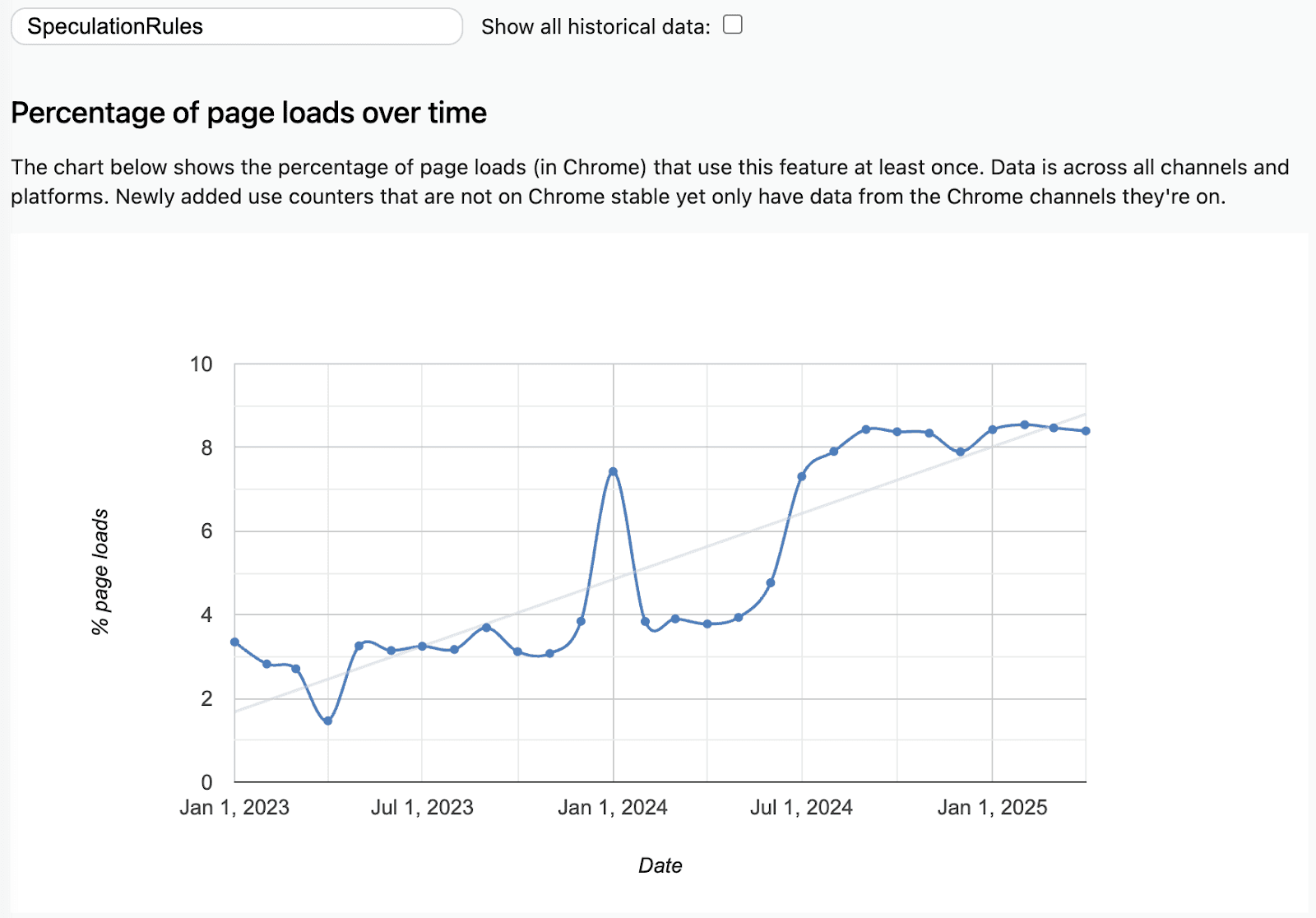
Source: ChromeStatus
Why Speculative Loading deserves your attention
Website performance is no longer just about shaving milliseconds off load times. It's about creating an experience that feels instant and engaging. That difference is what speculative loading delivers.
Speculative loading works by identifying where a user will go next and preloading that content in the background. So when they click, that next page is already prepared and delivered instantly. It doesn’t just reduce wait times, it erases them and avoids unnecessary performance-related exits. Our research across thousands of sites uncovered a +50% visitor drop-off spike for pages loading in 3 seconds vs 2 seconds.
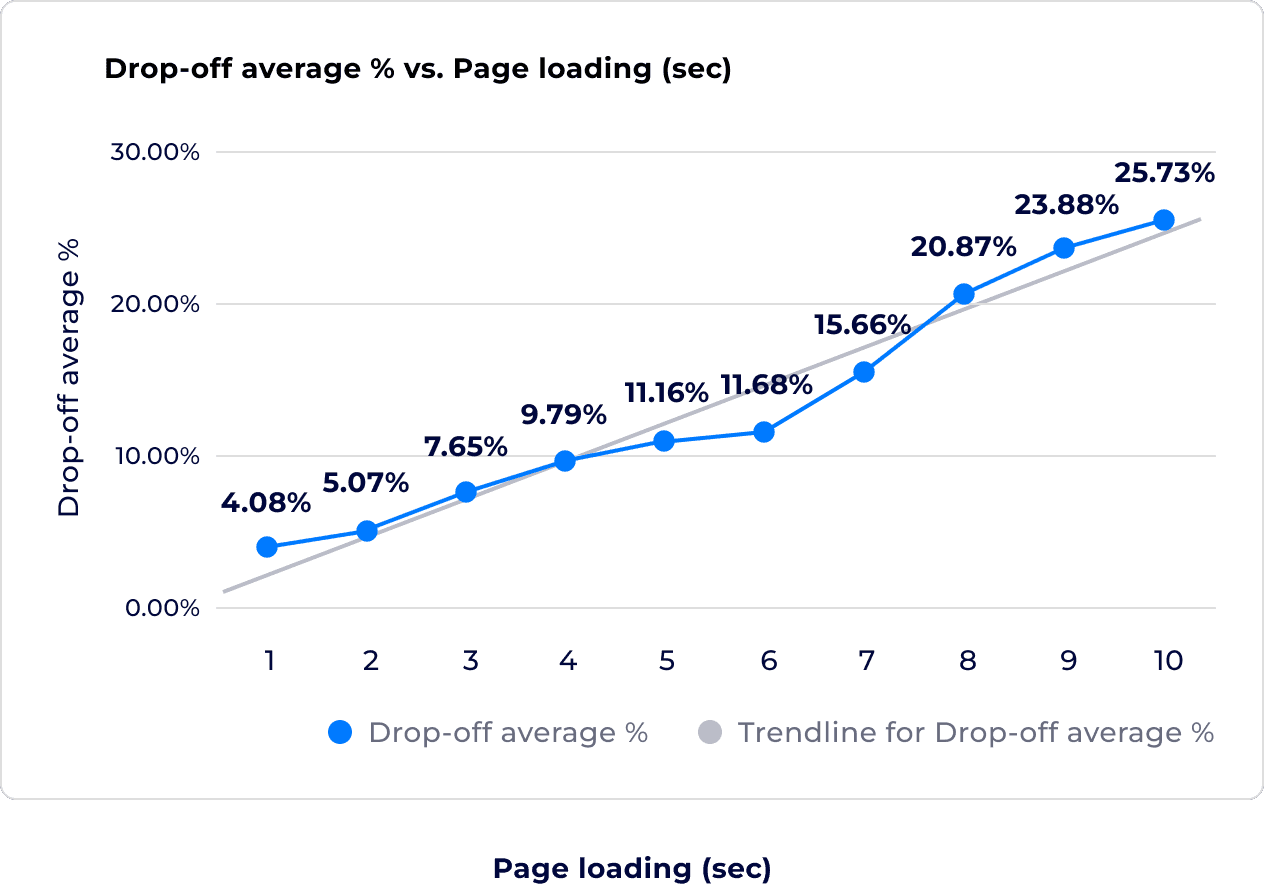
Source: Uxify
Businesses are beginning to recognize the UX difference this creates: more engagement, smoother journeys, and fewer exits. For marketers, business owners, and merchants alike, the challenge is no longer if this matters but how to measure the impact.
What makes Speculative Loading different?
Most performance strategies are reactive: compressing assets, lazy-loading content, reducing third-party scripts. Speculative loading is proactive. It anticipates user intent and acts before the user does.
Done right, this results in:
Faster navigation between pages
Reduced bounce and exit rates
Improved engagement and flow
Better business outcomes without changing content or design
But not all speculative loading is equal. Manual prefetching based on fixed rules can waste resources or miss key moments. It also requires constant attention to site visitors’ ever-changing browsing behaviors. Uxify’s Navigation AI changes that by learning from real user behavior and continuously adapting in real-time to optimize what pages to preload and when.
The KPIs that matter with Speculative Loading
To understand the true impact of speculative loading, you need to look beyond generic page speed. These are the KPIs that tell the real story of our users’ experience:
⚙️ Performance KPIs
Optimized vs. Non-Optimized Navigations
See what percentage of page transitions were enhanced and accelerated by speculative loading. Higher optimization coverage usually means smoother user journeys.Core Web Vitals (LCP, INP, CLS, TTFB) — Optimized vs Non
Compare performance on pages enhanced by speculative loading versus those that weren’t. You’ll likely see improvements in LCP and TTFB thanks to faster loading and better network prioritization. INP and CLS can also benefit - INP through reduced main thread blocking, and CLS through stabilized layouts from earlier resource preparation.
Note: To fully understand the impact, it’s recommended to monitor CWV metrics over time and compare optimized against non-optimized navigations to isolate the delta.
Time to First Engagement
Measures how fast users interact with a page after arriving. A shorter time here suggests a more fluid experience.Exit Rate (Optimized vs. Non-Optimized)
Exit rate measures how often users leave your site from a given page. By comparing exit rates on pages enhanced with speculative loading versus those without, you can assess how faster, more seamless navigations reduce abandonment during critical steps in the journey.
📈 Business Impact KPIs
Engagement on Optimized vs. Non-Optimized Pages
Compare scrolls, clicks, or time-on-page between users who landed via optimized transitions versus standard ones.Pageviews Per Session
Instant page transitions encourage exploration. This metric shows if users are digging deeper by engaging with a site. More pages per session typically indicate higher user engagement—something that's strongly correlated with increased conversion rates across industries. Keep an eye on this metric for journeys that have been optimized by speculative loading compared to those that haven’t (our benchmark is journeys that have had over 50% of their navigated pages optimized).Cart Visits (if Ecommerce)
This KPI reflects strong buying intent. It measures how many users reach the cart page after interacting with the site. Comparing optimized and non-optimized sessions helps you understand whether faster, more seamless journeys lead to more visitors reaching this high-value step.Conversion Rate Per Visitor or Session
The gold standard. If speculative loading is working, you should see more users reaching your conversion points.
Tools and Tips to Make Speculative Loading Easier
If you're technically inclined, the Speculation Rules API is a powerful browser feature that allows you to define rules for preloading or prerendering pages based on likely user navigation. You can preload URLs that match certain patterns or are triggered by user actions like hovering or clicking.
But it comes with limitations:
You need to define the rules manually.
It's harder to personalize.
Proving value and measuring success can be complex.
That's where tools like Navigation AI by Uxify come in.
It automatically predicts user behavior using real-time interaction data
Prerenders only what matters, avoiding resource waste
Provides a side-by-side breakdown of optimized vs non-optimized sessions
Surfaces KPI improvements directly in your dashboard
Runs built-in A/B tests to isolate impact
Whether you're running an Ecommerce site, SaaS product, or content platform, Uxify helps you see exactly how speculative loading affects both user experience and business results.
See other tips and tools we suggest for instant page loading.
Getting Started with Speculative Loading
If you’re curious about implementing speculative loading, you don’t have to jump into AI right away. Here’s how to begin:
Understand how speculation works.
Chrome’s Speculation Rules API enables you to define JSON-based instructions that tell the browser which pages to prefetch or prerender. These rules can be embedded directly in your page or delivered via HTTP headers.Choose a setup: static or dynamic.
Static setup works well for predictable routes (like blog posts or product highlights). You can insert <script type="speculationrules"> into your HTML.
Dynamic setup lets you create rules on the fly using JavaScript—ideal for personalized flows or user-based routing.
Start with low-risk, high-reward pages.
Focus on pages with high traffic or commercial value, such as product pages, checkout, or pricing. Avoid preloading sensitive or state-dependent pages like sign-in or cart submission URLs.Experiment with prerendering eagerness.
Chrome supports different levels of prerendering based on user behavior: from conservative (on click) to eager (on hover). Start with conservative to avoid unnecessary bandwidth usage, then refine.Measure prediction accuracy.
Use performance tools to track how many prerendered pages were actually visited (via activationStart). Compare that to overall page views to understand hit rates and refine your strategy.When you're ready to scale, automate.
Tools like Uxify’s Navigation AI handle speculative loading at scale, using AI to continuously improve prediction accuracy, reduce waste, and maximize engagement.
Final Thoughts: Measuring What Matters Most
Speculative loading isn’t just a technical feature—it’s a strategic advantage. For businesses focused on growth, every second saved in load time can directly influence revenue, user satisfaction, and engagement.
But speed alone isn’t the full story. Measuring the impact of that speed on user behavior and business results is what truly matters. That’s where KPIs like Time to Engagement, Conversion Rate, and Prevented Early Exits come into play.
With tools like Uxify’s Navigation AI, you can go beyond best guesses and surface real data to drive real decisions.
If you're not measuring these KPIs, you're leaving performance gains and profit on the table.
The future of performance is not just about loading fast. It's about proving experiences that drive business outcomes.
And when you're ready to scale, Uxify helps you make it measurable, automatic, and impactful.

" height="200.00000219726564px" id="j9Mmwfnw8" transform="translate(143.5 0)" width="479.5329973144531px"/><path d="M 0 15.944 C 0 7.139 7.154 0 15.98 0 C 24.804 0 31.959 7.138 31.959 15.943 L 31.959 59.637 C 31.959 68.442 39.113 75.58 47.938 75.58 C 56.763 75.58 63.917 68.442 63.917 59.637 L 63.917 15.944 C 63.917 7.139 71.071 0.001 79.897 0.001 C 88.721 0.001 95.875 7.139 95.875 15.944 L 95.875 56.095 C 95.875 82.51 74.413 103.923 47.938 103.923 C 21.462 103.923 0 82.51 0 56.095 Z" fill="rgb(59, 63, 91)" height="103.923px" id="KJCDMITFE" transform="translate(0 53)" width="95.875px"/><path d="M 0 15.943 C 0 7.138 7.154 0 15.979 0 C 24.804 0 31.958 7.138 31.958 15.943 C 31.958 24.748 24.804 31.886 15.979 31.886 C 7.154 31.886 0 24.748 0 15.943 Z" fill="rgb(252, 200, 0)" height="31.885999999999996px" id="q2K9EYOvZ" transform="translate(0 53)" width="31.95799999999963px"/><path d="M 0 15.943 C 0 7.138 7.154 0 15.979 0 C 24.804 0 31.958 7.138 31.958 15.943 C 31.958 24.748 24.804 31.886 15.979 31.886 C 7.154 31.886 0 24.748 0 15.943 Z" fill="rgb(63, 184, 126)" height="31.885999999999996px" id="bBya7XCj7" transform="translate(64 53)" width="31.95799999999963px"/><path d="M 0 14.171 C 0 6.344 6.359 0 14.204 0 C 22.048 0 28.407 6.344 28.407 14.171 C 28.407 21.997 22.048 28.342 14.204 28.342 C 6.359 28.342 0 21.997 0 14.171 Z" fill="rgb(229, 0, 106)" height="28.341999999999985px" id="WNzwBFOi7" transform="translate(34.5 128.5)" width="28.407000000000153px"/></g></svg>)