Google's AI bet is paying off, and they made sure everyone knew it. Sundar Pichai's LinkedIn post ahead of the event set the stage: Alphabet posted $109.9 billion in Q1 2026 revenue, up 22% year over year, with Google Cloud growing 63% and Search revenue climbing 19%
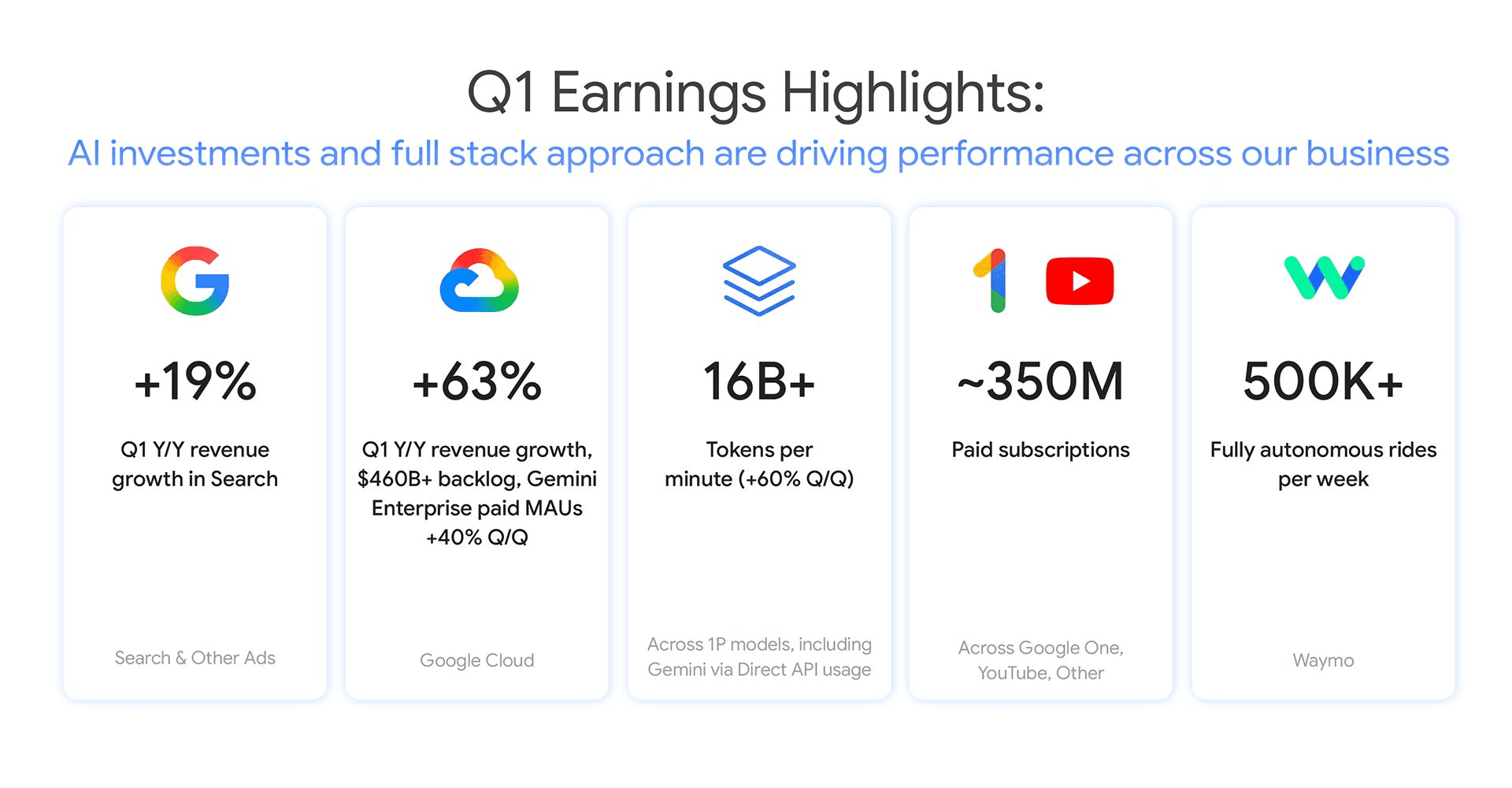
Source: LinkedIn
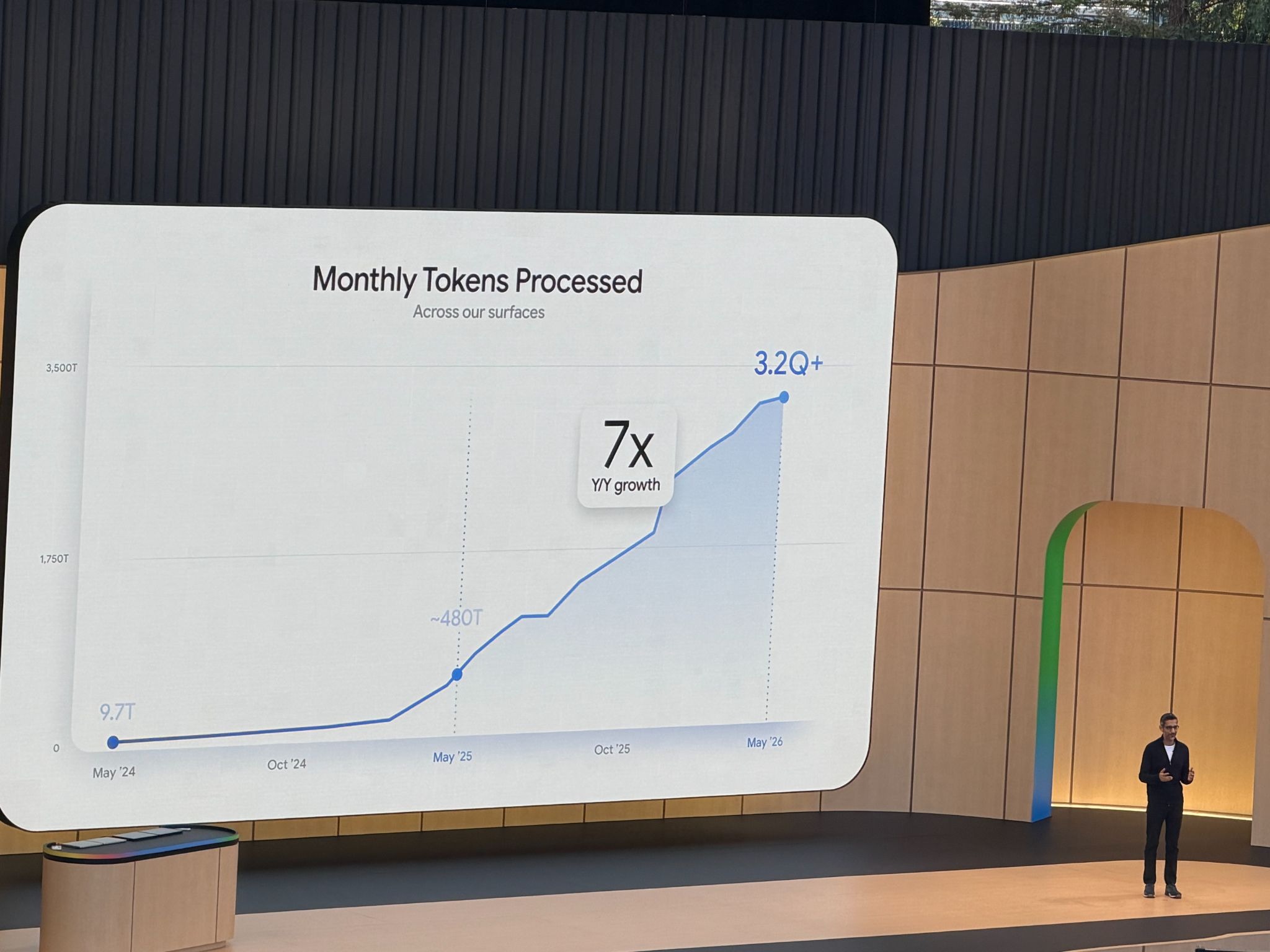
On stage, Pichai doubled down with the usage numbers. 8.5 million developers are now coding with Gemini, five times more than last year. Google's services process over 3.2 quadrillion tokens per month, a 7x increase year over year. Those aren't projections. That's the current adoption. When the biggest internet company is scaling AI at that rate and spending $180-190 billion in capex to keep going, it tells you where the industry is headed. And what stood out at I/O was how Google is embedding AI into its products in a native, meaningful way, not bolting it on as an afterthought.
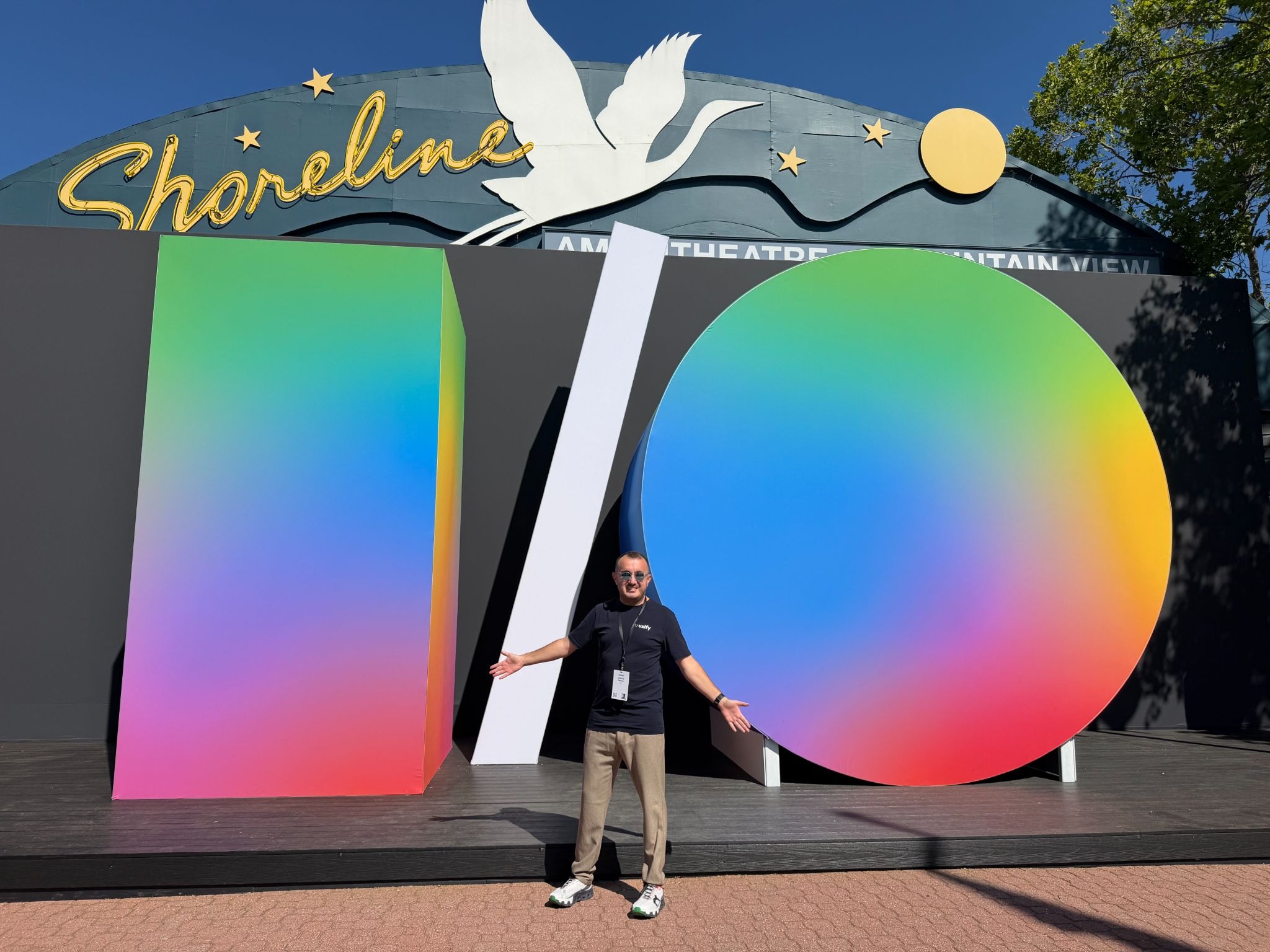
Once again, we were honored to be among the live participants at the event, hearing about all the updates firsthand among industry experts from Shopify, Netflix, Target, and getting the chance to talk directly with engineers and leaders across the industry.
Agentic AI was the core of the event, but there was plenty more in the areas we care most about. Here's what stood out across Chrome, web performance, and the broader ecosystem.
What did Google announce for Chrome at I/O 2026?
Google shipped 15 updates for Chrome at I/O 2026, covering AI agent integration, developer tooling, built-in AI, and browser-level assistant features. The core narrative across all of them: bring AI into site and DevTools functionalities to make optimization easier, both for the people building sites and the people using them.
How does WebMCP change the way AI agents interact with your site?
WebMCP is a proposed open web standard, developed jointly by engineers at Google and Microsoft and incubated through the W3C's Web Machine Learning community group. It lets any website expose structured, callable tools directly to browser-based AI agents. Instead of an agent clicking through your UI like a confused human, it calls your backend APIs directly, with the precision and context you define.
What this means for site owners. You control how agents interact with your site. You define the tools, the parameters, the boundaries. Instead of hoping the agent figures out your checkout flow, you declare it. This is a shift from reactive (hoping agents figure it out) to proactive (telling agents exactly what's available).
What this means for end users. Faster, more personalized task completion. Google's example: a user planning a multi-city vacation authorizes an agent to query travel APIs directly and build a weather-optimized itinerary in seconds, rather than clicking through five booking forms.
The experimental WebMCP origin trial starts in Chrome 149. Brands like Booking.com, Shopify, and Etsy are already experimenting with it.
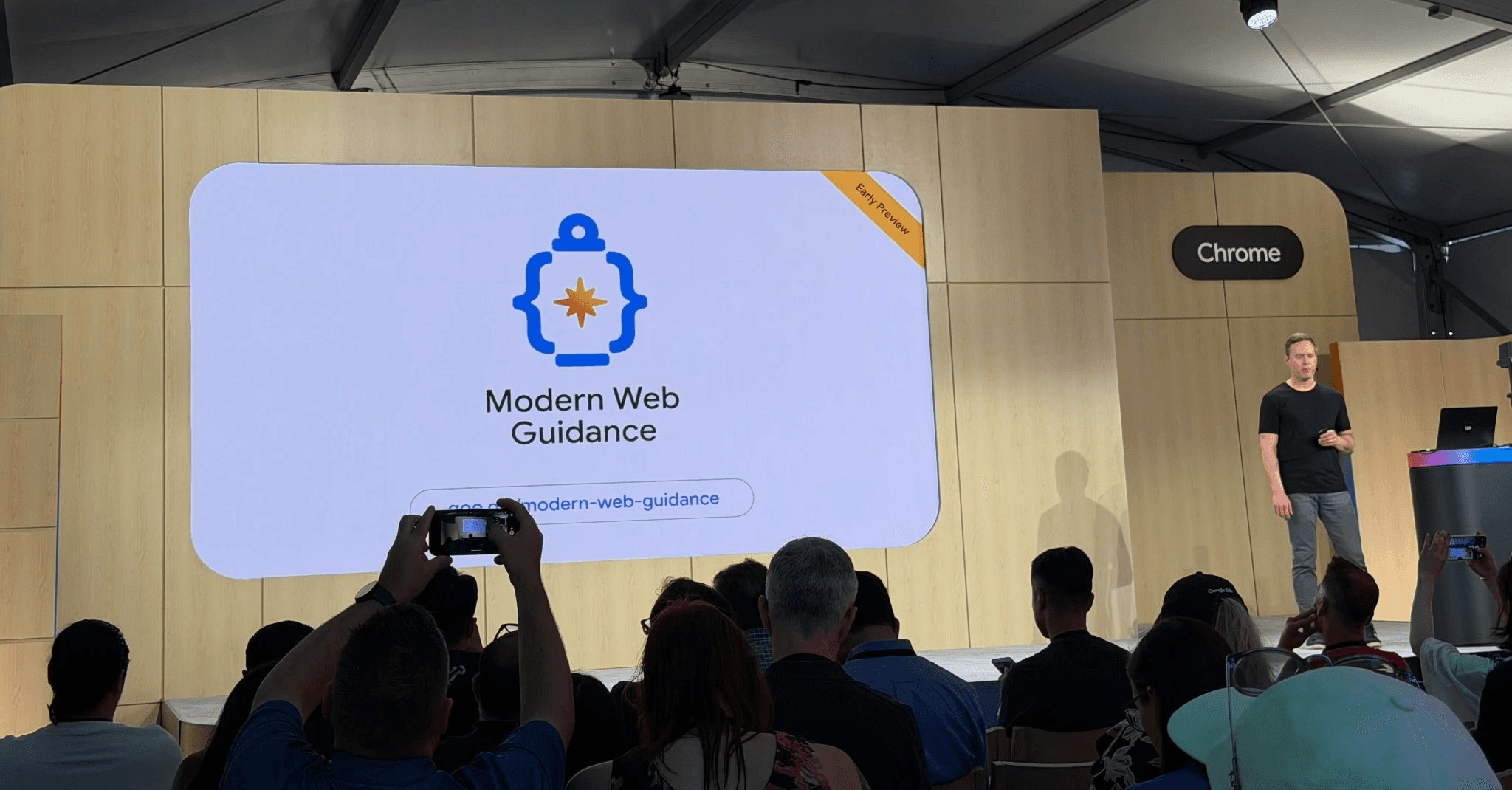
How does Modern Web Guidance help you build better sites with AI?
AI can whip out a website in minutes. The problem is what you get: inconsistent fonts and sizing, no real grid system, and pages that feel like they belong to different sites. The most common issues with vibe-coded websites come down to broken fundamentals.
Modern Web Guidance is Google's response. It's a set of expert-vetted skills that guide coding agents across 100+ use cases to make sure basic design and UX principles are actually followed, so the sites people build with AI are ultimately usable. It integrates with Baseline, so your coding agent picks the right features and fallbacks for your browser support target automatically.
Install it with a single click in Google Antigravity, through npx, or as an extension in any coding agent. Currently MWG supports over 100 use cases, with continuous updates.
What changed in Chrome DevTools for performance engineers?
DevTools got four updates, all pushing in the same direction: close the gap between spotting a performance problem and actually fixing it, with AI doing more of the heavy lifting on both sides.
DevTools for agents: problem monitoring meets problem solving
Chrome DevTools for agents gives AI coding agents direct access to console logs, network traffic, accessibility trees, and Lighthouse audits. The agent verifies its own code in a real browser, catches bugs, and fixes them without a human clicking through panels.
The direction here is clear: monitoring a problem and fixing it are merging into one workflow. You shouldn't need a human to read a Lighthouse report, figure out what's wrong, and then manually go fix it. That's exactly why Uxify was built with agents at its core. The gap between "your LCP is 4.2 seconds" and "here is the fix, deployed" should be zero, and Google is clearly building the tooling to make that possible at scale.
It is available today for Antigravity and more than 20 other coding agents. LY Corporation used it to build an automated performance auditing system that reduced their manual analysis by 96-98%. Not a typo.
AI assistance in DevTools
AI assistance now has access to Lighthouse data and can field open-ended debugging questions. Interactive widgets show Gemini's full reasoning chain, so you see why it recommends a particular fix. If you've stared at a Lighthouse score wondering where to start, this is worth trying.
Built-in AI: deploy mini agents on your site
You can now deploy AI agents directly on your site to handle tasks like translating content, creating summaries, proofreading, and helping users with writing. For site owners, the benefit is clear: these agents run locally in the browser, so there are no server round trips and no token bills to worry about. For users, the experience is immediate and personal, the help shows up right where they need it without leaving the page.
Trip.com is already doing this, using built-in AI to generate personalized travel summaries on-device with zero server overhead and unlimited queries.
The approach used by Google for these agentic capabilities is going to change how site optimization works, too. Instead of blanket optimizations applied universally across every page regardless of whether there's an actual problem, optimization can now happen only when the need arises. The result is a lighter site overall, because you're not adding weight to pages that don't need it, and smarter fixes where they count.
Baseline target with real world traffic data
Baseline Checker is a new tool Google announced at I/O 2026. It connects to the Google Analytics API and shows you what percentage of your actual site visitors support specific modern web features (like new CSS properties, APIs, etc.). You pick a Baseline target (e.g. "Baseline 2024" or "Baseline 2025"), and it tells you how many of your real users can handle those features vs. how many need fallbacks.
How is Gemini turning your Chrome browser into a personal assistant?
With Gemini built into Chrome on desktop, iOS, and now Android, the browser is no longer just a window to the web. It's becoming an active participant that can take actions, automate tasks, and respond to what you're looking at. Three capabilities stand out.
Auto browse: automating multi-step tasks
Auto browse lets Chrome on Android handle multi-step tasks across the web on your behalf. This is the first time Google has let the browser act as an autonomous agent on mobile, taking actions across sites without the user driving each click. Book parking for the comedy show you forgot about, find in-stock items across retailers, plan a party. Coming to Android in late June, with desktop integrating into Gemini Spark in the coming months.
Skills: saving prompts as one-click tools
Skills in Chrome let you save your best AI prompts and reuse them with one click. Shopping comparison across tabs, scanning documents for key info, recipe optimization. Save it once, run it whenever.
Voice and on-screen selection
Now you can select specific parts of a webpage with your mouse and ask Gemini about them directly, instead of trying to describe what you're looking at. You can also use the functionality for better and more contextual image editing, as you can point exactly Gemini at the things you want changed.
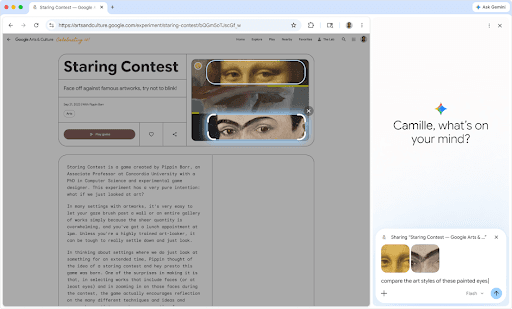
Furthermore, it was announced that soon users will be able to use their voice to type into websites across Chrome on desktop, with Gemini cleaning up transcriptions to fit the context. Think drafting emails, leaving comments, writing longer prompts...
What are the biggest web performance updates from Google I/O 2026?
Two announcements matter most for the performance community: the Soft Navigations API bringing Core Web Vitals to SPAs, and Declarative Partial Updates rethinking how HTML arrives in the browser. Both have been in development for years. Both are now testable.
How does the Soft Navigations API enable the Core Web Vitals measurement for SPAs?
Single Page Applications have had a measurement blind spot for years. When a user navigates within an SPA, JavaScript changes the content and URL without a full page load. The browser never treated that as a real navigation event. Metrics like LCP, CLS, and INP became unreliable or disappeared from performance data entirely.
The Soft Navigations API fixes this. Chrome uses built-in heuristics to detect client-side navigations automatically. A soft navigation is identified when a user interaction triggers a pushState or replaceState, that interaction leads to visible DOM changes and a paint event, and the URL changes with a new history entry created. The API creates navigation-scoped performance boundaries that allow Core Web Vitals to be attributed similarly to traditional page loads.
The origin trial started in Chrome 139, with the final trial running in Chrome 147. This has been in development for a while, and seeing it reach this stage matters for every team running SPAs, which is most teams.
For the first time, you'll be able to see real Core Web Vitals data for every route change in your SPA, not just the initial load. If you're already doing real user monitoring, the performance picture just got a lot more complete.
What are Declarative Partial Updates and why do they matter?
HTML has always been delivered top to bottom. If something slow sits in the middle of your page, everything after it waits. Developers work around this with JavaScript frameworks that deliver components asynchronously, but that adds weight and complexity.
Declarative Partial Updates introduce two capabilities. First, out-of-order streaming using <template for> elements and processing instruction placeholders. Deliver a page skeleton, then stream each section as it becomes ready, in whatever order. Second, renewed HTML insertion and streaming JavaScript APIs that pipe content directly from a fetch response into the DOM without waiting for the full payload.
The use cases are practical: island architecture without framework overhead, delivering content when it's ready instead of holding back the whole page, and reordering HTML delivery to prioritize what matters for initial paint.
The end result? Pages will get faster without developers changing much, especially when it comes to LCP optimization, where HTML delivery order directly affects how fast the largest visible element loads.
Available for testing from Chrome 148, with polyfills on npm.
What are the most important general announcements from Google I/O 2026?
Chrome and performance were our focus, but AI was the connective tissue across every product Google shipped this week. Beyond the browser, there were updates to models, the Gemini app, search, shopping, and content verification.
How does SynthID Detector help verify AI-generated content?
The web is filling up with generated content, and as models get more advanced, it's getting harder for people to tell what's real and what's AI-generated. This is a growing problem, and Google is taking a concrete step to address it.
SynthID is Google's watermarking technology that embeds invisible markers into content created by its AI models, including Gemini, Imagen, Lyria, and Veo. Over 10 billion pieces of content have already been watermarked since SynthID launched (Google Blog, 2026).
What's new at I/O 2026 is the SynthID Detector, a verification portal where you can upload an image, audio track, video, or piece of text and check whether it contains a SynthID watermark. The tool highlights which specific portions of the content are most likely watermarked. Google is rolling it out to journalists, media professionals, and researchers first via a waitlist, and also announced a partnership with GetReal Security to expand the verification ecosystem.
This is a big step towards a safer and more reliable internet, and quite frankly one of the most exciting pieces of news from the entire event.
What new AI models did Google announce?
Gemini Omni is said to enable you to create anything from any input and more specifically to create super realistic and studio-like videos and motion graphics. It combines Gemini reasoning with Nano Banana, Veo, and Genie to simulate physics, gravity, and kinetic motion in video. Omni Flash is rolling out globally for Google AI Plus, Pro, and Ultra subscribers.
Gemini 3.5 Flash is built for speed and agentic workloads. Google claims 4x faster performance, optimized for agentic coding, long-horizon tasks, and real-world workflows.
How has the Gemini app changed?
The Gemini app got a "Neural Expressive" redesign with improved voice recognition. You're less likely to be interrupted mid-sentence. Regional dialect support is coming.
Gemini Spark is the big one here. A 24/7 cloud-based personal AI agent that works across Gmail, Docs, Slides, and more. Close your laptop, lock your phone, it keeps working. A persistent assistant that doesn't go idle. Rolling out to Google AI Ultra subscribers first.
Daily Brief gives you a personalized morning briefing pulled from connected apps: important emails, upcoming events, suggested follow-ups. Rolling out to AI Plus, Pro, and Ultra subscribers in the US.
How is Google making search more agentic?
Google redesigned the search box for the first time in over 25 years. It now accepts text, images, files, videos, and even Chrome tabs as input. Search is no longer a keyword-in, links-out system. It's becoming agentic: you describe what you need, and Search synthesizes an answer from multiple sources, explains why it matters, compares perspectives, and gives you something actionable.
What does that mean for SEO? Earlier this month, Google came out and said something important: although agentic search is the new normal, the core principles that apply are still the ones of search engine optimization. Their new AI search guide confirmed that AEO (Answer Engine Optimization) and GEO (Generative Engine Optimization) are "still SEO". You still need to do SEO well in order to rank, even in generative search results. Structured, accessible, high quality content with clear technical foundations. That's the foundation, not some new discipline. We wrote about this shift in our AI visibility and SEO piece, and the same principle applies to AI SEO for e-commerce specifically.
Google also introduced information agents, a new type of AI agent that runs in the background 24/7, monitoring topics you care about and surfacing updates without you having to search repeatedly (TechCrunch, 2026). Think of them as the next evolution of Google Alerts: they look across blogs, news sites, social posts, and Google's real-time data on finance, shopping, and sports. Launching this summer for AI Pro and Ultra subscribers in the US.
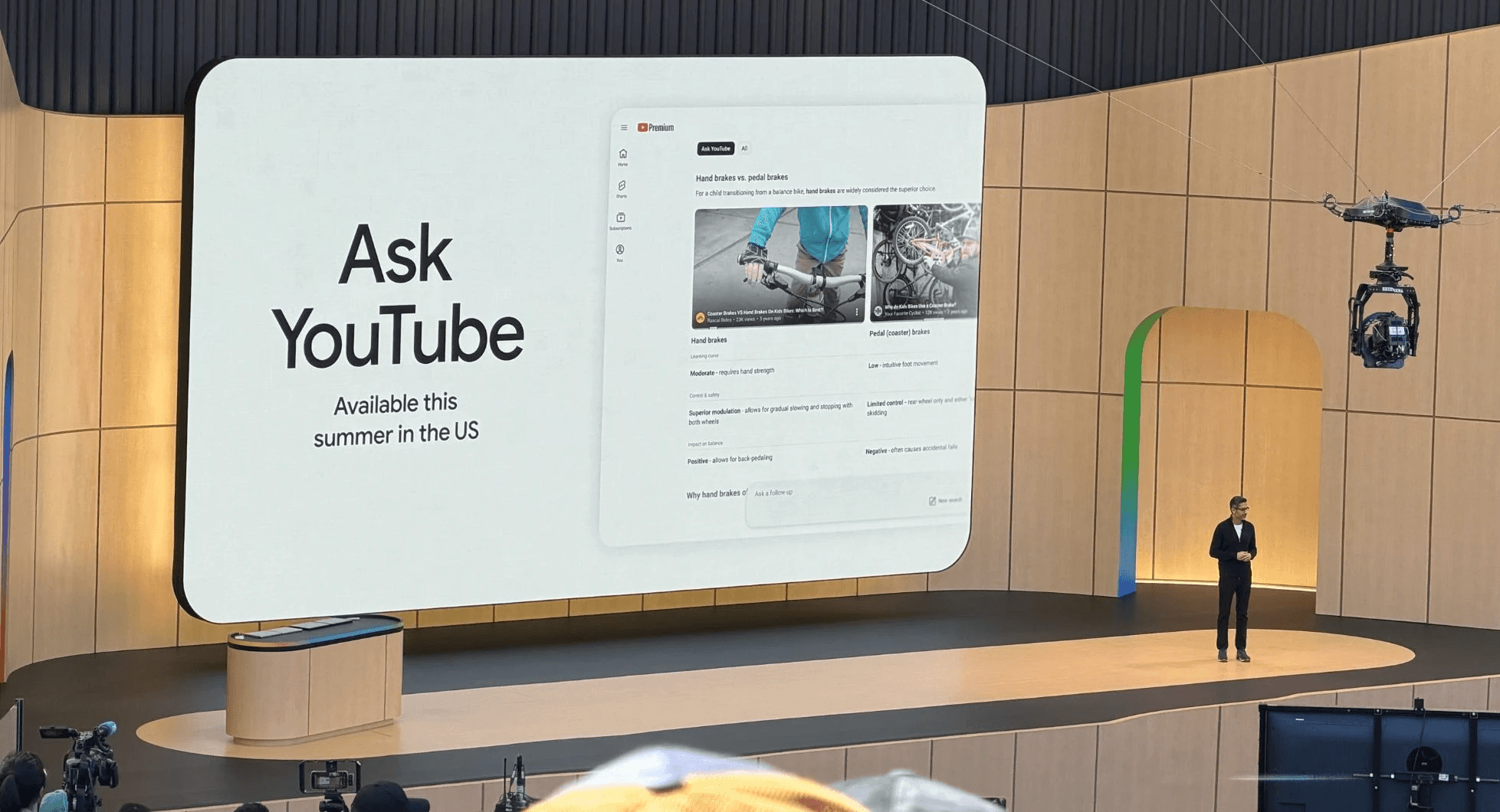
YouTube search is shifting in the same direction. You can search the way you'd ask a friend and still get relevant, explanatory results. It feels more conversational without losing precision.
What is Universal Cart and how is Google pushing agentic commerce forward?
Google introduced Universal Cart at I/O 2026, an intelligent shopping cart that works across Search, Gemini, YouTube, and Gmail. You can add items while browsing any of these surfaces, and the cart handles the rest: finding deals, tracking price drops, showing price history, and even validating compatibility (it'll flag if parts for a custom PC build don't work together). Checkout is live with merchants like Nike, Sephora, Target, and Shopify merchants such as Fenty and Steve Madden.
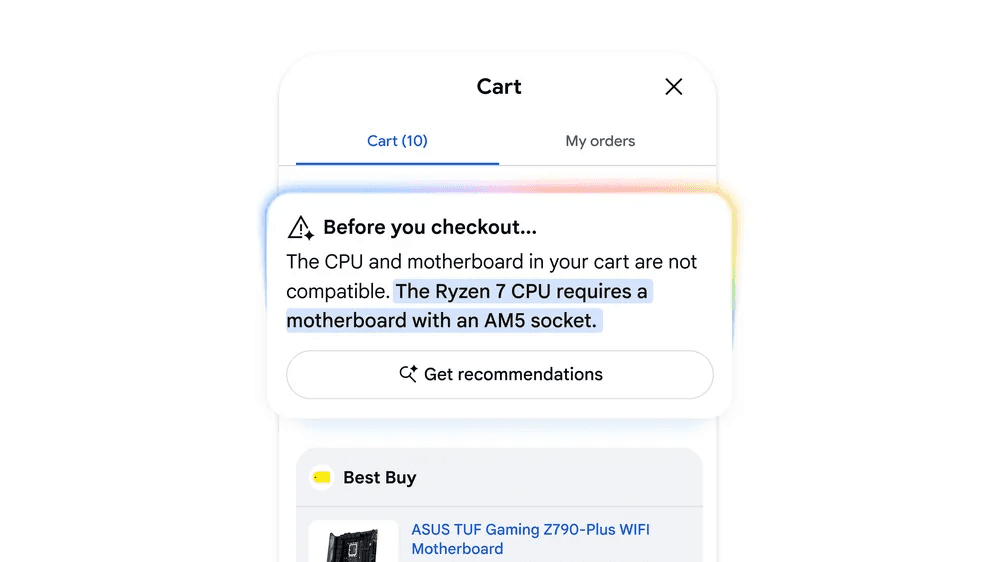
Source: Google
This builds on a foundation Google and Shopify laid earlier this year with the Universal Commerce Protocol (UCP), an open standard that creates a universal language for AI agents to read, compare, and transact with any merchant. UCP makes product catalogs, pricing, inventory, and checkout flows machine-readable, so agents can browse and compare across stores the same way a human would, just faster. Universal Cart is the consumer-facing layer on top of that infrastructure.
What other highlights did Google announce at I/O 2026?
Antigravity 2.0 is Google's AI coding assistant, now with Projects and Scheduled Tasks. It receives exports from Stitch and comes pre-bundled with Chrome DevTools for agents.
Google Workspace continues deeper AI integration across the productivity suite, with Spark working natively across Gmail, Docs, and Slides.
Project Genie is connected with nearly 20 years of Google Street View imagery, letting you create new interactive worlds anchored in real locations.
Pomelli introduces AI agents that design brand books and launch websites. Point it at a URL with your product list, and it ingests the entire inventory in one pass instead of uploading items individually.
Stitch turns design into a back and forth with AI. You design, the Stitch Agent iterates in real time, and you steer it until it looks right. Export to Antigravity for backend logic or publish to the web via Netlify.
What should site owners do after Google I/O 2026?
I/O 2026 was not about the announcement of a single product or the ultimate AI model. It was about an ecosystem shifting to agents as the primary interface between users and the web.
If you run a site, the action items are concrete. Explore WebMCP to control how agents interact with your pages. Use Modern Web Guidance to make sure AI-generated code meets real standards. Deploy built-in AI where your users actually need help. And keep doing SEO. Google said it plainly.
For the performance community, the Soft Navigations API and Declarative Partial Updates are the wins that'll compound over the next year.
Uxify at Google I/O 2026
This was the third consecutive year our co-founder Georgi was invited to Google I/O. The first year, Navigation AI was featured on stage as a pioneer in speculative loading, with Google's CEO highlighting it during the keynote. This year, he had a chance to talk with experts from Google, Cloudflare, Shopify, and many others, and to showcase what we've been building over the past months.
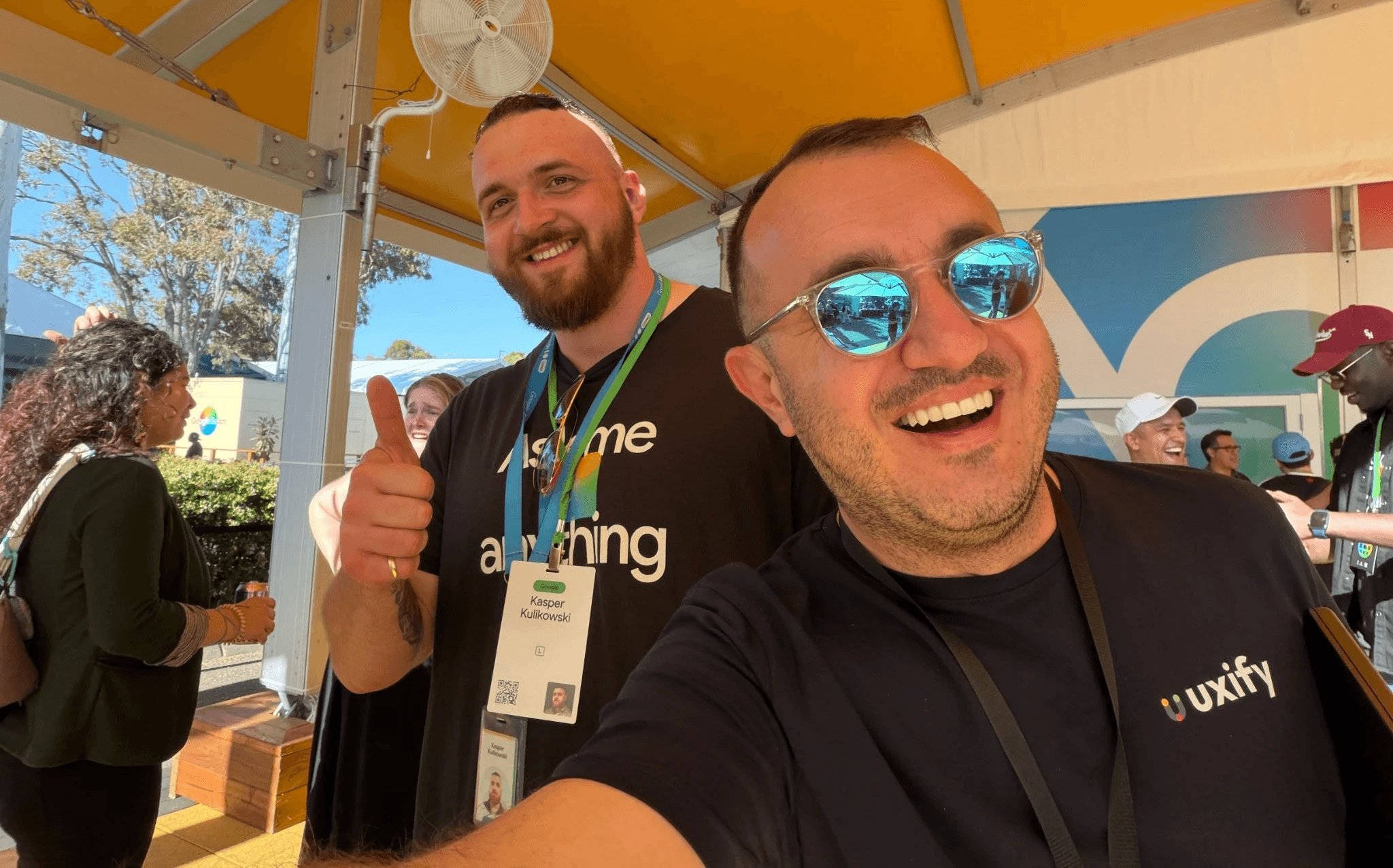
We've been building Uxify to be agentic first. Not because it's a trend, but because it's the right way to solve the problems we care about: monitoring performance, diagnosing issues, and fixing them in the same workflow. Seeing the rest of the industry arrive at the same conclusion at I/O this year was a good sign. We're excited to finally show what we've been working on to the rest of our users soon.
If you're curious about the direction, our piece on the agentic CRO platform explains the thinking behind it.
Frequently asked questions
What is WebMCP and when can I use it?
WebMCP is an open web standard that lets websites declare structured tools (like APIs and form actions) that browser-based AI agents can call directly, instead of clicking through the UI. It's co-developed by Google and Microsoft through the W3C. You can start testing it when the experimental origin trial launches in Chrome 149. Brands like Expedia, Shopify, and Target are already experimenting with early access.
Does the Soft Navigations API work for all SPAs?
It works for SPAs that use pushState or replaceState for navigation, which covers most modern frameworks like React, Vue, and Angular. Chrome detects these client-side navigations using built-in heuristics and measures LCP, CLS, and INP for each route change. SPAs that handle routing differently (e.g. hash-based navigation without history API) may not be covered.
Is AI search optimization different from SEO?
No. Google's May 2026 AI search guide explicitly states that AEO (Answer Engine Optimization) and GEO (Generative Engine Optimization) are "still SEO". Agentic search responses follow the same ranking principles as traditional results. Foundational SEO with structured, high quality content remains the path to visibility, including in AI-generated answers.
What is the Universal Commerce Protocol (UCP)?
UCP is an open standard that creates a universal, machine-readable language for product catalogs, pricing, and checkout flows, so AI agents can browse and transact with any merchant. It was co-developed by Google and Shopify and is aimed at merchants who want their stores to be discoverable and shoppable by AI agents across Google Search, Gemini, YouTube, and Gmail.
How does SynthID Detector work?
SynthID is a technology that embeds invisible watermarks into AI-generated content. The SynthID Detector scans uploaded images, audio, video, and text to check whether they were AI-generated or AI-altered by looking for those watermarks. It currently detects content from Google's models (Gemini, Imagen, Lyria, Veo) and is available via waitlist for journalists, media professionals, and researchers.

" height="200.00000219726564px" id="j9Mmwfnw8" transform="translate(143.5 0)" width="479.5329973144531px"/><path d="M 0 15.944 C 0 7.139 7.154 0 15.98 0 C 24.804 0 31.959 7.138 31.959 15.943 L 31.959 59.637 C 31.959 68.442 39.113 75.58 47.938 75.58 C 56.763 75.58 63.917 68.442 63.917 59.637 L 63.917 15.944 C 63.917 7.139 71.071 0.001 79.897 0.001 C 88.721 0.001 95.875 7.139 95.875 15.944 L 95.875 56.095 C 95.875 82.51 74.413 103.923 47.938 103.923 C 21.462 103.923 0 82.51 0 56.095 Z" fill="rgb(59, 63, 91)" height="103.923px" id="KJCDMITFE" transform="translate(0 53)" width="95.875px"/><path d="M 0 15.943 C 0 7.138 7.154 0 15.979 0 C 24.804 0 31.958 7.138 31.958 15.943 C 31.958 24.748 24.804 31.886 15.979 31.886 C 7.154 31.886 0 24.748 0 15.943 Z" fill="rgb(252, 200, 0)" height="31.885999999999996px" id="q2K9EYOvZ" transform="translate(0 53)" width="31.95799999999963px"/><path d="M 0 15.943 C 0 7.138 7.154 0 15.979 0 C 24.804 0 31.958 7.138 31.958 15.943 C 31.958 24.748 24.804 31.886 15.979 31.886 C 7.154 31.886 0 24.748 0 15.943 Z" fill="rgb(63, 184, 126)" height="31.885999999999996px" id="bBya7XCj7" transform="translate(64 53)" width="31.95799999999963px"/><path d="M 0 14.171 C 0 6.344 6.359 0 14.204 0 C 22.048 0 28.407 6.344 28.407 14.171 C 28.407 21.997 22.048 28.342 14.204 28.342 C 6.359 28.342 0 21.997 0 14.171 Z" fill="rgb(229, 0, 106)" height="28.341999999999985px" id="WNzwBFOi7" transform="translate(34.5 128.5)" width="28.407000000000153px"/></g></svg>)