Make Uxify one of your go-to sources on Google
 Add Uxify on Google
With Google’s Speculation Rules API, websites have gained new ways to predict user behavior and prefetch resources accordingly, potentially boosting site performance and user experience. But, once implemented, how can you tell if speculation rules are truly delivering the intended results? Here’s a guide to assess their effectiveness.
Understanding Speculation Rules and their purpose
Before diving into the metrics, let’s briefly recap what speculation rules are designed to do.
What are Speculation Rules?
Speculation rules are a feature that allows websites to anticipate what a user might do next and start loading the necessary content in advance. By observing user cues like link visibility, hovers, or even past actions, browsers can decide which pages to prefetch or prerender, helping make interactions feel much faster. Using the Speculation Rules API, developers can guide the browser on which elements to prioritize for preloading, ultimately creating a smoother, more responsive browsing experience.
Why use them?
The main advantage of speculation rules is improved speed. By speculative loading key content, sites can significantly cut down on wait times, making interactions feel instant. Imagine hovering over a link and then clicking it, only to find the next page loads immediately—that’s speculation rules at work. They reduce the time users spend waiting and help keep them engaged, which means fewer bounces and a more seamless experience overall.
Identifying key metrics
The success of speculation rules can be measured by monitoring specific metrics, especially those focused on load time and engagement, such as the Core Web Vitals. Here are some of the most relevant ones:
- Largest Contentful Paint (LCP): Since speculation rules aim to optimize page loads, tracking changes in LCP can reveal whether content loads faster after implementation.
- Time to First Byte (TTFB): TTFB can show if prefetching is speeding up server responses.
- Interaction to Next Paint (INP): By reducing delays in loading and rendering, speculation rules can help improve INP, which measures responsiveness. Most INP problems come from heavy JavaScript after the page opens, though, and that’s the job of INProve, the Uxify agent that yields that work so the visitor’s click goes first.
- Cumulative Layout Shift (CLS): If the speculative loading is implemented carefully, CLS should be reduced by prefetching key visual elements.
Pro Tip: Use tools like Google PageSpeed Insights or Chrome DevTools to quickly look at these metrics.
Tools and methods to monitor Speculation Rule effectiveness
To get accurate insights into whether speculation rules are working, these methods can help:
User journey mapping
Tracking typical user pathways allows you to see if the anticipated pages are indeed loading faster or if users are exiting before engaging. Through Journey monitoring tools such as Google Analytics, Hotjar, FullStory and many others you can observe the most common navigation pattern for your customers.
Real User Monitoring (RUM)
These tools can also track actual user interactions and can give a close look at real-world performance. RUM solutions like New Relic or Dynatrace offer insight into which resources are loaded due to speculation rules.
Checking Speculative loads in DevTools
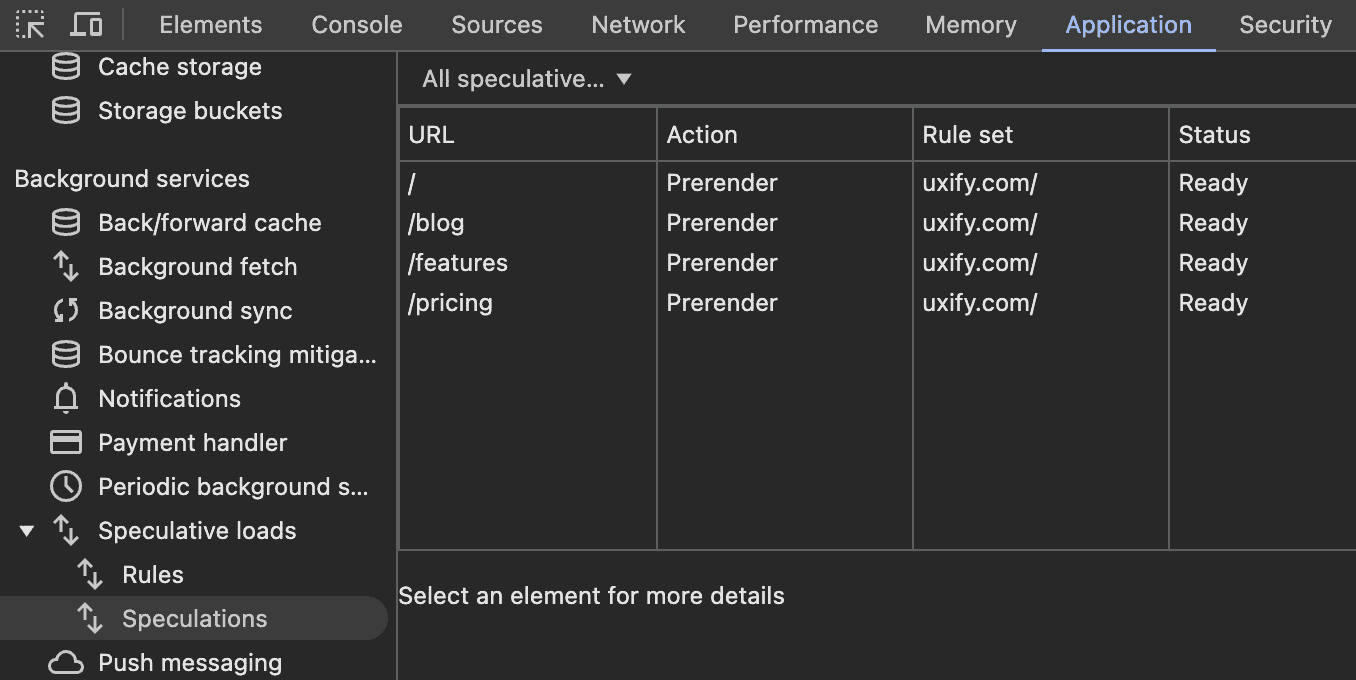
Chrome DevTools includes a dedicated panel to view speculative loads. You can navigate to DevTools > Application > Speculative Loads to see a list of prerendered or prefetched pages. This panel provides visibility into which pages are loaded in advance, helping you verify if speculation rules are working.
How to interpret the data
Once you have the data from your monitoring tools, here’s how to interpret the results:
- Compare Before and After Implementation: Look at your KPIs from before and after you enabled speculation rules. Significant improvements in LCP, TTFB, or INP indicate they’re having a positive impact.
- Identify Trends Across Pages: If only certain pages show improvement, your rules may need refining to target a broader user experience.
- Improved exit rates and better engagement: If speculation rules are working effectively, you should notice a reduction in exit rates and increase in user engagement and average session duration as resources load more smoothly and users browse more.
Troubleshooting and optimizing Speculation Rules
If your metrics don’t show the expected results, here are some potential issues to troubleshoot:
- Overloading with Unnecessary Prefetching/Prerendering: Make sure speculation rules are set to prefetch or prerender only the most critical pages, as too many speculative actions can have unintended effects. Chrome has a limit on the number of pages it can preload at once, so it’s best to focus on the most popular pages. Otherwise, you may hit this limit, and additional navigations won’t benefit from preloading.
- Correct Targeting: Ensure you’re targeting the right pages based on actual user flow. Avoid prefetching or prerendering links that aren’t accessible from the current page through standard navigation. Also, pages that open in a new tab can’t be prerendered in Chrome version 130.0, so those links should be skipped as well.
- Adjustments for Mobile Users: Prefetching and prerendering strategies should be carefully adapted for mobile devices, considering the unique challenges of mobile networks and the diverse range of device capabilities. Mobile users often experience varying network speeds and connection stability, which makes efficient resource management critical. Additionally, the design and functionality of mobile interfaces differ from desktop, so prioritizing essential content for preloading ensures a smoother, faster user experience on mobile while minimizing unnecessary data usage.
Speculation Rules made simple with Uxify
Implementing and tracking speculation rules takes a lot of fine-tuning and constant analysis. Navigation AI is the Uxify agent that takes that job off your plate, applying AI to page speed so you don’t have to. It runs on Reality, Uxify’s real-user data layer, predicts each visitor’s next click from viewport position, scroll, device and live session signals, and prerenders that page with the Speculation Rules API. It’s right 72% of the time.
Since this post is about knowing whether speculation rules work, here’s the part that matters most: the agent tells you. This is how Navigation AI covers each step above:
- No setup to get wrong: It runs from the same Uxify snippet as every other Uxify agent, on all leading platforms (including Shopify, WordPress, and Wix). There are no rules to write and no infrastructure changes.
- Targeting from real behavior: It predicts from real sessions, so it prerenders the page a visitor is likely to open instead of a guessed list. That keeps it inside Chrome’s prerender limits.
- Adjusts as patterns change: When traffic shifts during a sale or a new section launches, its predictions shift with it.
- A report instead of a DevTools session: Weekly or monthly, it sends a summary of what it did and what it earned. That covers optimized vs non-optimized navigations, LCP and TTFB for both, pageviews per session and, for stores, extra product pages viewed per visit. One store saw shoppers view 2.43 more products per visit.
- Built-in A/B tests: It compares predicted and non-predicted navigations on the same site, so the before-and-after question from earlier answers itself. Across Uxify customers, predicted navigations are 55% faster, pageviews per session rise 30% and conversion rate lifts by 1%.

Conclusion: Enhancing Speculation Rules with AI-Driven precision
Speculation rules offer a significant opportunity to boost website performance by anticipating user needs, but tracking their effectiveness and making real-time adjustments can be a complex process. With careful monitoring through KPIs, user journey analysis, and tools like DevTools, you can gain valuable insights into whether speculation rules are delivering the desired results.
If you’d rather not do that analysis by hand, Navigation AI does it for you. It runs AI-driven predictive navigations on your real traffic, adjusts as behavior changes on any device and layout, and reports back with the numbers that show whether speculation is paying off.