Key takeaways:
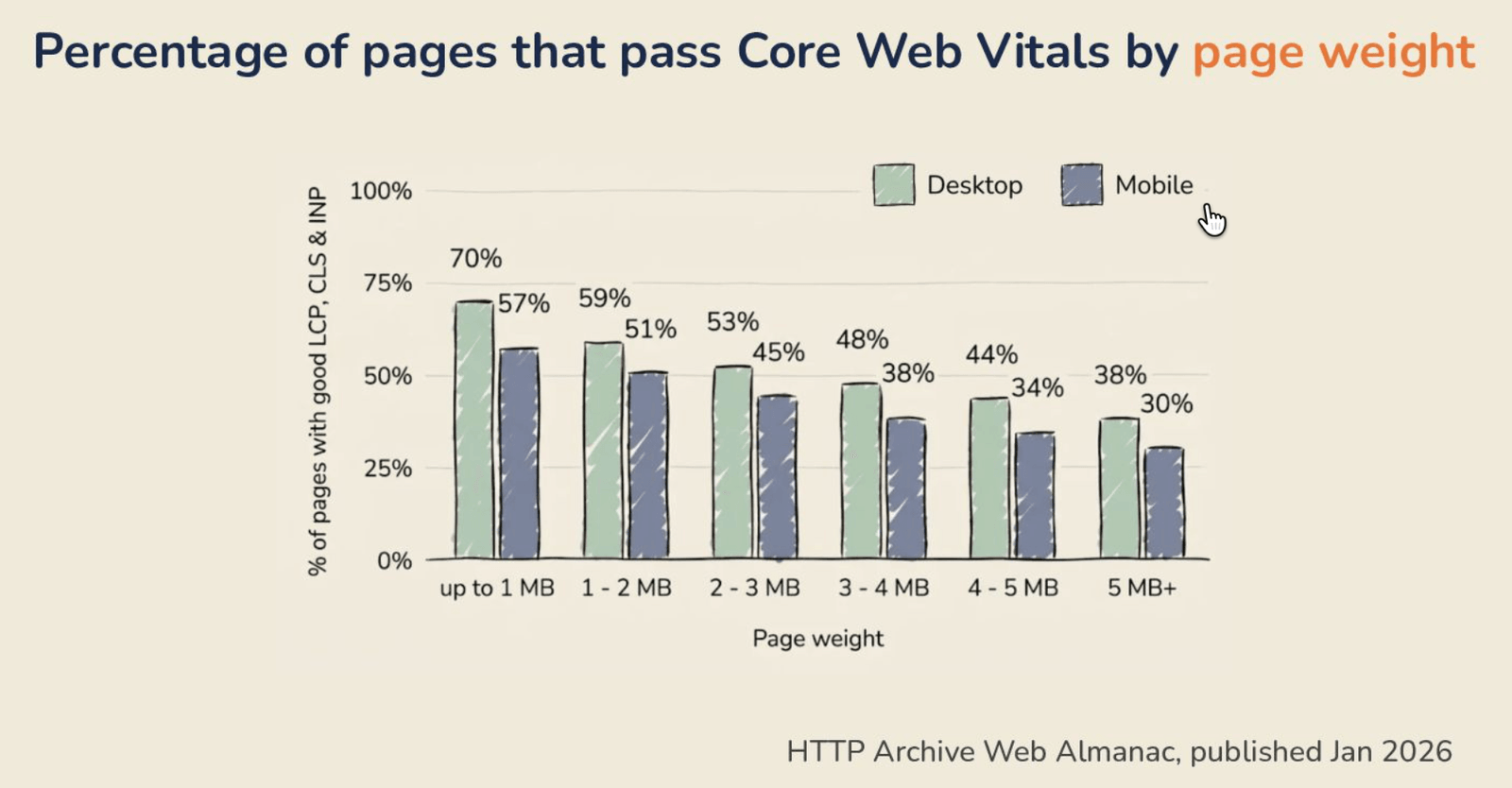
- The median web page now weighs about 3 MB, and heavier pages fail Core Web Vitals more often.
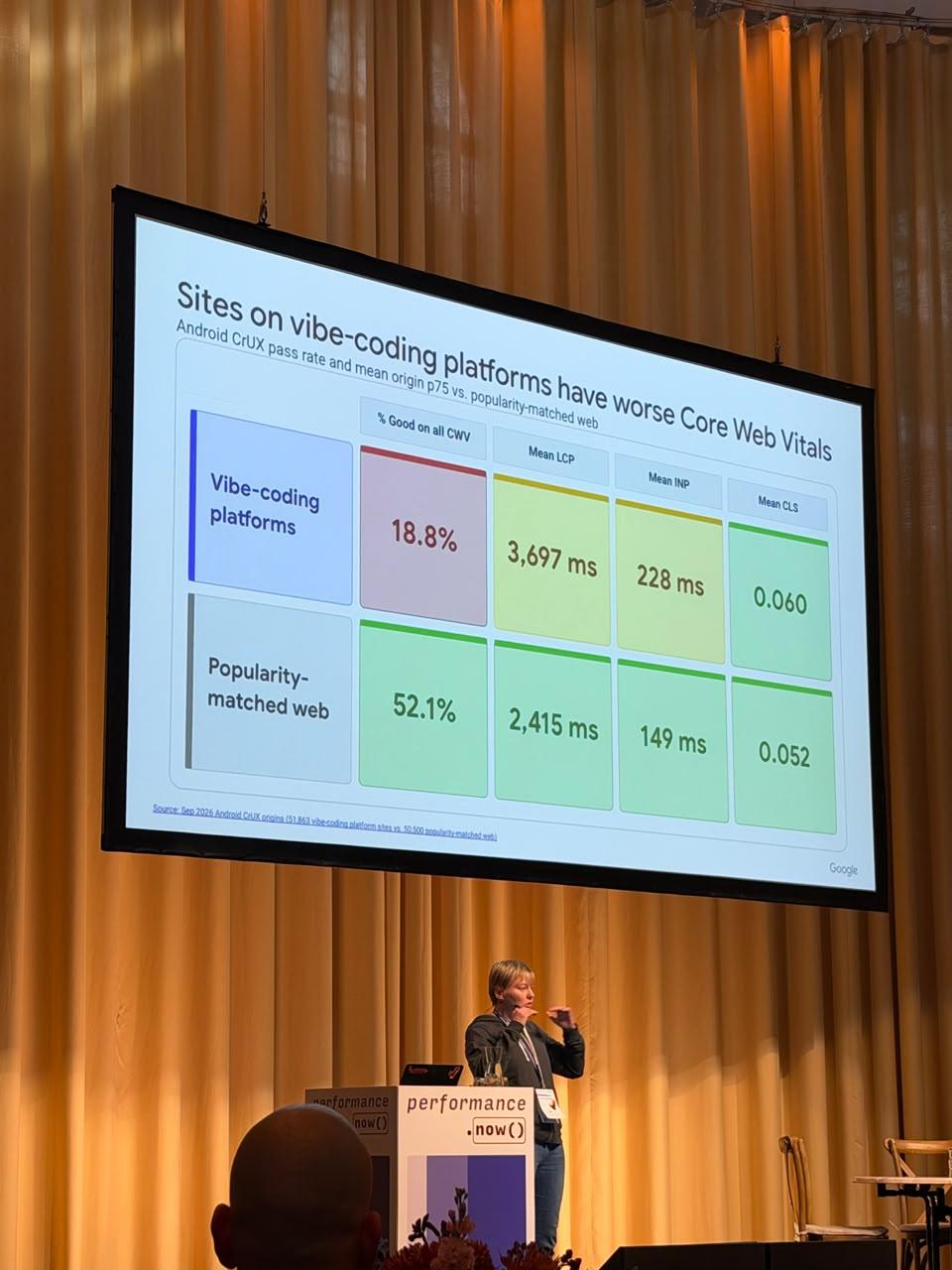
- Sites built on vibe-coding platforms pass all Core Web Vitals 18.8% of the time, against 52.1% for comparable sites, mostly because of client-side rendering.
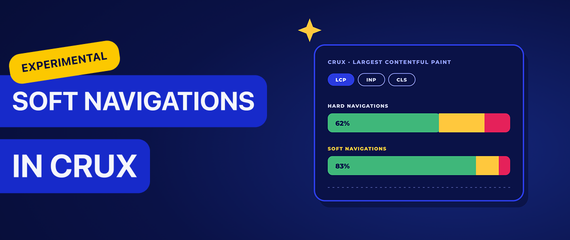
- Chrome added experimental soft-navigation Core Web Vitals to CrUX in October 2026, and Safari has reported LCP and INP since December 2025.
- Bots, crawlers and AI agents now make up 57% of web traffic (Cloudflare Radar, June 2026), which raises the question of how to measure and optimise for agents.
- Speed work gets funded only when it is tied to business results, so performance and conversion data need to be read together.
Make Uxify one of your go-to sources on Google
 Add Uxify on Google
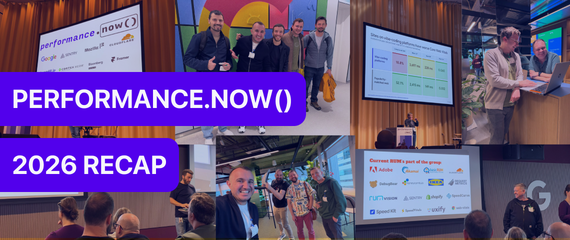
performance.now() 2026, the web performance conference held in Amsterdam on 19–20 November 2026, kept coming back to two ideas. First, pages keep getting heavier, as AI coding tools can make this better or worse depending on how they are used. Second, measurement is getting more precise: with soft navigations, single-page apps are no longer judged only by their first page load, but by every view a visitor opens after it. Here is what we heard across the week’s three events and eleven talks.
What is performance.now()?
performance.now() is an annual web performance conference in Amsterdam, and its 2026 edition brought the community to Amsterdam for a week of three connected events: a W3C RUM Community Group meeting at Google’s Amsterdam office on 18 November, the Mozilla-sponsored performance.sync() meetup that same evening, and the two-day, single-track main conference at the Oosterkerk on 19–20 November. Uxify was among the sponsors, next to Google, Mozilla, Cloudflare, Sentry and DebugBear.
This year’s edition was smaller and more focused than earlier ones. 2026 was a year of steady progress in web performance rather than one headline change, and with AI making performance work more approachable and many teams covering several roles at once, the people who came were the ones closest to the work. That made for long, practical conversations in the hallways as much as on stage.
What were the main themes of performance.now() 2026?
Four threads ran through almost every session.
- Pages keep getting heavier, and AI can push either way. Pages, and their JavaScript in particular, keep growing, and AI-built sites can land on either side of that trend depending on how the tool is guided. Several speakers argued that modern HTML can do far more than most teams ask of it.
- Measurement is getting more precise. Until now, a single-page application (SPA) was judged mainly on its first page load. Speakers showed how to look further, with soft navigations, Core Mobile Vitals for native apps and custom product moments in web apps. How to measure the experience of AI agents was the big open question of the week.
- Numbers mislead unless you read them carefully. Audience shifts, tool bugs and single percentiles can all send a team the wrong way, so compare full distributions and use real A/B tests.
- Performance is a people and business problem. Nobody owns speed end to end, designers rarely plan for slow states, and businesses only invest when speed is framed in their own goals.
What was discussed at the W3C RUM Community Group meeting?
The week opened with a meeting of the W3C RUM Community Group at Google’s Amsterdam office. It brought together people from browser teams, CDNs and monitoring vendors to discuss open questions in how the industry measures real user experience.
The discussion centred on how to measure and track performance for AI agents, whether sites should be optimised for agents as well as for humans, and what comes next for soft navigations. With browser vendors in the room, these were working discussions rather than presentations, and many of the same questions came back on the main stage later in the week.
What happened at performance.sync() 2026?
performance.sync(), the official pre-conference meetup sponsored by Mozilla, took place the same evening at Desmet Studios. The theme was AI tooling for performance work: AI workflows for finding and fixing issues, monitoring setups, and how MCP servers fit into a performance engineer’s day.
The common conclusion was that AI brings both risk and opportunity for performance work, and the outcome depends on who uses it. In inexperienced hands it can produce heavy, slow sites; in experienced hands it becomes a tool that makes sites faster and saves a lot of manual work. Our own website is a good example, which we describe at the end of this article.
What happened on the performance.now() main stage?
On the main stage, JavaScript was the common enemy. Speakers looked at how it has piled up on the web over the years, how AI coding tools often default to the same JavaScript-heavy libraries unless they are guided otherwise, and how capable modern HTML has become while still being underused. Many talks built on themes the community has worked on for years and went deeper into how teams measure, test and explain performance. The talks below are grouped by theme, not by schedule.
| Theme | Talk | Speaker |
|---|---|---|
| State of the web | Performance Is a Journey | Tammy Everts |
| State of the web | Does AI Build Fast Websites? | Annie Sullivan, Google |
| State of the web | Long-term performance | Jeremy Keith |
| Measuring what users feel | Well, that’s weird… | Harry Roberts, CSS Wizardry |
| Measuring what users feel | Performance regression testing | Risko Ruus |
| Measuring what users feel | Core Mobile Vitals | Cliff Crocker, Palo Alto Networks |
| People and business | Why Is Fast So Hard to Sell? | Martin Michálek, PageSpeed.ONE |
| People and business | Performance as a design opportunity | Stéphanie Walter |
| Under the hood | Compression on the web, 2026 edition | Patrick Meenan, Google |
| Under the hood | Save a round trip | Max Inden, Mozilla |
| Under the hood | Go fast? Go web native | Aleth Gueguen |
What’s new in web performance in 2026?
The biggest news of the year came from the browsers, Chrome in particular:
- Soft navigations in CrUX. Chrome 151 launched the Soft Navigations API for page changes inside single-page apps, and since October 2026 Chrome’s field data (CrUX) includes experimental Core Web Vitals that blend soft and regular navigations. Separate reporting is harder because most sites have very few soft navigations: about 70% of origins have fewer than 5%. Each LCP, INP and CLS entry now carries a navigation identifier, so a slow metric can be traced to the exact view where it happened. Chrome aims to move these metrics out of experimental status by May 2027.
- LCP and INP in Safari. Since Safari 26.2 in December 2025, Safari reports Largest Contentful Paint and Interaction to Next Paint, so both metrics can now be measured in every major browser.
- fetchLater(). A new API that lets a page queue a request, such as an analytics beacon, that the browser sends reliably even after the page is closed.
- Declarative partial updates. New Chrome features let a page fill in or replace parts of its HTML as they arrive, without a heavy JavaScript framework. Shopify builds on the same idea with its {% partial %} Liquid tag, in developer preview since July 2026, which refreshes one part of a page, like a filtered product grid, while the rest stays in place. Our Shopify DotDev 2026 recap explains what it means for merchants.
- Modern Web Guidance. Google’s guidance that tells AI coding tools how to build fast sites from the start (goo.gle/mwg).
performance.now() 2026 talks: key findings by speaker
Tammy Everts: Performance Is a Journey
Tammy looked back at 16 years of web performance and how much has changed since 2010, when a page was mostly HTML and one onload timestamp described the whole experience. Today the median page weighs 3,044 KB on desktop and 2,683 KB on mobile (HTTP Archive, May 2026), with around 700 KB of compressed JavaScript, and heavier pages fail Core Web Vitals more often: 57% of mobile pages under 1 MB pass, against 30% above 5 MB.
AI is making this worse, not better. A study of nine LLMs fixed all SEO and accessibility issues on 15 pages but handled performance poorly. Tammy also questioned whether Core Web Vitals measure what users feel, pointing to rage clicks as a better signal of frustration and calling for metrics that capture confusion, not only speed.
Slides: Performance Is a Journey on Speaker Deck
Annie Sullivan: Does AI Build Fast Websites?
Annie analysed more than 100,000 AI-generated sites using HTTP Archive and Chrome field data. Sites on vibe-coding platforms pass all Core Web Vitals 18.8% of the time against 52.1% for comparable sites, with mean LCP of 3.7 s against 2.4 s. The main cause is architecture: over half use client-side rendering, while 89% of these sites would work as static or multi-page HTML. 73% ship the same four-library “vibe stack” (React, Tailwind CSS, shadcn/ui, Radix UI), and 85% of new sites with that stack are not even on vibe-coding platforms, so the pattern is spreading across the web. Sites that followed all best practices (static generation, hero image in HTML, under 300 KB of JS) ended up faster than the rest of the web, which shows the defaults can change.
Slides: AI-generated code and web performance
Jeremy Keith: Long-term performance
Jeremy told the story of thesession.org, a traditional Irish music site he has run since 2001, to show how a site can stay fast for 25 years. Each new feature, from sheet music rendered as SVG to interactive maps, was added on top of a simple core, with heavy libraries loaded only when needed and cached by a service worker. He walked through modern tools such as font fallbacks with size-adjust, speculation rules and view transitions. His recipe: find the core function, deliver it with the simplest technology, then enhance.
Slides: Long-term performance
Harry Roberts: Well, that’s weird…
Harry shared real client debugging stories where the numbers pointed the wrong way. A sudden slowdown turned out to be an ad campaign in French-speaking countries bringing in visitors on slower networks, and a “redirect problem” mattered little because redirects happened once for every 73 server responses. His main lessons:
- Performance data describes your visitors’ context, not only your site, so a change in audience can explain a change in numbers.
- Look at the whole distribution (a CDF plot), not one percentile, before judging a fix.
- Compare before and after in multiples of seven days, and leave out the release day.
- Frequency matters as much as severity, and tools have bugs too.
- Only fully randomised, concurrent A/B tests show real impact. In one case a faster site seemed to convert worse (8.4% down to 4.8%), yet every visitor group converted better; the visitor mix had shifted toward a group that converts less.
Slides: Well, that’s weird…
Risko Ruus: Performance regression testing
Risko, a QA engineer, explained why mobile and hybrid apps end up slow: product teams, the mobile team, third parties, the CMS and OS updates each add small costs, and nobody owns the whole experience. So as a QA, he built his own regression detector: a CI job runs Lighthouse with custom throttling on three device profiles, logged in and out, keeps every run, and compares the medians of each release with the previous one, down to which scripts added JavaScript time.
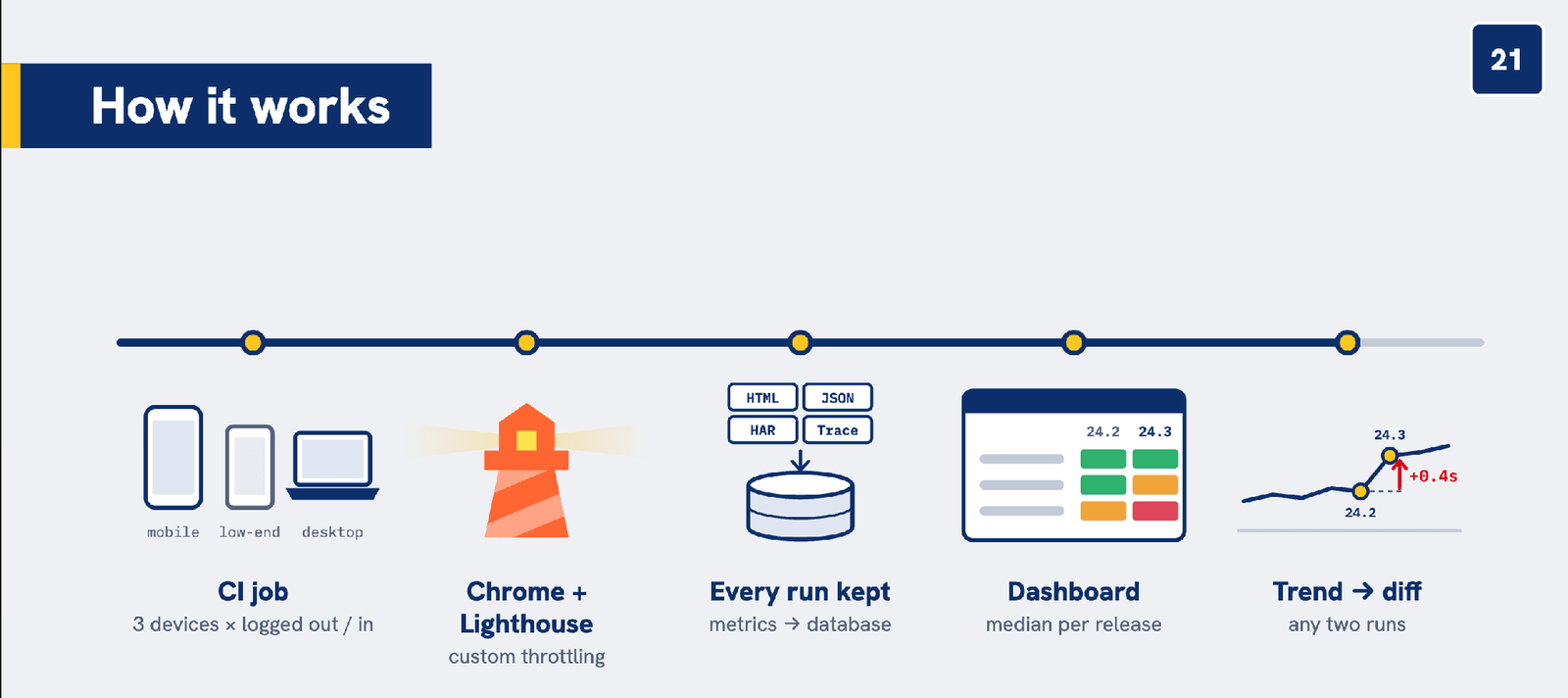
He also replaced LCP with product moments like time to first tile and time to tiles interactive, because the LCP element was often just a changing banner. His key point is that dev teams have to join QA in this, and that regressions need to be translated into metrics each stakeholder cares about.
Slides: nullp2ike.github.io/perf-now-slides
Cliff Crocker: Core Mobile Vitals
Cliff argued that native mobile apps lack a shared standard for user-perceived performance: Android Vitals and Apple’s MetricKit each measure different things, and every vendor defines its own metrics. He proposed four Core Mobile Vitals: screen load (similar to LCP), stability (crashes and ANRs), smoothness and responsiveness (similar to INP).
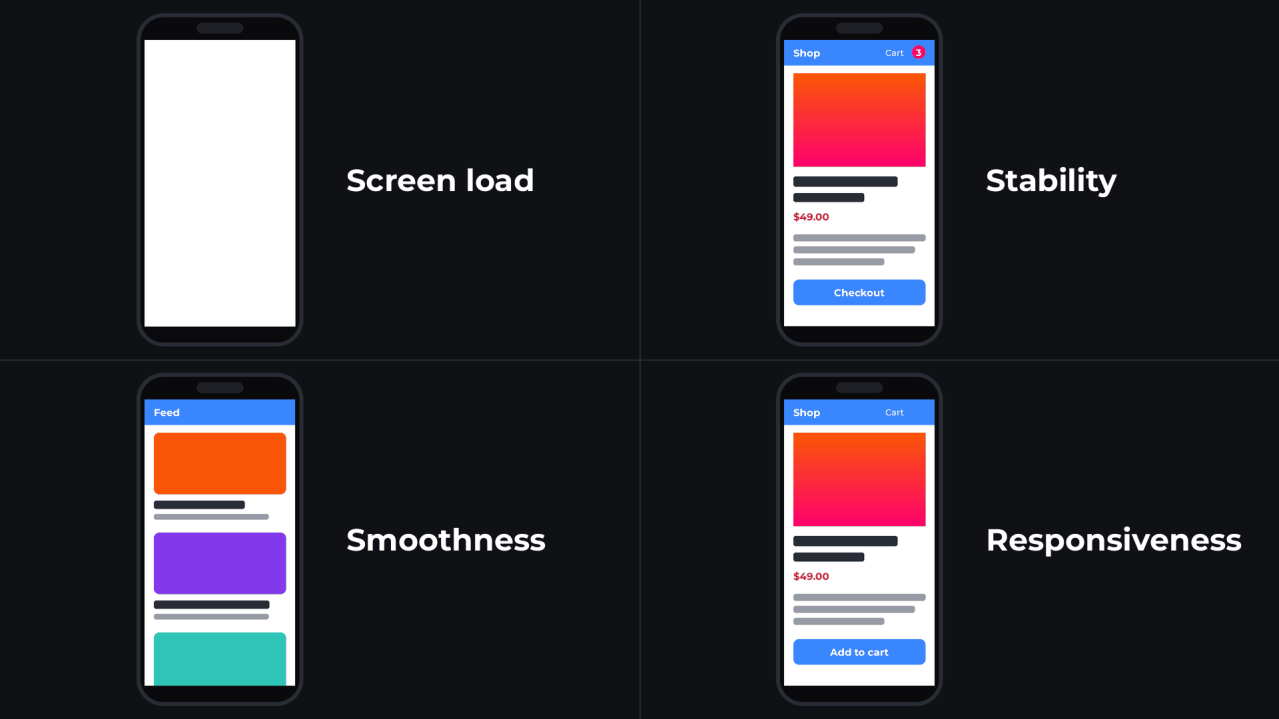
For smoothness, frame-based scores showed almost every app as perfect, so his team switched to scoring each interaction as pass or fail, which revealed one app with about seven times more janky interactions than another. He also raised the device question: the same app had 0.8% bad interactions on Android 17 and 24.5% on Android 9, and a good vital should tell teams when a device simply can’t go faster.
Slides: Core Mobile Vitals.
Martin Michálek: Why Is Fast So Hard to Sell?
Martin, who leads sales at PageSpeed.ONE, built his talk on more than 250 conversations about speed. His core point is that businesses don’t buy performance for its own sake, so the first meeting should be questions, not a pitch: what KPI should improve, who owns the budget, who will implement the work, and what could block it. He showed that selling performance is a long process that needs commitment from both sides, moving through eight steps from first awareness to a long-term partnership. One of the best ways to win the argument is to show what slow actually looks like instead of quoting metrics that businesses don’t understand or care about: a video of the client’s own site loading on an old Android phone persuades more than any score.
Slides: pagespeed.one/en/perfnow
Stéphanie Walter: Performance as a design opportunity
Stéphanie, a UX researcher and product designer, argued that every “perfectly loaded” mockup hides decisions someone will later make in a hurry. Performance decisions are also design decisions: developers know the technical limits, designers know what users need to see first. She shared four tools for teams to use together: a map of how each page loads, waiting-time targets per element, a “what could go wrong” checklist for errors and empty states, and an interaction flow for what happens after the first load. Her message: if you don’t design for slow moments, someone else will improvise them.
Slides: Performance as a design opportunity
Patrick Meenan: Compression on the web, 2026 edition
Patrick’s talk was about sending fewer bytes by letting the browser reuse what it already has. With compression dictionaries (now the standard RFC 9842, live in Chrome and Edge for two years), a returning visitor’s cached copy of a file or page template is used to compress the next one, so only the differences travel over the network. After two years of real rollouts, the biggest win is for HTML pages: 20–50% smaller HTML and steady FCP and LCP gains. Updates to JavaScript files cut transferred bytes by 60–90% but barely moved Core Web Vitals, partly because of caching bugs in Chrome that are now being fixed. He was clear that this is the “last 5–10%” of optimisation, worth it only once server speed, caching and architecture are in good shape.
Slides: Compression on the web, 2026 edition
Max Inden: Save a round trip
Max, who works on Firefox networking at Mozilla, showed how much time is lost to the back-and-forth needed before a page can start loading. The newer HTTP/3 protocol needs fewer of these round trips, so it connects in about half the time of HTTP/2, and on a repeat visit it can send the first request straight away. In his example, that cut the time to load a simple page from 600 ms to 200 ms. Firefox now tries HTTP/3 more often by default, which raised the share of page loads using it from 20.1% to 25.6% and made them slightly faster. The bigger win sits with website owners: switching on HTTP/3 on their servers and letting browsers know it’s available. He noted that even perfnow.nl scored 0 out of 4 on his checker, savearoundtrip.com.
Slides: mxinden-bot.github.io/slides/15-perfnow
Aleth Gueguen: Go fast? Go web native
Aleth builds business web apps for small companies as a one-person team, and tests her ideas on a boat that runs on a 100 W solar panel, often with no network at all. Her approach: send HTML from the server, give each page one job, and use the browser’s built-in APIs instead of a framework, since the browser displays HTML far faster than it can build pages from JavaScript. A service worker then serves cached pages locally with no server round trip, and the Background Sync API lets users submit forms even when the network drops. She shipped one 250-field form app to production in 12 days with no separate performance work, because speed came from the simple setup.
Slides: alethgueguen.com
What does this mean for ecommerce teams?
For ecommerce teams, the event confirmed the problem Uxify is built around. Almost nobody in the industry combines performance data with conversion data, so teams rarely hear “this slow INP is costing you this much revenue,” and without a money figure, speed work doesn’t get funded. Martin Michálek’s talk said the same from the sales side, and Harry Roberts showed why the link has to be measured carefully, with real A/B tests rather than before-and-after comparisons. Speed is also only part of the picture: behavioural signals like rage clicks reveal friction that Core Web Vitals scores miss, which is why we read speed and behaviour side by side.
The week also confirmed something we saw on our own website. When uxify.com ran on Framer, we kept fighting high LCP values, because much of the platform’s JavaScript was render-blocking and every gain took a lot of manual optimisation. We then rebuilt the site with AI as a custom build, written mostly in HTML and CSS instead of JavaScript. Engagement stayed at the same level, the site became much lighter, and LCP dropped by about 40%.
That is the idea we brought home from Amsterdam: AI doesn’t replace performance expertise, it multiplies it, in whichever direction the person using it is heading.
Frequently asked questions
When and where was performance.now() 2026?
performance.now() 2026 took place on 19–20 November 2026 at the Oosterkerk in Amsterdam. It is a single-track web performance conference, and in 2026 it was preceded on 18 November by a W3C RUM Community Group meeting at Google’s Amsterdam office and the Mozilla-sponsored performance.sync() meetup.
Do AI-built websites have worse Core Web Vitals?
On average, yes. Annie Sullivan’s analysis of more than 100,000 AI-generated sites found that sites on vibe-coding platforms pass all Core Web Vitals 18.8% of the time, against 52.1% for comparable sites, with a mean LCP of 3.7 s against 2.4 s. AI-built sites that follow best practices, such as static generation and less than 300 KB of JavaScript, did better than the rest of the web.
Are soft navigations part of Core Web Vitals now?
Partly. Since October 2026, CrUX includes experimental versions of LCP, INP and CLS that blend soft navigations with regular page loads. Chrome aims to move them out of experimental status by May 2027.
Does Safari support LCP and INP?
Yes. Safari 26.2, released in December 2025, added the Largest Contentful Paint and Event Timing APIs, so LCP and INP can now be measured in Chrome, Edge, Firefox and Safari.
What are Core Mobile Vitals?
Core Mobile Vitals are a proposed standard for native mobile apps, presented by Cliff Crocker at performance.now() 2026. They cover four areas: screen load, stability, smoothness and responsiveness, modelled on the web’s Core Web Vitals.