Make Uxify one of your go-to sources on Google
 Add Uxify on Google
In today’s digital world, website performance is more crucial than ever. Users don’t just expect sites to load quickly; they demand near-instantaneous experiences. A 2024 study showed that laggy websites can lead to a 16% drop in user engagement, impacting conversions and overall satisfaction.
So, how can site owners balance the need for lean, fast sites with the desire for engaging, interactive experiences?
The answer may lie in the capabilities of your own browser and the latest advancements in AI speed optimization.
By using technologies like the Speculation Rules API, site owners can now signal to browsers which pages to speculatively preload, creating truly instant experiences upon navigation. In this article, we’ll dive into predictive page preloading, explore how it works, and help you decide if it’s the right fit for your website.
Understanding predictive page preloading
Predictive page preloading or predictive navigation is an advanced technique that anticipates which pages users will visit next and preloads them in the background. This approach drastically reduces load times when the user navigates to those pages, offering a smarter, more effective method compared to traditional speculative navigation, which typically requires a set of static rules.
By predicting and preparing for the user’s next steps, your website can deliver an almost instant page-loading experience.
The role of Speculation Rules API
Predictive preloading builds upon the Speculation Rules API, a technology that lets developers signal to the browser which pages should be preloaded. The API supports both prefetching (downloading HTML contents) and prerendering (preparing the page in the browser) to create a truly instant experience.
The Speculation Rules API is compatible with Chromium-based browsers like Chrome, Opera, Edge, and their Android equivalents. Developers can create rules and patterns that dictate when page preloading occurs. This setup requires a deep understanding of on-site user behavior and can be time-consuming without automation tools.
How predictive page preloading works
Predictive page preloading is more precise and less resource-intensive than speculative loading alone. It utilizes large AI data models to improve its predictions about where the user is likely to click next. This ensures a consistently smooth browsing experience that evolves with the site’s content and user patterns.
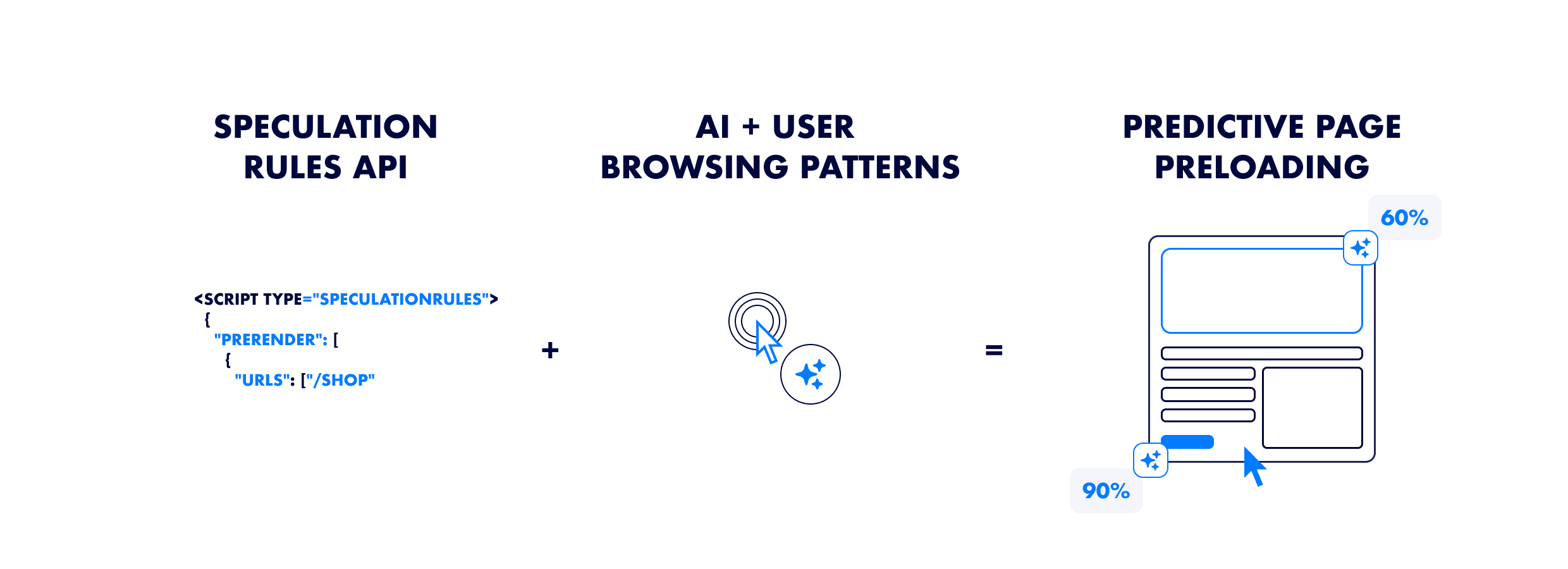
But you may ask, why do you need all these data layers to preload pages, isn’t the Speculation Rules API enough?
Let’s explore this further:
Speculative loading works with 3 most common scenarios:
- You need to define a set of pages that should be prerendered/prefetched by the browser. This scenario works if you have a limited number of links on the site, or you know exactly where the user will click once they are on a certain page. The approach requires a very deep understanding of your site and ongoing maintenance as the page evolves over time. Unless strictly monitored, it can lead to a high amount of waste (pages that were prerendered but not navigated on).
- You decide to use a more moderate approach, where only when a user hovers on a link, the page will be prerendered/prefetched. This approach usually gives the browser a 200ms headstart to preload any resources, which typically is not enough to create a truly instant experience or increase performance at a meaningful rate.
- Finally, you can go with the most strict approach and speculatively load a page the moment your site visitor clicks on its link, which provides the browser with an even more limited headstart.
In all these scenarios, the performance gain for the site is limited, as the browser may either be preloading irrelevant pages or it lacks sufficient time to preload them. By adapting to the real user behavior, predictive preloading solves these limitations.
Benefits of predictive page preloading
Predictive navigation drives significant improvements in page speed and Core Web Vitals. These enhancements translate into meaningful benefits for site owners. In competitive industries, a website that loads almost instantly provides a clear advantage over competitors who haven’t prioritized optimizing their site speed.
Let’s explore how this technology can provide a real competitive advantage:
a. Enhanced user experience
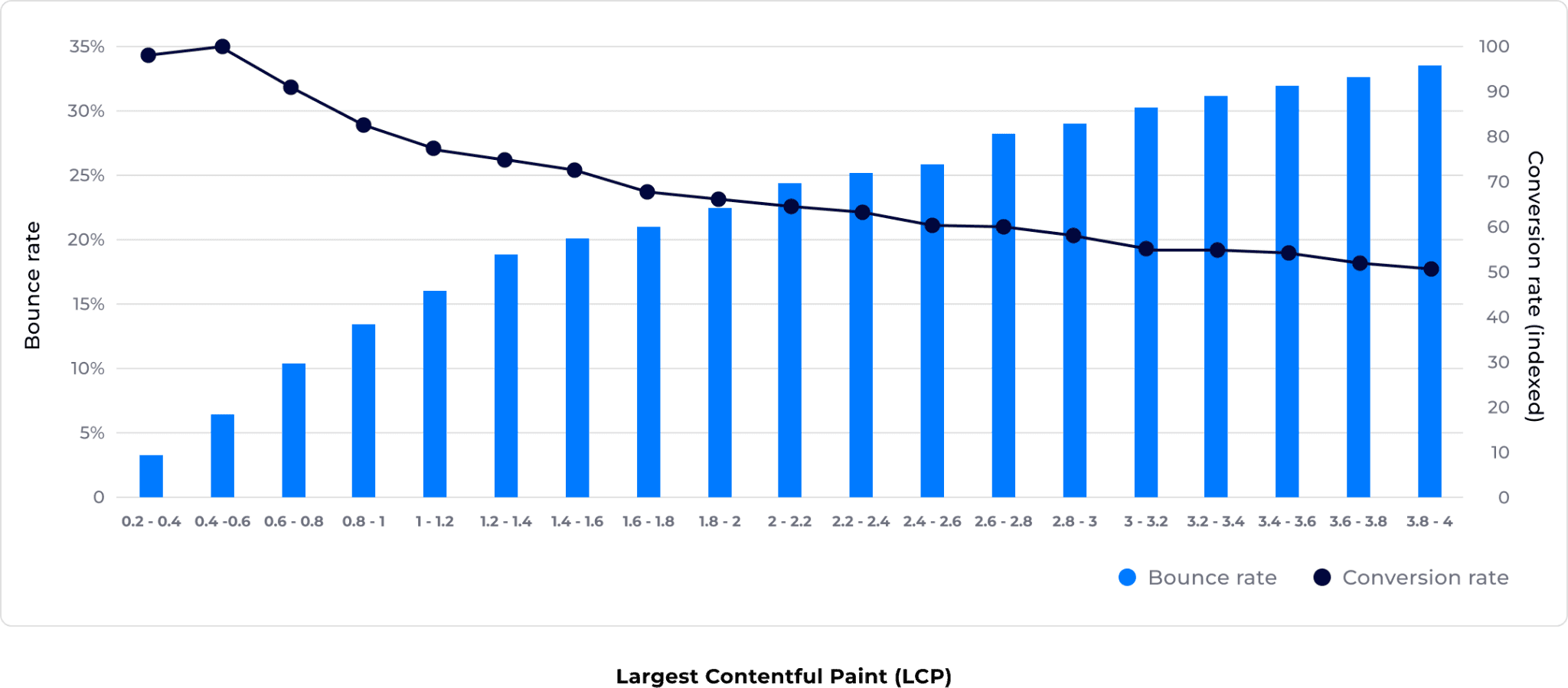
One of the main advantages of predictive page preloading is its ability to significantly enhance user experience by reducing load times. When pages load quickly, users are more likely to stay on-site, explore additional content, and complete important actions such as making a purchase or filling out a form. A Deloitte study found that every 0.1 second of improvement in loading time can lead to a noticeable reduction in bounce rates, encouraging users to engage more meaningfully with a site.
b. Improved SEO results
Faster page loads directly impact search engine rankings, with improved engagement boosting SEO performance. Since Google considers page speed as a ranking factor, predictive preloading helps meet those standards, enhancing a site’s visibility.
c. Increased conversion rates
As speed and engagement are closely linked, predictive page preloading drives higher conversion rates by making the site more responsive. Whether completing a purchase, signing up for a newsletter, or downloading a resource, users are more likely to convert when loading times are fast.
Limitations and challenges with predictive page preloading
So, predictive page preloading offers an instantaneous page experience, boosts conversions, and improves SEO. Where’s the catch, you may wonder? The reality is that while it’s a highly beneficial technology, it still comes with its limitations and challenges. Let’s review some of them:
a. Browser support and compatibility
The Speculation Rules API, the technology behind predictive page preloading, isn’t supported by all browsers yet. For instance, Safari and Firefox don’t currently support it, which could impact your traffic if a significant portion of visitors use these browsers. This limitation is particularly significant for mobile traffic, as many users may access your site using Apple devices that rely on Safari.
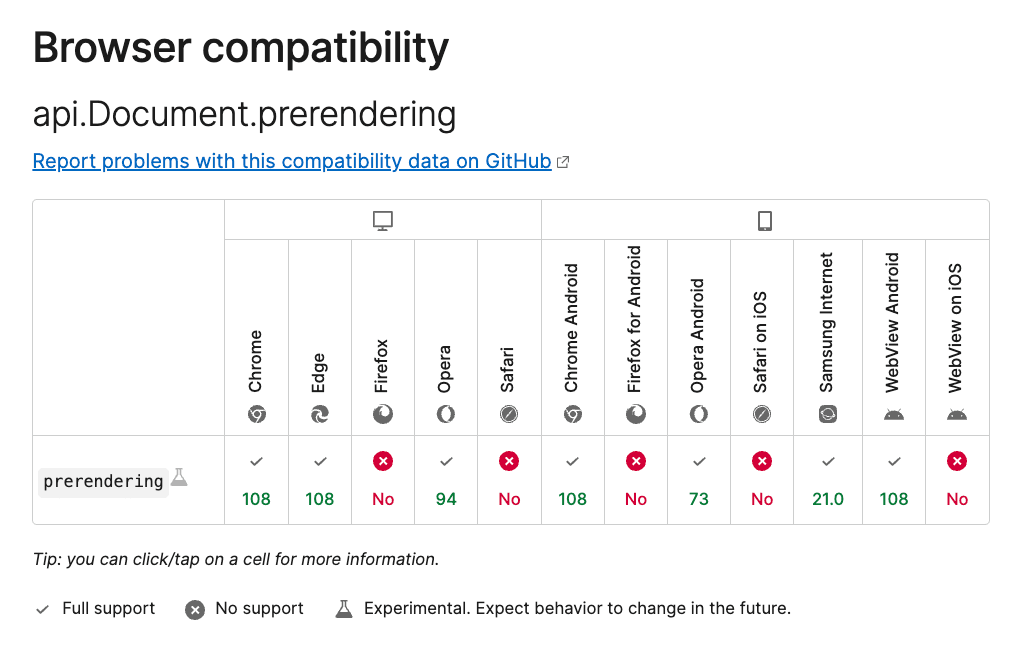
MDN web docs, Speculation Rules API
b. Site structure considerations
Predictive page preloading works best for websites with traditional multi-page navigation (MPAs). For Single Page Applications (SPAs), which load content dynamically, preloading is less useful because SPAs do not rely on the standard browser navigations.
c. User navigation patterns
Predictive navigation thrives when users engage in behaviors that involve multiple page views during a session. This works because the optimization takes place after the user initially lands on a site, enhancing the experience for subsequent navigations. However, on sites where users typically land on a specific page and do not navigate further, preloading additional pages offers limited performance gains.
Maximizing the benefits with Navigation AI by Uxify
Navigation AI is the Uxify agent that does predictive page loading for you. A common speculative loading plugin applies one static rule to every visitor. Navigation AI decides visitor by visitor. It reads live session signals (where they are in the viewport, how they scroll, which device they’re on, what they’ve already done) and prerenders the page they’re most likely to open next.
Advantages of using Navigation AI
The big one is that nobody has to write or maintain the rules. You switch it on with the Uxify snippet, and the agent picks the pages, the timing and the eagerness. When your catalogue changes or a campaign brings in a different kind of visitor, its predictions follow.
It also works from your data, not the web’s. Navigation AI runs on Reality, Uxify’s real-user data layer, which tracks 3,000+ signals from real sessions on your site. That context is what keeps waste low: the agent gets the next click right 72% of the time, so the browser spends its effort on pages people actually open.
And it tells you what it did. Every week or month, Navigation AI sends a report on what it prerendered and what that earned you, including how many more product pages the average visit reached. One store saw 2.43 more products per visit.

Performance and Navigation AI
Across the sites it runs on, Navigation AI delivers:
- 55% faster navigations, because the page the visitor opens has already loaded and painted
- 30% more pageviews per session, since browsing stops costing a wait at every click
- A 1% lift in conversion rate
Store-level results tell the same story. Ecigone, a Shopify store, grew engaged sessions by 22% and repeat traffic by 9% with Navigation AI.
Give it time to show in your Core Web Vitals. CrUX reports on a rolling 28-day window, so the full effect takes up to 28 days to appear there, even though visitors feel faster navigations from day one.
One thing prerendering doesn’t fix is a slow response once the visitor is on the page. That’s Interaction to Next Paint, and it depends on how busy the main thread is. Uxify has a separate agent for it: INProve spots heavy JavaScript blocking the main thread and reschedules it so the click or tap goes first. It has improved INP by up to 84%.
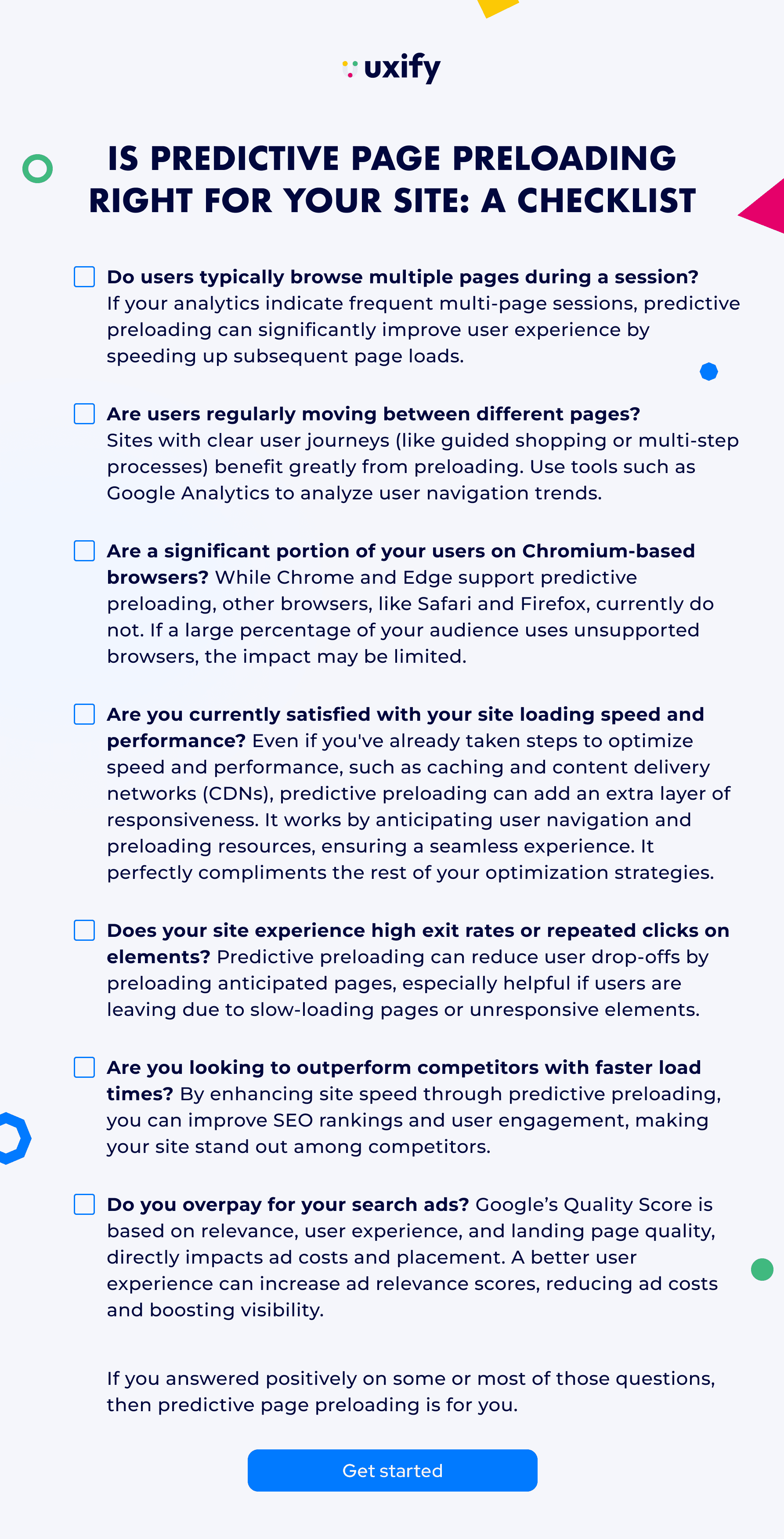
Is Predictive page preloading right for your site: A Checklist
To help you determine if predictive preloading is right for your website, we’ve created a checklist of factors to consider, simplifying the decision-making process and boosting your confidence in enhancing your site’s performance.
⬜ Do users typically browse multiple pages during a session? If your analytics indicate frequent multi-page sessions, predictive preloading can significantly improve user experience by speeding up subsequent page loads.
⬜ Are users regularly moving between different pages? Sites with clear user journeys (like guided shopping or multi-step processes) benefit greatly from predictive navigations. Use tools such as Google Analytics to analyze user navigation trends.
⬜ Are a significant portion of your users on browsers that support the Speculation Rules API, such as Chrome? While Chrome and Edge support predictive page preloading, other browsers, like Safari and Firefox, currently do not. If a large percentage of your audience uses unsupported browsers, the impact may be limited.
⬜ Do your users browse on iOS devices only? If most of your users are on iOS, it’s worth noting that Safari, which powers all iOS browsers—including Chrome—does not support the Speculation Rules API needed for predictive page preloading. To better access the benefits of predictive page preloading on your site, check your User Tech report in Google Analytics 4.
⬜ Are you currently satisfied with your site loading speed and performance? Even if you’ve already taken steps to optimize speed and performance, such as caching and content delivery networks (CDNs), predictive preloading adds an extra layer of responsiveness. It works by anticipating user navigation and preloading resources, ensuring a seamless experience. It perfectly complements existing optimization strategies.
⬜ Does your site experience high exit rates or repeated clicks on elements? Predictive preloading can reduce user drop-offs by preloading anticipated pages, especially helpful if users are exiting due to slow-loading pages or unresponsive elements.
⬜ Are you looking to outperform competitors with faster load times? By enhancing site speed through predictive preloading, you can improve SEO rankings and user engagement, making your site stand out among competitors.
⬜ Do you overpay for your search ads? Google’s Quality Score, based on relevance, user experience, and landing page quality, directly impacts ad costs and placement. A better user experience can increase ad relevance scores, reducing ad costs and boosting visibility.
When does predictive page preloading works best?
Predictive preloading can be particularly effective in these scenarios:
- Ecommerce sites where users browse through products, especially if they’re looking at several items before making a purchase decision. Predictive page preloading reduces wait times and creates a smooth shopping experience, which can be crucial for keeping customers engaged and preventing cart abandonment.
- News and blog sites with sequential content like news or blogs, where users are likely to read one article and then move on to the next.
- SaaS business sites where preloading key pages like features, case studies, and pricing. SaaS sites can ensure that users don’t get frustrated by load times and drop off mid-journey. This seamless flow between pages helps build trust and encourages potential leads to reach that crucial conversion point, whether it’s signing up for a demo or starting a trial.
- High-traffic platforms where user retention and engagement heavily depend on speed, such as gaming sites or streaming services.
- Sites with heavy media content that showcases a lot of visual content like videos, high-resolution images, or animations and loading times can be affected due to the large file sizes.
- Sites with interactive components like sliders, pop-ups, or forms that require extensive JavaScript to function.
Situations where predictive page preloading might not add value
There are cases where predictive preloading might not deliver substantial benefits:
- Single Page Applications (SPAs) or one-page websites: These sites load content dynamically on the same page, reducing the need for predictive preloading.
- Sites with few pages per session: If your audience tends to leave after viewing just one page, preloading won’t significantly enhance the user experience.
Predictive preloading offers a powerful way to enhance website performance, improve user experience, and boost SEO rankings. However, its effectiveness depends on various factors, including your site’s structure and user behavior.
Before implementing predictive preloading, carefully assess whether it aligns with your goals and resources. If it does, Navigation AI can take the prediction work off your hands, so you get the benefit without writing or maintaining a single rule.