Make Uxify one of your go-to sources on Google
 Add Uxify on Google
Website speed has become a critical focus for businesses, largely driven by constantly rising user expectations and Google’s introduction of Core Web Vitals (CWV), a set of metrics designed to measure user experience.
By linking site speed and user experience to search engine rankings, Google turned speed optimization into a business imperative. Sites that load faster and deliver smoother user interactions rank higher, attract more organic traffic, and perform better overall.
But the conversation doesn’t stop at SEO. The business impact of speed is undeniable. For example, BBC reported losing 10% of users for every additional second of load time. Similarly, Amazon found that 100ms of latency cost them 1% of revenue. And according to a Deloitte and Google study, improving site speed by just 0.1 seconds can result in:
- A 9.2% increase in conversions for retail sites.
- A 10.1% increase in order value for travel sites.
- A significant reduction in bounce rates and higher user engagement across industries.
Users expect seamless experiences, and their standards are only increasing. The irony is that better user experiences often introduce more complexity. Features like personalization, real-time recommendations, and media-rich content all add value but come at a performance cost. This creates a dilemma for site owners: deliver an engaging, interactive experience or maintain a lightning-fast site.
To balance this complex equation, website owners have not-so-secret allies on their side: performance optimization tools. With their help, websites have consistently gotten faster, despite the ever-increasing complexity. But plugins only speed up the page a visitor has already asked for. In this article, we’ll look at what they do well, where they stop, and how the Navigation AI agent takes over the part they can’t reach: the next click.
Web performance tools: a must-have for a modern website
As websites became more dynamic and content-heavy, keeping them fast became increasingly harder. Tasks like setting up caching, delaying non-essential scripts, and configuring browser hints require technical skills and constant fine-tuning, which can quickly overwhelm non-technical site owners.
For smaller websites without dedicated performance teams, doing all of this manually is often impossible. Even larger teams find it time-consuming and draining on resources that could be spent on more strategic tasks.
Web performance tools were created to solve this problem. They automate repetitive work, ensure consistency, and reduce errors. By simplifying the process, these tools make it easier for anyone to keep their site fast and user-friendly, allowing more time and energy to focus on growing their business.
Key features of performance optimization tools
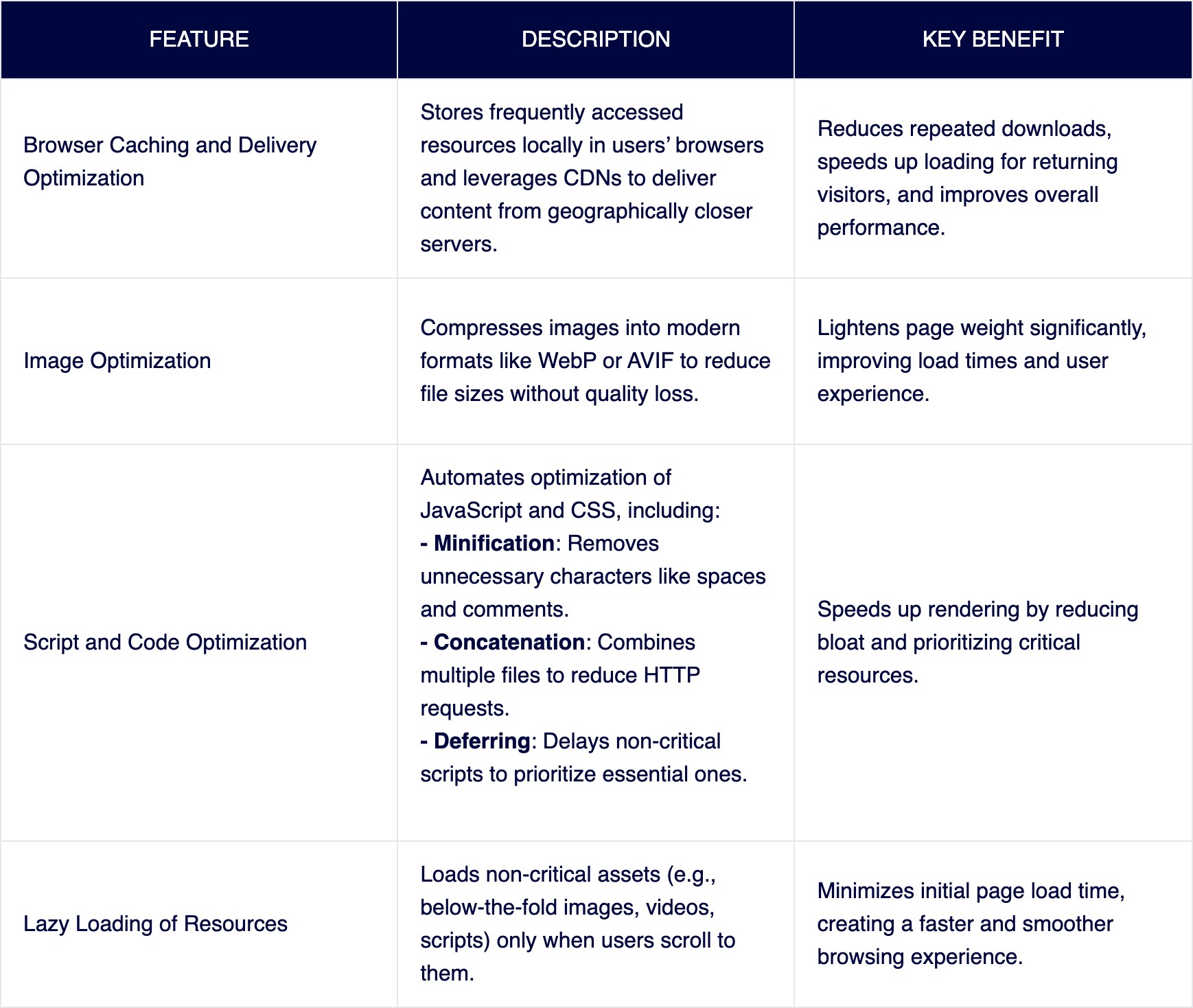
Whether you choose an all-in-one platform to manage your entire optimization strategy or prefer specialized tools for specific tasks, modern web performance plugins offer a range of features to enhance speed and efficiency. Here are some of the most popular capabilities, though the list is far from exhaustive.
Web performance solutions and Core Web Vitals
Core Web Vitals are Google’s way of measuring how well your website performs in key areas like speed, responsiveness, and visual stability. And let’s face it, if you want to rank well and keep your visitors happy, you can’t ignore them.
But here’s the thing: these benchmarks aren’t set to impossible standards. They’re designed to reflect what’s achievable with today’s tools and techniques. That means, with the right web performance tools in place, hitting those targets is attainable, even without a tech background.

Now, here’s where it gets interesting. Google openly admits that the ideal experience would involve no waiting at all - instant responses, seamless transitions, the works. But why aren’t CWV thresholds set that high? It’s because the web is complicated. People use different devices, browse on slow connections, and visit sites packed with interactive features.
Even with powerful web performance solutions, there’s only so much you can optimize before running into the limits of traditional techniques. That’s where the need for new, innovative approaches comes into play.
The limitations of caching solutions
The modern web has become significantly heavier. By 2024, the median size of a desktop webpage reached 2.68 MB, with mobile pages averaging 2.36 MB
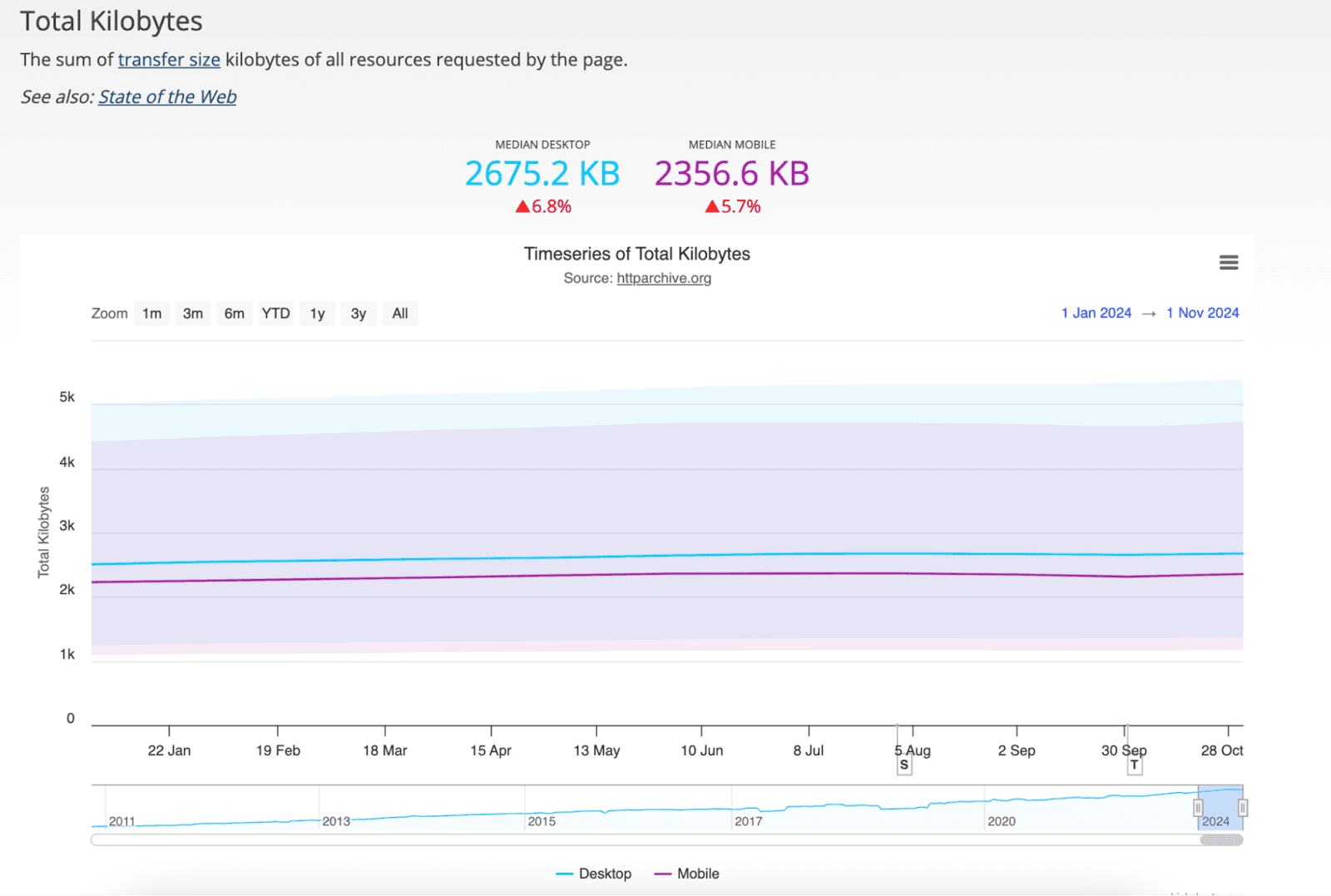
Source:HTTP Archive
While these rich features create more engaging experiences, they also slow down loading times. Compounding the problem, global internet speeds haven’t kept up. According to Ookla, while high-speed internet access has expanded, median speeds (particularly on mobile networks) have stagnated in many regions, making it harder for heavier websites to perform well.
Traditional optimization techniques, like compressing files, shrinking images, and setting up caching have been the backbone of making websites faster for years. But here’s the catch: they’re designed to enhance what’s already being accessed. In other words, they fine-tune the delivery of content visitors have already clicked on or visited—not what’s coming next.
Some advanced strategies, like cache warmup or browser hints, try to predict and prepare resources ahead of time. While these are helpful, they work within a limited framework, relying on rules set in advance. As a result, users still encounter delays while waiting for content to load—especially when pages are rich with visuals or interactive elements.
Even the most refined traditional optimization techniques have their limits. Reducing file sizes and streamlining delivery can only go so far in addressing delays inherent in the request-download-render cycle. As websites grow larger and user expectations rise, relying solely on these methods has become insufficient to meet the demand for faster, smoother experiences.
Breaking through this performance plateau requires a fresh perspective, one that goes beyond traditional methods and reimagines how content is delivered. Instead of waiting for users to request a page and then rushing to fetch and render it, the focus shifts to predicting what users will need next and preparing it in advance.
This is where speculative loading comes into play. Google’s Chrome team introduced the Speculation Rules API, a tool that enables browsers to anticipate user actions and preload or even prerender pages before they’re needed. By preparing content proactively, this technology creates near-instant page transitions, transforming the user experience from merely fast to seamless.
From fast to instant page loading
The Speculation Rules API is implemented via two powerful techniques: prefetching and prerendering. Each option balances speed and resource efficiency, allowing developers to choose the best approach based on expected visitor behaviour.
Prefetching works by loading a page’s HTML into the browser’s cache ahead of time. This reduces the time it takes for a page to appear when users click, giving a noticeable speed boost without heavy resource use. It’s a great option when you need faster loading but don’t want to overburden your system.
Prerendering, on the other hand, takes speed to the next level. It fully loads a page in the background, so when a user clicks, it’s ready to go—no waiting. This is especially valuable for critical pages, like product listings, dashboards, or visually rich content, where even a split-second delay could mean a lost sale or disengaged visitor.
The challenge? Setting this up manually requires deep insight into how users navigate your site. Without automation and insight, you could end up wasting resources by preloading pages that never get visited.
How Navigation AI simplifies instant page speed
The manual implementation of Speculation Rules API is real work. You have to decide which pages to prerender, for which visitors and when, then keep adjusting those rules as your site and your traffic change. Most teams write a rule once and never touch it again, or never write one at all.
Navigation AI is the Uxify agent that owns this job. It doesn’t replace your speed plugins. It picks up where they stop: the gap between one page and the next. Here’s the loop it runs:
1. It watches real sessions
Navigation AI runs on Reality, our real-user data layer, which tracks 3,000+ signals from real sessions. So it learns how your visitors move through your site, not how an average site behaves.
2. It predicts the next click
From viewport position, scroll, device and live session signals, it works out which link each visitor is most likely to click next. It gets that right 72% of the time.
3. It prerenders that page
It prerenders the predicted page in the background with the Speculation Rules API. When the visitor clicks, the page is already painted. Navigations get 55% faster.
4. It reports back
Every week or month, Navigation AI sends you a summary of what it did and what it earned, including how many extra product pages people viewed per visit. One store saw 2.43 more products per visit.
There’s no rule file to write and nothing to tune. You switch it on from the Uxify dashboard, and it keeps adjusting as your traffic shifts.

Impact of Navigation AI on Core Web Vitals
Your plugins already make each page as light as it can be. Prerendering changes something they can’t touch: what the visitor sees after the click. Here’s how that plays out across the metrics.
Largest Contentful Paint (LCP): faster loading
With prerendering, the largest visual elements on a page, like hero images, videos, or key text, are already loaded by the time a visitor arrives. Instead of waiting for content to fetch and render after the click, they see the page straight away, so LCP on those navigations drops sharply.
Field data moves slower than the page does. The full Core Web Vitals effect can take up to 28 days to show in CrUX.
Cumulative Layout Shift (CLS): no more jumpy pages
You’ve probably seen it before: a page loads, and elements shift around as images or fonts appear. On a prerendered page, most of that happens in the background, before the visitor arrives. They land on a page that’s already settled.
Interaction to Next Paint (INP): a separate job
Prerendering gets a page on screen sooner. It doesn’t make that page answer faster once someone starts tapping. INP measures the delay between a click, tap or keystroke and the next paint, and that delay comes from heavy JavaScript blocking the main thread, on prerendered pages and normal ones alike.
That’s a different agent’s job. INProve spots main-thread blocking as it happens and yields or reschedules the heavy work so the visitor’s interaction goes first. The script still runs, just not in front of the customer. It has delivered up to 84% INP improvement, and it tracks your real-user INP over time.
Smoother transitions for every click
Even if a page isn’t fully loaded when a user clicks, prerendering gives it a significant “head start.” Key resources are already in place, so transitions feel smooth, and visible loading indicators are minimized. On media-heavy or complex pages, that’s the difference between someone browsing on and someone giving up.
Real-world data: Navigation AI on live sites
Here’s what the agent has done on live sites:
- Ecigone, a Shopify store, grew engaged sessions 22% and repeat traffic 9% with Navigation AI.
- Strand saw pageviews per mobile session rise 80% and add-to-carts rise 14% with Navigation AI.
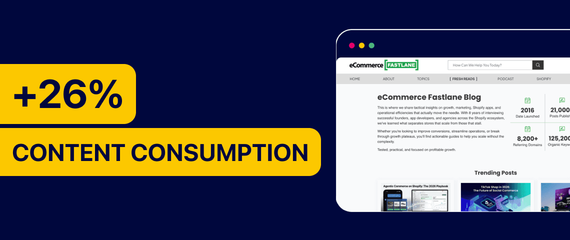
- eCommerce Fastlane, a publisher, grew pageviews per session 26% and more than halved rage clicks with Navigation AI and INProve.
This isn’t an isolated finding. Other studies have consistently shown that speculative loading techniques, like prerendering and prefetching, can significantly boost key metrics such as how quickly the main content loads (LCP).
Best optimization strategy: combining web performance plugins and Navigation AI
Your speed plugins and Navigation AI aren’t fighting over the same job. They split it.
How speed tools and Navigation AI work together:
-
Your plugins handle delivery. Caching, compression, minification, image optimization, script delay. They make every page lighter and quicker to send. That’s the foundation, and you should keep it.
-
Navigation AI owns navigation speed. It decides, visitor by visitor, which page to prerender next, and does it before the click. A plugin can’t do that, because it only acts on the page that’s already been requested.
-
INProve owns interaction speed. Plugins that delay JavaScript help, but they can’t see the moment a script blocks a tap. INProve can, and it moves that work aside while the visitor is still on the page.
There’s a bonus in the split. A lighter page is cheaper to prerender, so the better your plugins do their job, the less each prerender costs the visitor’s device and your server. The plugins and the agents run side by side on the same site.
The benefits of using performance tools and Navigation AI
Instant next pages
Your plugins make each page faster to deliver. Navigation AI makes the next one appear the moment it’s clicked, because it’s already prerendered.
Better Core Web Vitals on pages that already pass
Prerendered navigations improve LCP and CLS even on pages your plugins have already tuned.
More pages per visit
When the next page is already there, people keep clicking. Sites running Navigation AI see +30% pageviews per session and a +1% lift in conversion rate.
A report instead of a guess
The agent tells you what it prerendered and what it earned, so you don’t have to read its impact off a CrUX chart.
The bottom line
Speed plugins are still essential. They keep pages light, cached and quick to deliver, and they’re a big reason so many sites now pass Core Web Vitals.
What they can’t do is act before the click. That’s the part Navigation AI owns. It predicts where each visitor is going and prerenders the page, so it’s already there when they arrive. INProve covers the taps and clicks on the page itself. Your plugins handle delivery, Navigation AI handles navigation, INProve handles interaction.
You don’t have to replace anything. Keep your plugins, switch the agents on from your Uxify dashboard and read the first report. You can see what each one does on the Uxify agents page.