Make Uxify one of your go-to sources on Google
 Add Uxify on Google
The Speculation Rules API from Google is a game-changer for speeding up web pages by prefetching or even prerendering pages based on how users interact with your site. This is super helpful for improving user experience, especially when people are browsing on slower connections or older hardware. But setting it up manually can take a bit of effort if you’re not familiar with the process.
In this guide, I’ll walk you through how to manually implement the Speculation Rules API step by step. By the end, you’ll know how to optimize your site to load faster and feel snappier for your users. Let’s get started!
Introduction to Speculation Rules API
The Speculation Rules API is all about guessing (well, speculating) what your users might do next. It helps your site load faster by prefetching or prerendering pages before users even click on them. Essentially, it allows the browser to “speculate” where the user is likely to go, and then load that content in the background, making your site feel much quicker.
Think of it like having your coffee ready before you even press the ON button. That’s the kind of smooth, proactive experience this API can give your users.
How to implement the Speculation Rules API
Step 1: Basic setup
Let’s start with a super simple HTML file. Below is a minimal setup where we’ll eventually add our speculation rules:
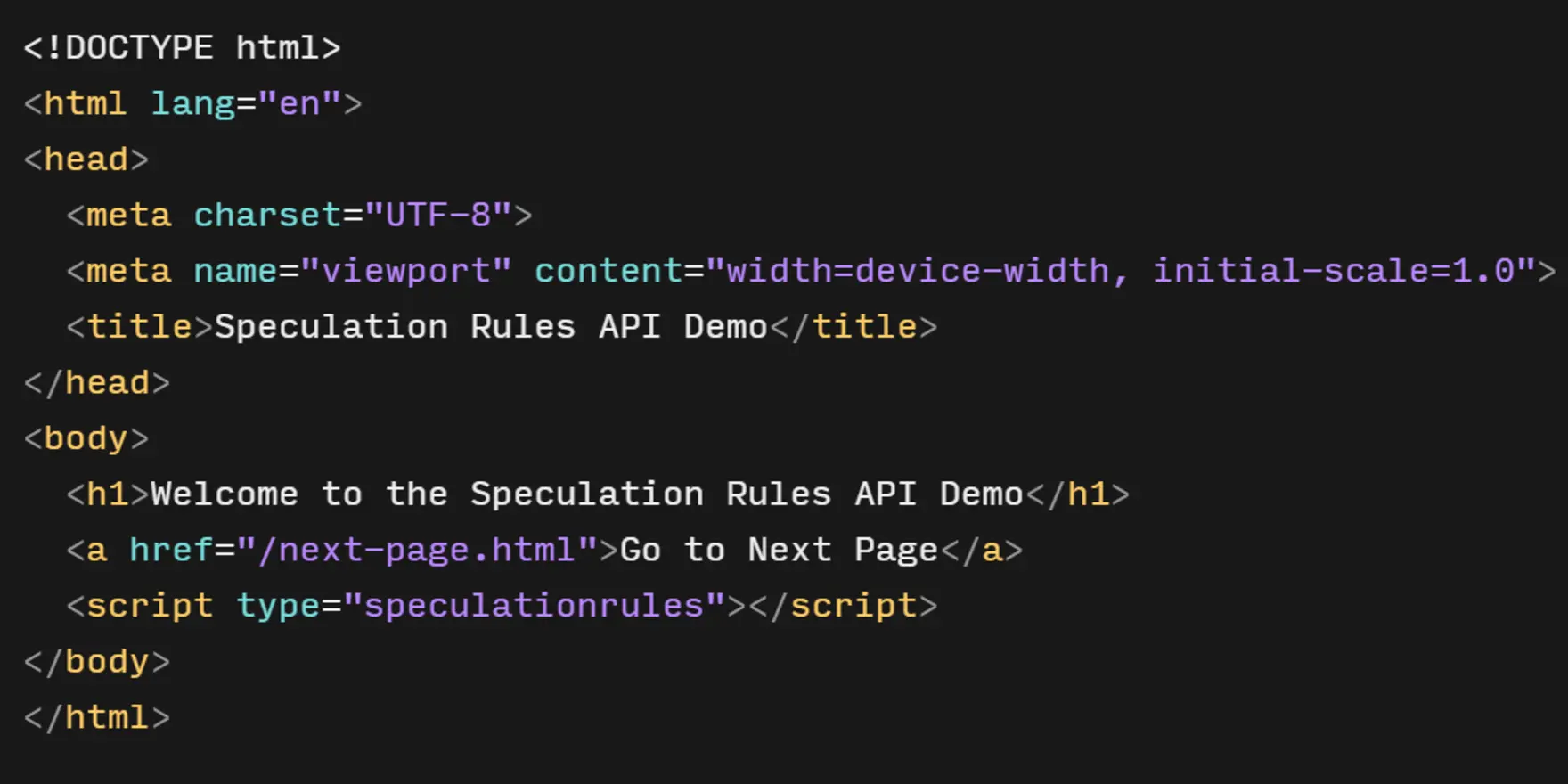
In this example, there’s just a basic link to a “Next Page.” We’ll make sure this page is prefetched or even prerendered as soon as the user starts interacting with the current page.
Step 2: Speculation Rules API example
Now we get to the good stuff—speculation rules! These rules inform the browser when and what to prefetch or prerender.
You’ll add them directly inside a <script> tag, but instead of the usual <script type="text/javascript">, we use <script type="speculationrules">.
Here’s an example of how to define a prerendering rule for the “Next Page”:
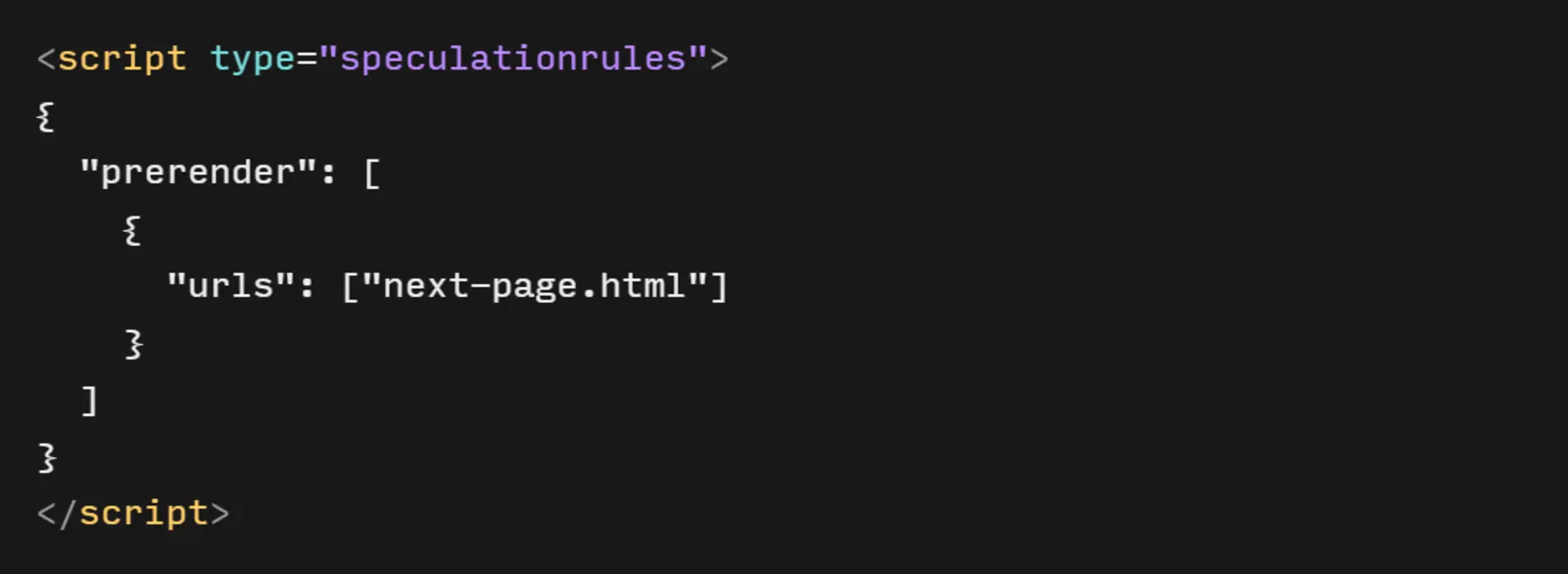
It is always a good practice to place this snippet in the <head> element of the page
In this snippet, we’re saying, “Hey browser, go ahead and prerender /next-page.html.” The browser will load and prepare the next page in the background, making it load instantly when clicked.
Step 3: Implementing prefetching
Next up is prefetching. This doesn’t load the full page like prerendering but ensures that the browser grabs the HTML of the next page before the user needs it. It’s a great way to speed things up without going full-on with prerendering.
Here’s how you can implement prefetching in your JavaScript:
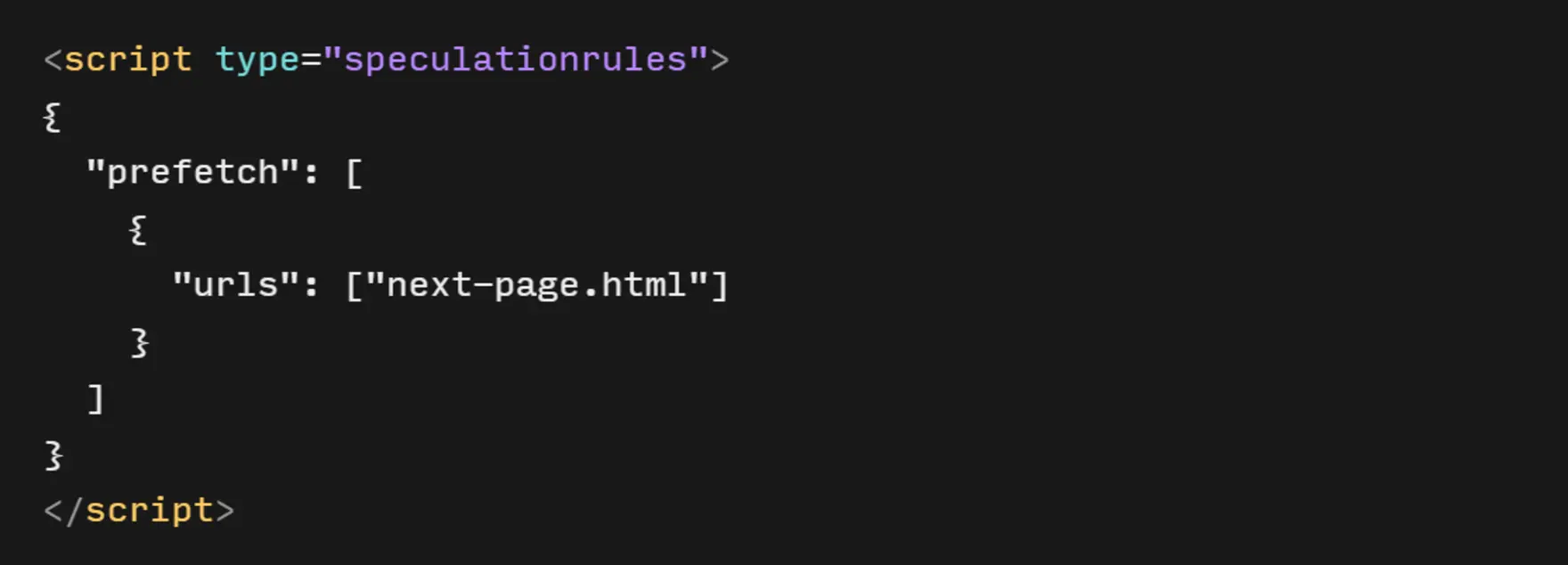
In our example, this is supposed to be placed inside <head>
This small piece of code adds a prefetch link to your head section, telling the browser to start fetching /next-page.html in the background as soon as the current page loads.
Step 4: Implementing prerendering
Prerendering is like prefetching on steroids. Not only does it download the next page’s resources, but it actually renders the page in the background. That way, when a user clicks the link, it’s instantly available.
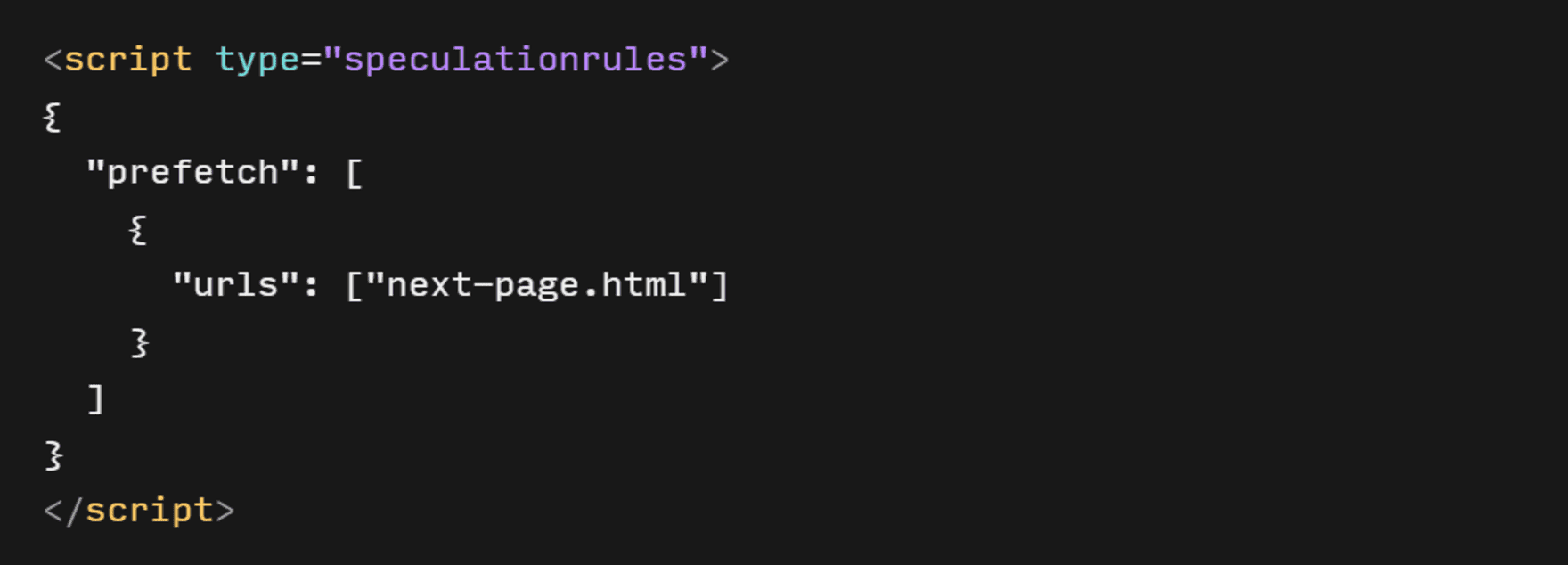
In our example, this is supposed to be placed inside <head>
Now the browser will not only load the next page but will also render it behind the scenes, so when the user clicks the link, they’ll experience a near-instant transition.
(origin:https://developer.chrome.com/docs/web-platform/prerender-pages)
Step 5: Testing and Debugging
Once you’ve set up prefetching or prerendering, it’s important to test things out to make sure your speculation rules work as expected. You can use the Application tab in Chrome DevTools to monitor the Rule Loads and see if the browser is prefetching or prerendering the right pages.
Here’s how:
- Open your page in Chrome.
- Go to the Application tab in DevTools.
- Open Speculative Loads and choose Rules or Speculations.
- Watch for prefetch or prerender actions when you load the page or hover over the links.
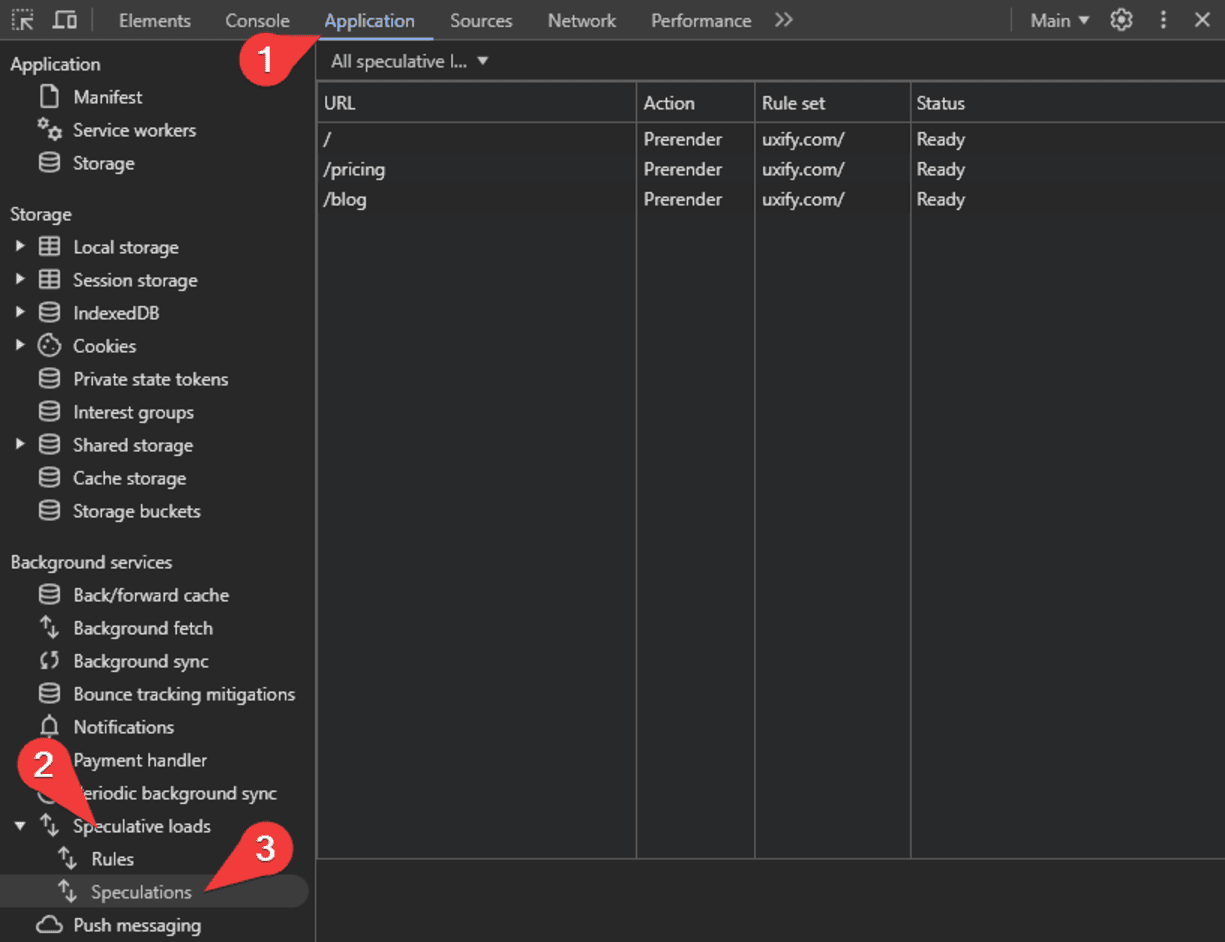
If something isn’t working as expected, double-check that your browser supports the Speculation Rules API and that you’ve set the rules up properly.
Is the manual implementation right for you?
Pros:
- Great for small websites: If you’re running a simple, static website, you can easily implement speculation rules manually without needing much development expertise.
- You’re in control: A manual setup lets you fine-tune which pages or resources get prefetched or prerendered. This is perfect if you have specific needs and want to optimize certain parts of your site.
- Cost-effective for smaller projects: If your website doesn’t have a ton of pages, the manual approach can be a quick, budget-friendly way to speed things up without needing extra tools or services.
Cons:
- Doesn’t scale well: As your website grows and becomes more dynamic, manually managing speculation rules becomes a headache. The more pages you add, the more difficult it gets to keep everything optimized.
- Ongoing maintenance: You’ll have to regularly update your rules to keep up with site changes, which adds extra development work as your project evolves.
- Lacks user behavior insights: Manually setting rules is based on assumptions about how users will navigate your site, which means you could be missing out on more accurate, real-time data about their actual behavior.
- Could waste resources: Without the ability to adapt in real-time, you might end up prefetching or prerendering resources for pages that users never even visit, which can slow things down instead of speeding them up.
Learn how to minimize resource waste in speculative preloading to ensure you’re not wasting bandwidth and improving performance.
Let an agent do the work
All of the above works. It also has to be redone every time your site changes. Someone has to decide which links deserve a rule, pick an eagerness level, test it in DevTools, and come back next month to check the rules still match how people actually browse.
Navigation AI, one of Uxify’s agents, takes that job over. Instead of a fixed list of URLs, it decides per visitor. It watches the live session (viewport position, scroll, device, what they’ve already looked at) and prerenders the page that visitor is most likely to open next, through the same Speculation Rules API you just wrote by hand. It runs on Reality, Uxify’s real-user data layer, so those decisions come from 3,000+ signals on your own site. That’s what it means to optimize site speed with AI without a single rule in your codebase.
Across the sites it runs on, Navigation AI predicts the next click correctly 72% of the time and makes navigations 55% faster. Visitors view 30% more pages per session, and conversion rate rises by 1%. Every week or month it sends you a report of what it did and what it earned, so you don’t have to open DevTools to know it’s working.

Is an agent right for you?
Pros:
- Scales with your site: Hand-written rules grow with every new template and category. The agent makes the same per-visitor decision on every page, whether it’s a Shopify store, a corporate site or a content platform, with 10 pages or 10,000.
- Predictions from real behavior: A manual rule is a guess you make once. Navigation AI reads what each visitor is doing right now, so the prerender follows the visitor instead of your assumptions.
- No rules to maintain: It switches on from one Uxify snippet. There’s no config and nothing to keep in sync, so a redesign or a new collection doesn’t mean another round of rule edits.
- Less waste: It prerenders the most likely next page instead of a fixed list, so the browser spends its effort on pages people actually open.
Cons:
- Depends on an outside service: You’re relying on Uxify staying up. If it has downtime, your site won’t get the speed boost for that window, though pages still load the way they normally would.
- Less direct control: You hand the decisions to the agent. If you need one specific page always prerendered, or one never touched, a hand-written rule is the more direct route. If you have unusual needs, talk to us and we’ll work out the right setup.
Conclusion
The Speculation Rules API is a powerful way to make your website feel faster and more responsive. Manually implementing it gives you control over how resources are loaded and can significantly improve the user experience. But if you’d rather get those benefits without writing and maintaining the rules yourself, Navigation AI makes those calls for you, visitor by visitor.
Whether you go the manual route or hand it to an agent, improving your site’s navigation speed and performance will leave your users happier, and that’s what it’s all about!
Happy coding, or if you’re using Uxify, happy relaxing!