The short version
- Traditional CRO and performance tools stop at diagnosis. Someone still has to interpret the data, ship the fix and verify it worked.
- Adding a chat layer to analytics did not change that. The chart just learned to talk.
- Uxify's agents each own one optimization job: navigation, interaction speed, cart recovery, monitoring, friction.
- The agents run on Reality, a data layer tracking 3,000+ signals from real sessions, so decisions fit your site instead of industry averages.
Make Uxify one of your go-to sources on Google
 Add Uxify on Google
For years, performance and CRO tools worked in more or less the same way. They watched your site, drew you a chart and handed the real work back to you. You read the data, worked out what it meant, decided what to change, shipped the fix and then checked whether it worked. The tool found the problem. You solved it.
Then AI arrived and everyone expected this to change. Mostly, it didn’t. A lot of tools got an AI layer. You could chat with your data, ask better questions and get summaries faster. Useful, yes. But the work still came back to you. The chart just learned to talk.
We did not want Uxify to become another tool that explains the problem and leaves you with a to-do list. As Georgi Petrov, our co-founder puts it:
“To me, an agent is much simpler than most definitions make it sound: it watches what is happening, understands what matters, takes the actions it is responsible for and tells you what it did.”
That is why we made Uxify agentic. Not because the word is fashionable, but because AI can now close the loop on the parts of optimization that never needed to wait for a human. So we let it.
Why do most CRO tools still hand the work back to you?
Most real user monitoring tools and digital experience platforms take you as far as your data and stop there.They show you that a page is slow, a funnel is leaking, or visitors are dropping off. Some now let you ask questions in plain language, which is useful. But the hard part is still the same: someone has to understand what matters, decide what to change, ship the fix, and check whether it worked.
That is the part almost no tool has touched.
The category has moved from static dashboards to AI-assisted analysis, but for most teams, the work still lands in the same place: a report, a recommendation, a ticket, a sprint, or an agency brief. For large teams, that is annoying. For smaller teams, it often means the work never happens at all.
Georgi is blunt about why that bothered us enough to build around it:
“Conversion is too important to depend on whether you happen to have a performance or a CRO expert free this month.”
A merchant should not need a specialist to keep the site fast. An agency should not need to spend days digging through dashboards just to prove where friction is hurting revenue. A founder should not have to choose between ignoring the problem and hiring a team.
Uxify exists because we think the tool should take on more of the work.
AI was already in Uxify from day one
When we say Uxify is AI-native, we mean we did not add AI later to keep up with a trend. We started the company with AI in the center, which is why turning Uxify into an agentic platform was a short step, not a rebuild.
From the start, Uxify used AI to read user behavior and adapt to each site’s patterns. We were not building a dashboard first and thinking about intelligence later. The data model, the product, and the optimization layer were built around the idea that every site behaves differently.
A fashion store, a vape store,and a B2B SaaS site do not have the same problems. They do not have the same paths, visitors, friction, or business goals. So the system could not be built around generic advice.
We added Ask Uxi because people should be able to talk to their data without spending half their day translating dashboard language into business language. Uxi reads your data, explains what is happening, and helps you understand where to focus.
But that was only part of the story. Navigation AI was already making live decisions from real user data. It predicted where visitors were likely to go next and prerendered those pages before the click. The behavior existed before the label did. So when everyone started using the word “agentic,” we did not have to invent a new story. We finally had a word for what Uxify already was.
And once you accept that software can do more than report on a problem, the next question becomes practical: which parts of the work can it actually take on?
AI made expertise easier to access. Agents can take it further.
Web performance is a good example. Not long ago, understanding a performance trace or figuring out why INP had suddenly gone south was work for a relatively small group of specialists. AI has already changed that. You can give an AI coding tool a PageSpeed report and ask what matters. Chrome DevTools MCP now lets coding agents inspect a live browser, record performance traces and debug issues using actual browser data instead of guessing from text.
That is a meaningful shift. But advice is still advice.
Most merchants do not want to run another report every Monday, discuss their JavaScript stack with an assistant and then turn the answer into a developer ticket. They want the site to stay fast. That is where agents become more interesting: instead of making the recommendation faster, they can take on the parts of the optimization that can be automated.
And the stakes are measurable. Shopify analyzed Core Web Vitals against conversion across its actively selling stores in early 2026. Every 100 milliseconds of slower load time correlated with roughly 3.5% lower conversion. Stores loading at 2.5 seconds converted about 30% worse than stores loading at 1.5 seconds. Shopify is careful to call this correlation rather than causation, and so are we. But the direction is consistent.
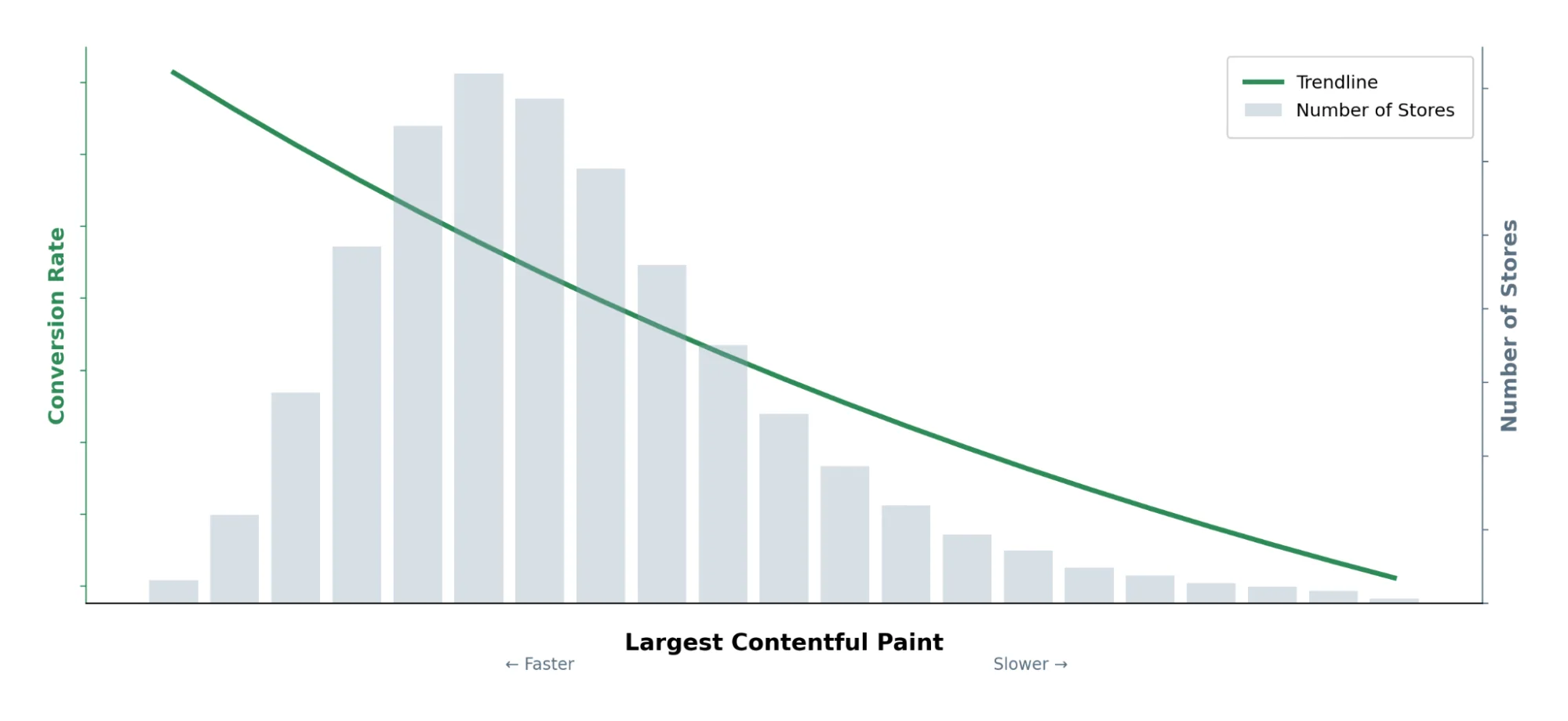
Source: Shopify: “Store Speed and Conversion”
This is also why we treat speed work as conversion work rather than as a separate engineering concern. If load time moves conversion, then an agent that removes waiting is a CRO agent, whatever the metric on its dashboard says. The split between “performance tools” and “CRO tools” is a category convention, not something shoppers experience. They just leave.
Agents need your data, not just a good model
By now, most people understand the basic idea. An agent takes an input, works toward a goal, chooses what to do next, and repeats that process over time. That sounds powerful, and it can be. But the quality of those decisions depends entirely on what the agent knows about the situation.
This is where a lot of agentic tools fall short. They run on generic assumptions about how websites behave. They may know what usually works across many sites, but not what is happening on your site, with your visitors and your conversion path. A slow homepage might be the biggest problem for one store. For another, the real issue is a laggy add-to-cart click on mobile, or a campaign that brings traffic that looks good in sessions and bad in revenue. The agent needs to know the difference.
That is why Uxify has Reality.
Reality is not an agent. It is the intelligence layer the agents run on. It holds two things at once: what usually happens across websites, and what is actually happening on yours, with your traffic, your pages, and your visitors. It tracks more than 3,000 signals from real sessions, then pairs that data with an AI model that understands what those signals mean.
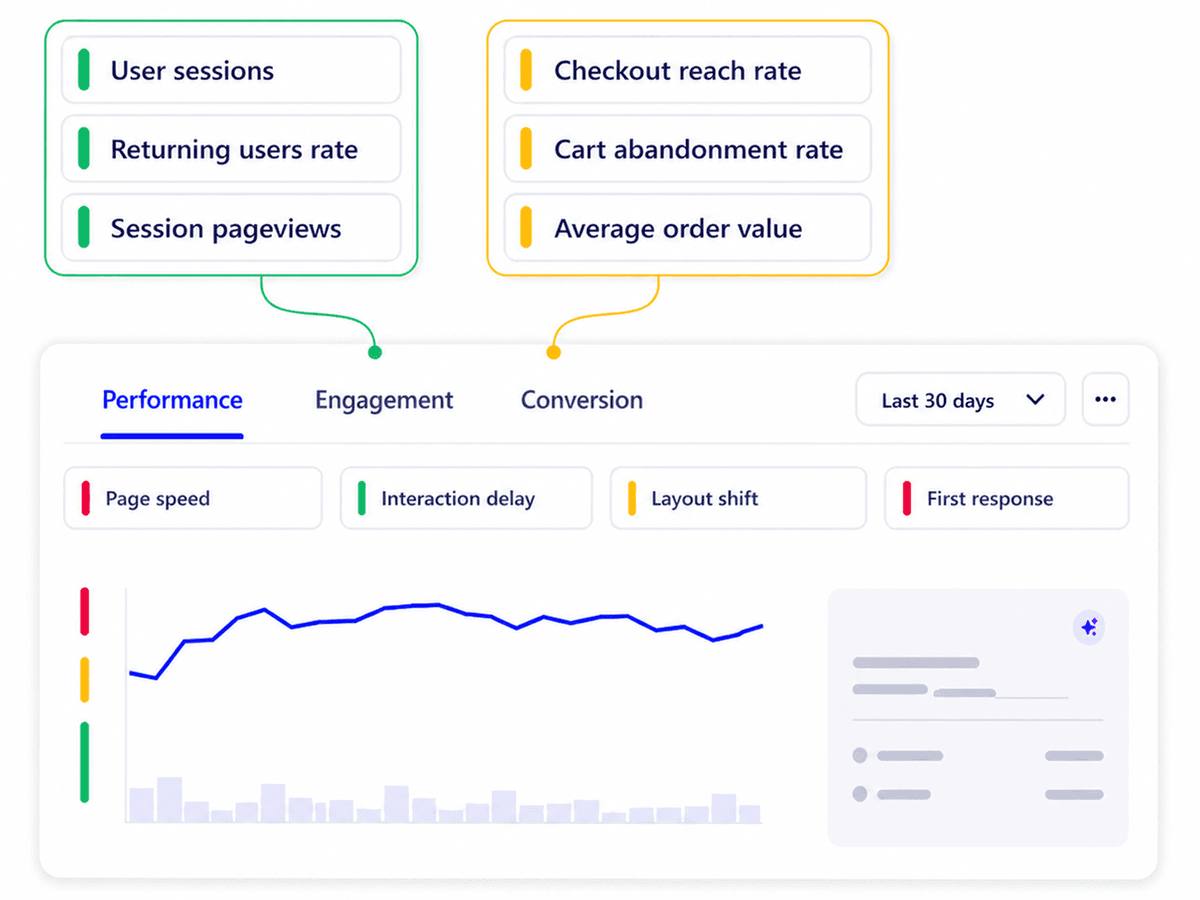
That is the difference between a generic recommendation and a fix that makes sense for your store. An agent running on Reality can see where people slow down, where they hesitate, where they leave, and which of those issues are actually tied to business outcomes. A general AI agent pointed at your store can still give you a decent starting point, but without your real user data underneath it, it is working from averages. Your site is not average.
What changes when your site has a team of agents?
Reality gives the agents the context they need, but the agents are the ones that take on specific parts of the optimization work. This is what agentic CRO looks like in practice: every agent improves one part of the site experience, acts on real user data, and shows you what changed.
Navigation AI focuses on navigation speed. It predicts where visitors are likely to click next and prerenders those pages before they get there. The result is simple: moving through the site feels faster. Less waiting. Fewer dead moments. Fewer chances for people to get bored and leave.
INProve focuses on interaction speed. It works on INP, the metric behind slow or laggy taps and clicks. That matters because people do not describe a site as “having poor INP.” They say the button felt stuck. They tapped, nothing happened, and they lost trust for a second.
Carter focuses on cart abandonment. When a shopper with items in their cart is about to leave, it intervenes at the point of exit and reports back on the carts it saved and the revenue they brought in.
Vita is live too. It watches Core Web Vitals across every page and device and flags a regression the moment it lands. More jobs are moving into that model: Reel is coming soon and will surface the short moments where users hit friction, instead of making someone watch entire session recordings.
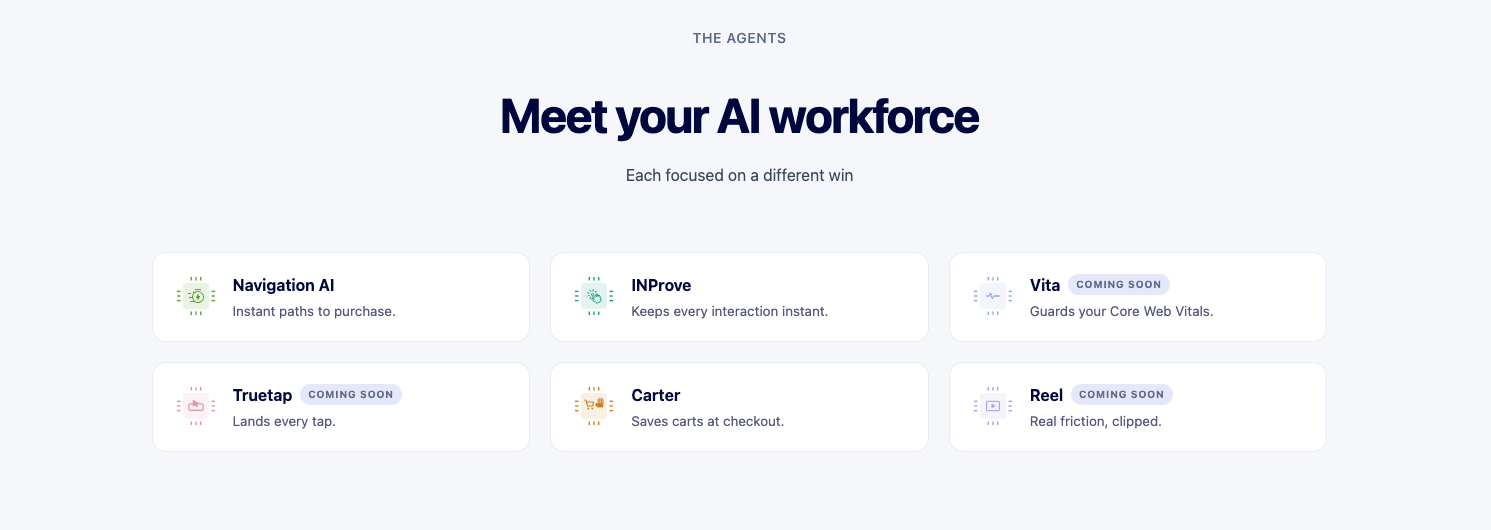
Navigation. Interaction. Cart saving. Monitoring. Friction. These used to be tasks sitting in somebody’s backlog. The point of the agents is to make them happen continuously.
We are already seeing what that looks like in practice. Ecigone increased engaged sessions 22% and repeat traffic 9% with Navigation AI. eCommerce Fastlane grew pageviews per session 26% and cut rage clicks by more than half using Navigation AI and INProve, without changing a single article.
And if you want to talk to the system directly, Ask Uxi and Uxify MCP make that possible in plain language and on any LLM tool you use. You can ask what changed, where friction is growing, what the agents did, and where to focus next.
The goal is to make site optimization and CRO more approachable to everyone.
CRO should become something the site does every day
The bigger idea behind Uxify is not that AI should replace CRO teams. It shouldn’t. Parts of optimization depend on judgment, strategy, brand, creativity and understanding why customers behave the way they do. Those are not problems we want to hand blindly to software.
But a huge amount of the work is repetitive. Watching for regressions. Finding friction. Keeping interactions responsive. Improving navigation. Checking whether the change worked. Reporting it back. That work does not need to wait for someone to have a free afternoon.
A merchant should not need a performance specialist on call just to keep a site responsive. An agency should be able to spend more time deciding what will actually grow the client and less time rebuilding the same report every month. A growth team should not have to choose between another optimization backlog and simply leaving the problem alone.
The software can own more of that work. Not all of it. Not blindly. But enough that CRO stops being a project you revisit every few months and starts becoming part of how the site operates every day.
That is what we want Uxify to do: watch what is happening, understand what matters, act where it can, show you what has improved. Then keep doing it.
That is why we made Uxify agentic.

FAQ
What is an agentic CRO platform?
An agentic CRO platform goes beyond showing conversion data or suggesting improvements. It monitors real user behaviour, identifies problems, takes specific optimization actions and reports on the result. The important distinction is action: traditional CRO software gives a person information to work with, while an agentic system can own parts of the optimization loop itself.
How is agentic optimization different from AI-assisted CRO?
AI-assisted CRO helps people work faster. It can explain data, summarize findings or recommend what to try next, but the human still implements the change. Agentic optimization goes one step further by allowing software to act within a defined job: prerendering a predicted page, resolving an interaction bottleneck or responding when a shopper is about to abandon a cart.
Do I need to be a developer to use Uxify?
No. Uxify is designed so merchants, agencies and growth teams can understand what is happening without reading performance traces or writing code. The agents handle the optimization jobs they are responsible for, while Uxi lets you ask questions about the underlying data in plain language.
What can Uxify’s agents actually do?
Navigation AI predicts where visitors are likely to go next and prepares those pages before the click. INProve reduces the main-thread blocking that makes taps, clicks and inputs feel stuck. Carter focuses on shoppers about to leave with items still in their cart. Vita watches Core Web Vitals around the clock and flags regressions as they land. More agents are on the way, such as Reel, which will surface the high-impact moments of user friction.
What results has Uxify seen from its agents?
Results depend on the agent and the site. In Uxify case studies, Ecigone increased engaged sessions by 22% and repeat traffic by 9%, while eCommerce Fastlane increased pageviews per session by 26% and cut rage clicks by more than half.
How does Uxify understand my site instead of relying on averages?
Uxify uses Reality, its real-user data layer. Reality tracks more than 3,000 signals across performance, behaviour, engagement and conversion, giving Uxify’s agents context from your actual visitors instead of generic web best practices. The point is not collecting more data. It is giving each agent enough context to make a better decision about your site.