

Make Uxify one of your go-to sources on Google
 Add Uxify on Google
You click a link and wait. Most people don’t wait long: Google found that 53% of mobile visits are abandoned when a page takes longer than 3 seconds to load. Slow pages cost you conversions, rankings and sales, and the cost lands right when a visitor is trying to go deeper into your site.
Navigation AI is the Uxify agent built for that moment. It watches how real visitors move through your site, predicts the page each one will open next, and prerenders it in the background. When the click comes, the page is already painted.
In this article, we’ll cover:
✅ How Navigation AI predicts the next click without wasting resources.
✅ What it changes in your Core Web Vitals and engagement numbers.
✅ What the agent reports back, and how to switch it on.
Understanding Navigation AI
What is Navigation AI?
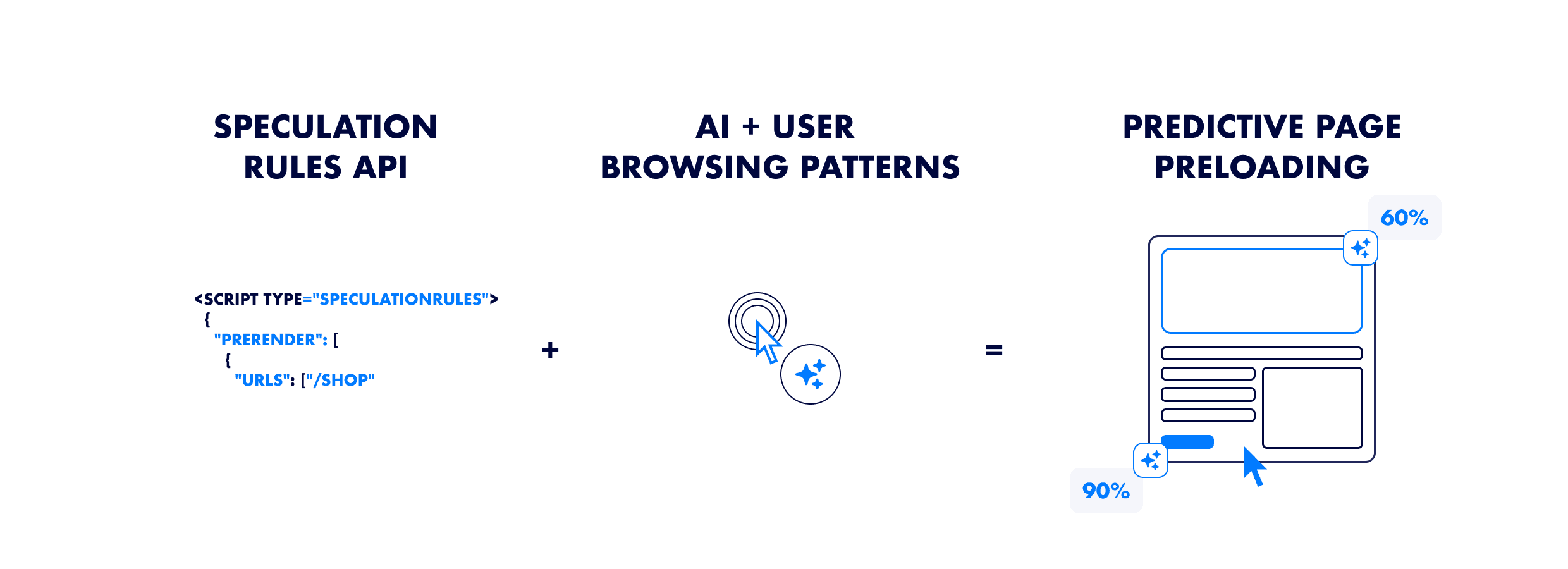
Navigation AI is the Uxify agent that owns navigation speed. Its one job is to make the next page open instantly. It predicts which page a visitor will open next and prerenders it before they click, so on sites where people move from page to page (category to product, article to article) most navigations stop feeling like a load at all. That shows up in your Core Web Vitals (CWV), and it shows up in how far people browse.
The technology behind it
Navigation AI runs on Reality, Uxify’s real-user data layer, which reads 3,000+ signals from real sessions on your site. So its predictions come from your visitors, not from an average of everyone else’s.
It works in a loop:
- It tracks behavior. It watches real sessions to learn the likely next destinations from every page.
- It predicts the next click. It combines those patterns with live signals from the current visit: what’s in the viewport, how the visitor scrolls, which device they’re on. These AI-powered predictions can call the next click up to 4 seconds ahead.
- It prerenders that page. It hands the top candidate to the Speculation Rules API, which loads and renders the page in a hidden browser context.
- The click lands instantly. The page is already painted when the visitor taps.
- It reports back. Weekly or monthly, you get a summary of what it did and what it earned.
How it compares to manual implementation
The biggest difference between Navigation AI and manual prerendering is the effort required.
Using the Speculation Rules API manually requires a lot of work – analyzing traffic data, setting up rules, testing performance, and constantly updating configurations to ensure effective preloading. Developers must also make sure that unnecessary pages aren’t preloaded, to prevent wasted bandwidth and avoid slowing down other parts on the site.

Navigation AI does that work for you. There are no rules to write and nothing to maintain. It runs from the same snippet as every other Uxify agent, and you switch it on from the dashboard. When your traffic or your navigation changes, its predictions change with it.
How Navigation AI speeds up your site
Instead of waiting for a click and then loading a page, Navigation AI gets the next page ready in advance. Across Uxify customers, that makes navigations 55% faster.
Predictive Prerendering
Think of Navigation AI as a good waiter at a restaurant. They don’t wait for you to order. They already know what you’re most likely to ask for and bring it over the moment you want it.
Navigation AI does the same with pages. It reads how each visitor is behaving and prerenders the page they’re likely to open next, and only that page.
Optimized Resource Allocation
You can’t just prerender your entire website. Doing so would use up too much bandwidth and slow down performance, especially for users on slower connections or low-power devices. Prerendering everything isn’t efficient, and it could actually hurt performance instead of improving it.
That’s why Navigation AI prerenders one page at a time: the one this visitor is most likely to open next. It’s right 72% of the time, so the bandwidth and memory it spends mostly go to pages people actually visit. That means:
✅ Little wasted bandwidth. It skips pages the visitor is unlikely to open.
✅ A better experience on slow networks and older devices. Those visitors gain the most from a page that’s ready before they tap.
✅ Predictions that keep up with your site. It learns from your visitors as they browse, so a new collection or a sale changes its predictions without anyone touching a rule.
Device and Layout Adaptation
Not all users browse the same way. A mobile visitor taps and scrolls differently from someone on a desktop, and Navigation AI predicts for each.
On mobile there’s no hover, so it reads which links sit in the viewport and how the visitor is scrolling. On desktop, pointer movement adds another signal, so it can prerender a page as soon as interest shows.
Core Web Vitals improvement
A slow-loading website drives people away. Google measures Core Web Vitals to see how fast and stable your site feels. A prerendered page has already loaded and rendered before the visitor arrives, so a predicted navigation skips most of the wait. You’ll see it most in:
✅ Loading speed ( LCP ). The main content is on screen the moment the page opens.
✅ Server response ( TTFB ). The request already happened in the background, so the visitor doesn’t wait on it.
✅ Visual stability ( CLS ). Shifts that happen while a page loads mostly happen before the visitor sees it.
Responsiveness (INP) is a different job. INP measures how fast a page reacts to a click or tap once it’s open, and that belongs to INProve, the Uxify agent that yields heavy JavaScript so the visitor’s interaction goes first. INProve has improved INP by up to 84%.
Faster navigations mean lower bounce rates and more pages per visit.
Real-world performance gains
Across Uxify customers, Navigation AI:
- predicts the next click correctly 72% of the time
- makes navigations 55% faster
- lifts pageviews per session by 30%
- lifts conversion rate by 1%
It runs built-in A/B tests to keep those numbers honest, comparing two kinds of navigation on the same site:
🟢 Predicted Navigations: pages Navigation AI prerendered before the click.
🔴 Not-Predicted Navigations: standard page loads without prerendering.
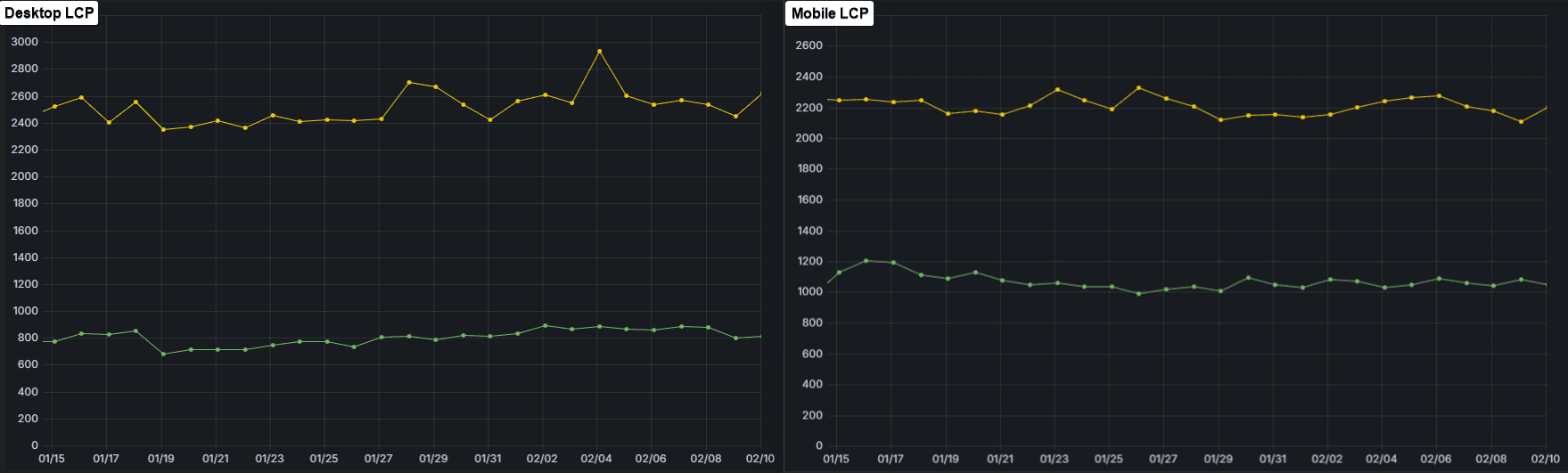
Sample from one site: 🟢 Predicted vs 🟡 Not-predicted LCP
Here’s what that looks like on real sites running Navigation AI:
- Strand saw pageviews per mobile session rise 80% and add-to-carts rise 14%.
- Ecigone, a Shopify store, grew engaged sessions by 22% and repeat traffic by 9%.
Prerendering pays off even when it’s done by hand. Ray-Ban’s own team wrote custom speculation rules and saw LCP drop 43%, exits drop 13% and conversion rate rise 156%. Navigation AI does that work per visitor, automatically.
What Navigation AI reports back
You shouldn’t have to take an agent’s word for it. Weekly or monthly, Navigation AI sends a summary of what it did and what it earned: how many navigations it prerendered, how much faster those pages opened than the ones it didn’t predict, and how far people browsed as a result.
On stores, the report also counts extra product pages viewed per visit. One store saw shoppers view 2.43 more products per visit.
If you want to track the same things yourself, we cover them in KPIs for speculative loading.
Installing Navigation AI on your site
There’s nothing to configure. Navigation AI runs from the Uxify snippet, the same one that powers every Uxify agent. If Uxify is already on your site, you switch Navigation AI on from the dashboard. If it isn’t, the dashboard walks you through adding the snippet first.
Once it’s on, it starts learning from your visitors right away. No rules to write, no thresholds to tune, nothing to maintain.
Platform Compatibility
Navigation AI works on any site that lets you add a script to the <head>. It runs on Shopify, BigCommerce, Magento, WordPress, Wix, Squarespace and custom-built sites.
⚠️ SPAs (Single Page Applications) Considerations:
Navigation AI predicts and prerenders full page loads, which is how traditional link-based navigation works. Single Page Applications (SPAs) swap content without a full page load, so on those frameworks there’s less for it to prerender.
Conclusion: Why Navigation AI is your competitive edge
Every navigation is a small moment where a visitor decides whether your site is worth another click. Navigation AI makes that moment instant. It predicts the next page from real visitor behavior, prerenders it, and tells you what that earned.
How Navigation AI Enhances Performance:
1️⃣ Faster navigations. Pages it predicts open 55% faster.
2️⃣ Accurate predictions. It’s right 72% of the time, so little bandwidth goes to waste.
3️⃣ Deeper browsing. Pageviews per session rise 30%.
4️⃣ More sales. Conversion rate lifts by 1%.
5️⃣ Proof, not promises. A weekly or monthly report shows what it did and what it earned.
Switch it on from the Uxify dashboard, and the first report will show you what it’s doing on your own traffic.
FAQ:
1️⃣ Will Navigation AI affect SEO?
Yes, in a good way. Google uses Core Web Vitals as a ranking signal, and prerendered navigations improve LCP and TTFB on the pages your visitors open next. For INP, pair it with INProve.
2️⃣ How soon will I see results?
You’ll see faster navigations as soon as Navigation AI is on, and its first report shows what it’s doing on your traffic.
Google’s Core Web Vitals reports move more slowly. CrUX (Chrome User Experience) data covers a rolling 28-day window, so the full effect can take up to 28 days to show there.
Note: Navigation AI keeps learning from your visitors, so its predictions sharpen over time.
3️⃣ Will Navigation AI preload all pages on my website?
No. It balances server limits like bandwidth against browser memory and only prerenders the page it’s confident the visitor will open next. That’s what keeps waste low.
4️⃣ How is Navigation AI different from the Speculation Rules API?
The Speculation Rules API is a browser feature: you give Chrome a fixed list of URLs to prefetch or prerender. Navigation AI sits on top of it. Instead of hardcoded rules, it predicts in real time which page each visitor will open next, from their viewport position, scrolling, device and live session signals, then prerenders only that page. You get the speed without writing or tuning rules.
5️⃣ How will Navigation AI affect my conversions?
Faster navigations keep people browsing. Across Uxify customers, Navigation AI lifts pageviews per session by 30% and conversion rate by 1%. Your weekly or monthly report shows what it earned on your own site.


