Key takeaways:
- Cart abandonment isn't one event; it's five. Roughly 70% of carts are abandoned, but the losses concentrate at load, product page, search, cart, and checkout.
- Speed is the first filter. When a site meets Core Web Vitals thresholds, shoppers are 24% less likely to abandon before the page finishes loading.
- Extra costs are the number-one fixable reason people quit: 40% of non-browsing abandonments. Show the full price early, not at step four.
- Your checkout is probably twice as long as it needs to be. The average US checkout displays 23.48 form elements; a strong one runs 12 to 14.
- Forced account creation and thin payment options bleed sales quietly. Offer guest checkout and more ways to pay.
Make Uxify one of your go-to sources on Google
 Add Uxify on Google
Most abandoned sales aren’t random. If you want to know how to reduce cart abandonment, start by accepting that it isn’t one event that leads to it. Shopping cart abandonment clusters at five predictable moments, and every one of them is fixable.
Seven in ten carts never convert. Baymard Institute puts the average documented cart abandonment rate at 70.22% across 50 studies. That number gets quoted like a law of nature, but it isn’t. Strip out the shoppers who were only browsing, and the rest walk for reasons you control: a slow page, an unanswered question, a search that returns nothing, a surprise fee, a checkout that asks too much.
This piece walks the funnel the way a shopper does. Five moments, in order, each with the data behind it and a sequenced fix you can ship. Conversion rate optimization (CRO) works less like pulling one big lever and more like plugging five specific holes.
But before that let’s start with the basics
What is cart abandonment, and how do you calculate it?
Cart abandonment is when an online shopper adds one or more items to a cart and then leaves without completing the purchase. It is measured as the cart abandonment rate:
Cart abandonment rate = (1 − completed orders ÷ carts created) × 100If 1,000 shoppers add to cart in a week and 280 buy, your cart abandonment rate is 1 − (280 ÷ 1,000) = 72%. Calculate it separately for mobile and desktop, because the two rarely match.
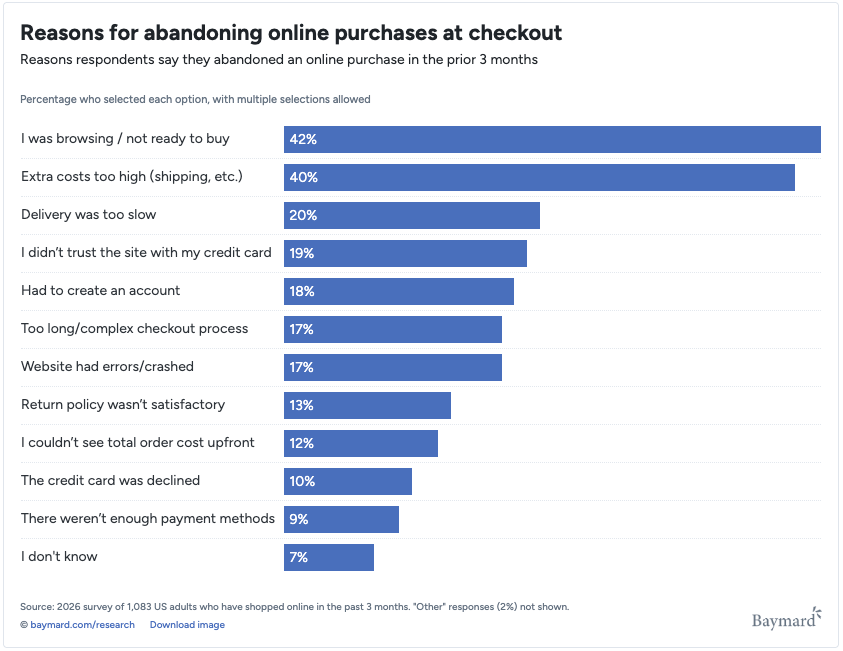
Yet the reality is that not every abandoned cart was ever a sale you could have won. Baymard finds that 42% of US online shoppers have abandoned a cart simply because they were browsing and not ready to buy. Window shopping will always be part of your rate, and no amount of checkout design converts someone who was never buying today.
Source: Baymard Institute
Moment 1: The page is still loading
The first cart-abandonment loss happens before the shopper reads a single word. If your page is still loading, they may never get far enough to see your product, offer, or CTA — and Google’s research on Core Web Vitals found that meeting the thresholds makes users 24% less likely to abandon a page load, meaning a measurable share of ecommerce abandonment is decided during rendering.
The impact shows up directly in conversion. Shopify’s 2026 analysis found that for every 100 milliseconds slower a store loads, conversion tends to be around 3.5% lower. Stores with a 2.5-second Largest Contentful Paint also saw roughly 30% lower conversion than stores at 1.5 seconds.
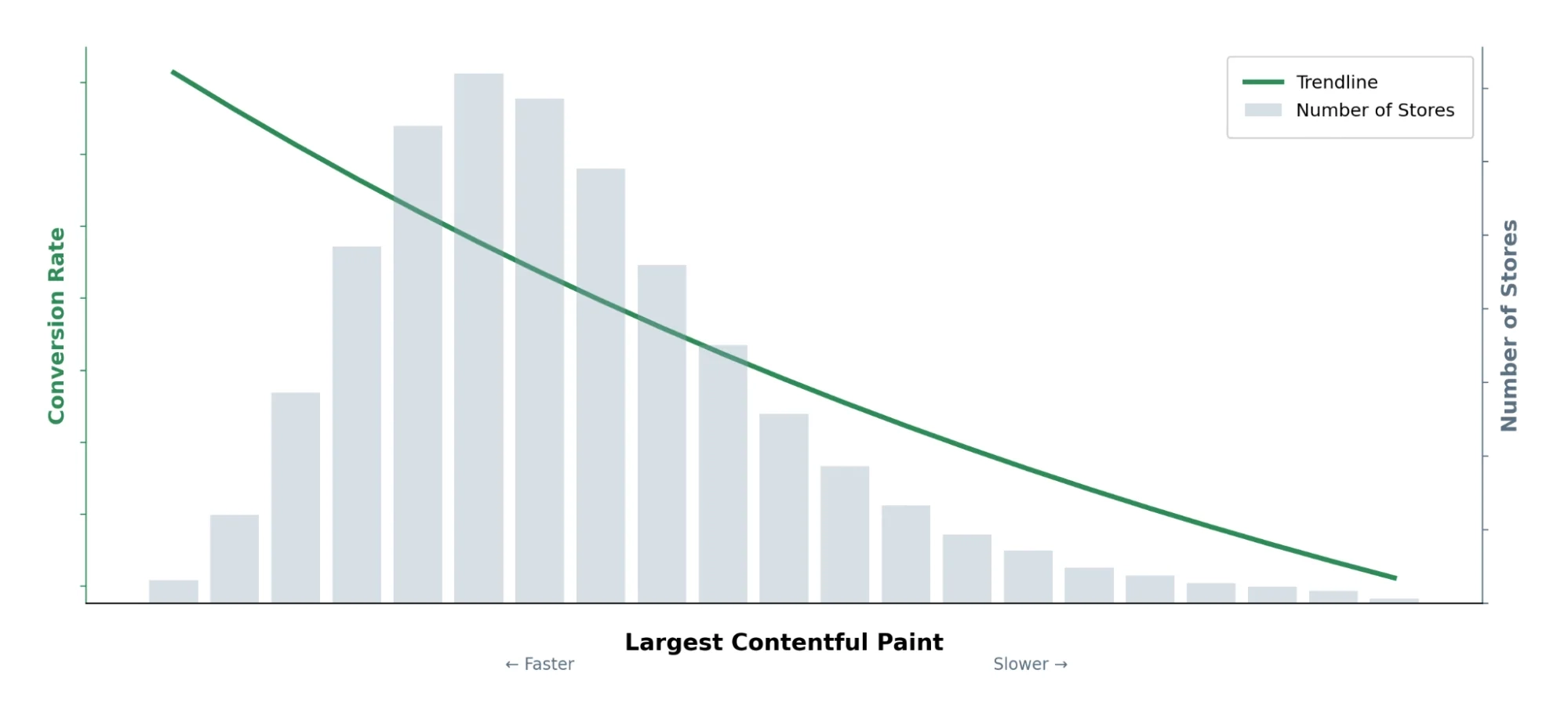
Source: Shopify: “Store Speed and Conversion”
So if you focus on one performance metric here, make it Largest Contentful Paint (LCP) measuring how quickly the largest piece of visible content actually appears for the shopper. It is one of the three Core Web Vitals, and the one that most directly governs whether a shopper ever sees your product.
How to fix it:
- Start with real-user LCP. Check field data in PageSpeed Insights or your real user monitoring platform to see what actual shoppers experience, rather than optimizing for a perfect lab score.
- Prioritize the element shoppers are waiting for. On most ecommerce pages, the LCP element is a hero or product image. Compress and correctly size it, don’t lazy-load it, and preload it or give it fetchpriority=“high” so the browser knows it matters more than less critical assets.
- Make the next page feel instant too. Predictive page preloading can start preparing likely next pages before the shopper clicks. On Shopify, Navigation AI, Uxify’s agent for navigation speed, does this for you. It predicts the next click from real sessions and prerenders that page, so the high-traffic journey from collection to product to cart feels instant.
- Trim the JavaScript competing for resources. Third-party apps, tracking scripts and unused theme code quickly add up. Defer what isn’t needed immediately and remove what isn’t being used. If you’re dealing with broader Shopify performance issues, this is usually one of the first places worth auditing. For the scripts you can’t remove, INProve keeps them out of the shopper’s way: it reschedules heavy JavaScript so a tap on Add to cart responds first.
Fixing loading speed doesn’t always feel like CRO. There’s no new offer, redesigned PDP or checkout trick. But it’s one of the most undervalued CRO boosts because, unlike most optimizations, it affects the entire funnel and every shopper moving through it. And its impact on conversion rate is measurable.
Moment 2: The product page can’t answer the question
A shopper who reaches your product page is interested. They leave when they hit a question the page won’t answer.
Will this fit? Does it work with what I own? When does it arrive? What if I return it? Static copy answers the top three questions and ignores the fourth, fifth, and sixth. And the information is usually there, the shopper couldn’t find it in the moment of doubt.
How to fix it:
- Mine your own support inbox. Pull the 20 most common pre-purchase questions from chat, email, and tickets. These are the doubts costing you sales, ranked by frequency.
- Answer them on the page, near the doubt. Put sizing next to the size selector, compatibility next to the specs, delivery windows and return terms next to the buy button. Don’t bury them in a footer link.
- Add a real-time answer layer for the long tail. You can’t pre-write every question. An AI chat assistant trained on your catalog and policies can answer “does this ship to Ireland by Friday” instantly, in the shopper’s language. Tools like Zipchat handle this on the product page so the question never becomes an exit.
- Watch what people ask, then promote the answers. If the same question keeps coming up in chat, it belongs in the static copy too. The page and the assistant should teach each other.
Losing a ready-to-buy shopper because your page is missing basic information is one of the most preventable leaks in the funnel.
Moment 3: Search returns nothing
When a shopper uses your search bar, they’re telling you exactly what they want. A dead end here is a self-inflicted loss.
On-site search failure is rarely a catalog problem; it is a language-matching problem. Baymard’s ecommerce search usability research documents how consistently sites fail on non-exact and use-case queries. Someone searches “waterproof jacket for hiking” and your engine matches on “waterproof” alone, or returns zero results because the exact string isn’t in a product title. A no-results page with no path forward gives the shopper two options: invent a new search, or leave. Most leave.
How to fix it:
- Audit your zero-results queries. Your search analytics already log every failed search. Sort by volume. The top failed queries are demand you’re not capturing — and pairing them with behavioral analytics shows you what those shoppers did next.
- Fix synonyms and natural language. Map the words shoppers use to your product data: “trainers” to “sneakers,” “waterproof” to “water-resistant,” use-case phrases to categories. This alone recovers a chunk of dead-end searches.
- Never show a true dead end. A no-results page should still offer something: popular products, related categories, or a prompt to describe what they want. Turn the wall into a doorway.
- Move beyond keyword search. Agentic AI search understands intent rather than just matching words. A shopper can search for “a gift for a runner under $50” and get relevant products even when that exact phrase appears nowhere in your catalog. And when there isn’t an exact match, the conversation can continue instead of ending on a no-results page.
Search intent is the strongest buying signal on your site, so make sure you have the right toolset to capture valuable information from it, while always providing your visitors the result they were searching for.
Moment 4: The cart reveals the real price
The shopping cart is one of the most critical touchpoints in every conversion. A shopper who felt good about a $40 item sees $52 after shipping and tax, and the deal changes in their head.
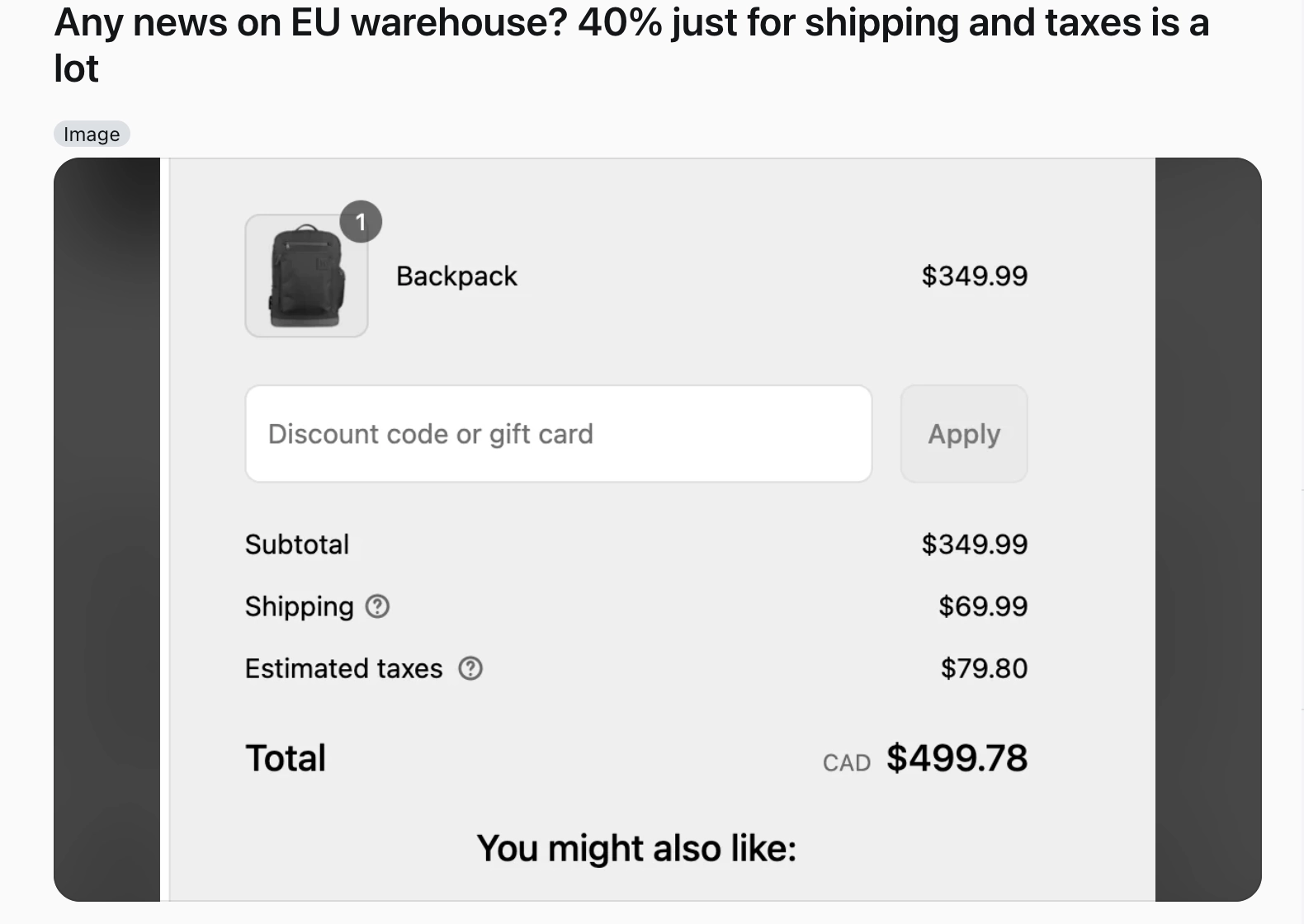
Source: Reddit
This is the biggest fixable leak in the funnel. Per Baymard, 40% of non-browsing shoppers abandon because extra costs (shipping, tax, fees) were too high, and 12% quit because they couldn’t see or calculate the total cost up front. So the price on itself isn’t the problem, it’s the surprise itself that breaks trust.
How to fix it:
- Show total cost as early as possible. Put shipping estimates on the product page or in the cart, not gated behind the final checkout step. Certainty beats a lower number revealed too late.
- Set a free-shipping threshold and surface progress. “You’re $8 away from free shipping” reframes the cost as a goal and lifts average order value (AOV), the average revenue per order. It turns a fee into a nudge.
- Be honest about fees you can’t remove. If duties or handling apply, say so before the cart. Shoppers forgive a known cost. They abandon a surprise one.
- Use exit intent with a specific offer. When a cart is about to be abandoned, a targeted message (“here’s free shipping on this order”) can recover a shopper who was leaving over the exact fee you addressed moments earlier. Uxify’s Carter agent does this for you: it catches shoppers at the point of exit, gives them a reason to stay and reports back on the carts it saved.
The fix here rarely means discounting. It means removing surprise. Predictable pricing keeps the shopper’s original decision intact.
Moment 5: Checkout asks for too much
The shopper decided to make the purchase. Now it’s time to put your checkout experience to the test.
Two friction points do most of the damage. Baymard’s data shows 18% abandon because the site forced them to create an account, 17% because the checkout was too long or complicated, and 9% because there weren’t enough payment methods. And the problem with the lengthy checkout is real and measurable: the average US checkout displays 23.48 form elements, while a well-designed flow needs only 12 to 14. That’s roughly double the work for the same purchase.
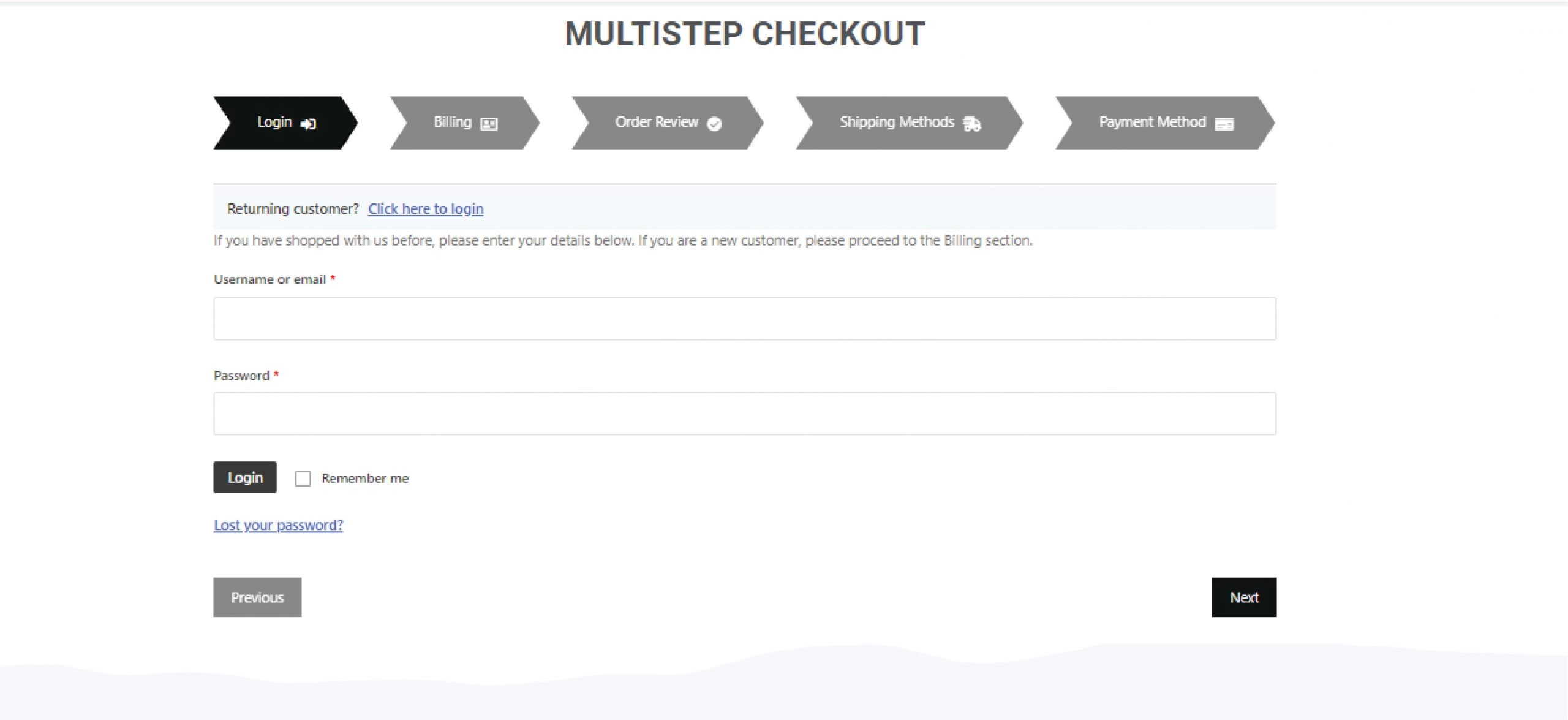
Source: WPMet
How to fix it:
- Offer guest checkout, prominently. Let people buy without an account. Ask them to save details after the order, not before. This single change addresses the most cited structural reason for abandonment.
- Cut the form to the essentials. Count your visible fields. Combine first and last name, autofill city and state from the postcode, hide the second address line behind a link, and drop anything you don’t need to ship the order. Aim for that 12-to-14 range.
- Add the payment methods people expect. Digital wallets like Apple Pay, Google Pay, and PayPal remove manual card entry and rebuild trust on mobile, where abandonment runs highest. More ways to pay means fewer dead ends at the last step.
- Show a progress indicator and keep the cart visible. People finish what they can see the end of. A clear step count and a persistent order summary reduce the “how much longer is this” anxiety that kills momentum.
Baymard estimates that better checkout design alone could recover $260 billion in lost orders across US and EU ecommerce, with the average large site able to lift conversions by 35.26%. The checkout isn’t a formality. It’s where the most winnable money sits.
Where this is heading: the agentic web
The five moments are about to get a sixth audience: AI shopping agents acting for the customer. When a person sends an agent to “find and buy a waterproof hiking jacket under $120 that ships by Friday,” that agent judges your store on the same signals shoppers do, only faster and less forgivingly. It needs a fast page, structured product data, clear pricing, and answers it can retrieve without guessing.
Every fix above doubles as agent-readiness. Good user experience, well-labeled product info, transparent totals, and a real-time answer layer are what let both humans and their agents complete the purchase. Stores that expose clear, machine-readable answers will win the transactions that never touch a human eye.
FAQ
What is the average cart abandonment rate?
Baymard Institute puts the average documented rate at 70.22%, based on 50 studies (updated September 2025). Around 42% of all abandonments come from people who were only browsing, so the rate you can influence is lower than the headline number.
What’s the number-one reason shoppers abandon carts?
Among shoppers who intended to buy, extra costs. Baymard finds 40% abandon because shipping, tax, or fees were too high, and another 12% because they couldn’t see the total cost up front. Shoppers abandon over the surprise as much as the number itself.
Does page speed really affect conversions?
Yes. Google’s research shows that when a site meets Core Web Vitals thresholds, users are 24% less likely to abandon the page load. Speed is the first filter a shopper passes through, before they ever see your product.
How many fields should a checkout have?
Baymard’s testing shows a strong checkout needs only 12 to 14 form elements, yet the average US checkout displays 23.48. If yours is longer, cutting fields and offering guest checkout are the highest-impact changes you can make.
How do I reduce product-page abandonment?
Answer buying questions where the doubt appears. Surface delivery, returns, sizing, and compatibility next to the buy button, and add a real-time chat layer to handle the questions static copy can’t predict.