Make Uxify one of your go-to sources on Google
 Add Uxify on Google
The 2026 holiday season is a few weeks away, and the pattern of recent years is a useful guide to what’s coming. For 2024, the NRF forecast U.S. holiday retail sales of up to $989 billion across November and December, with ecommerce accounting for roughly 30% of holiday spending. The growth it forecast was modest, at 3.5% at the top end.
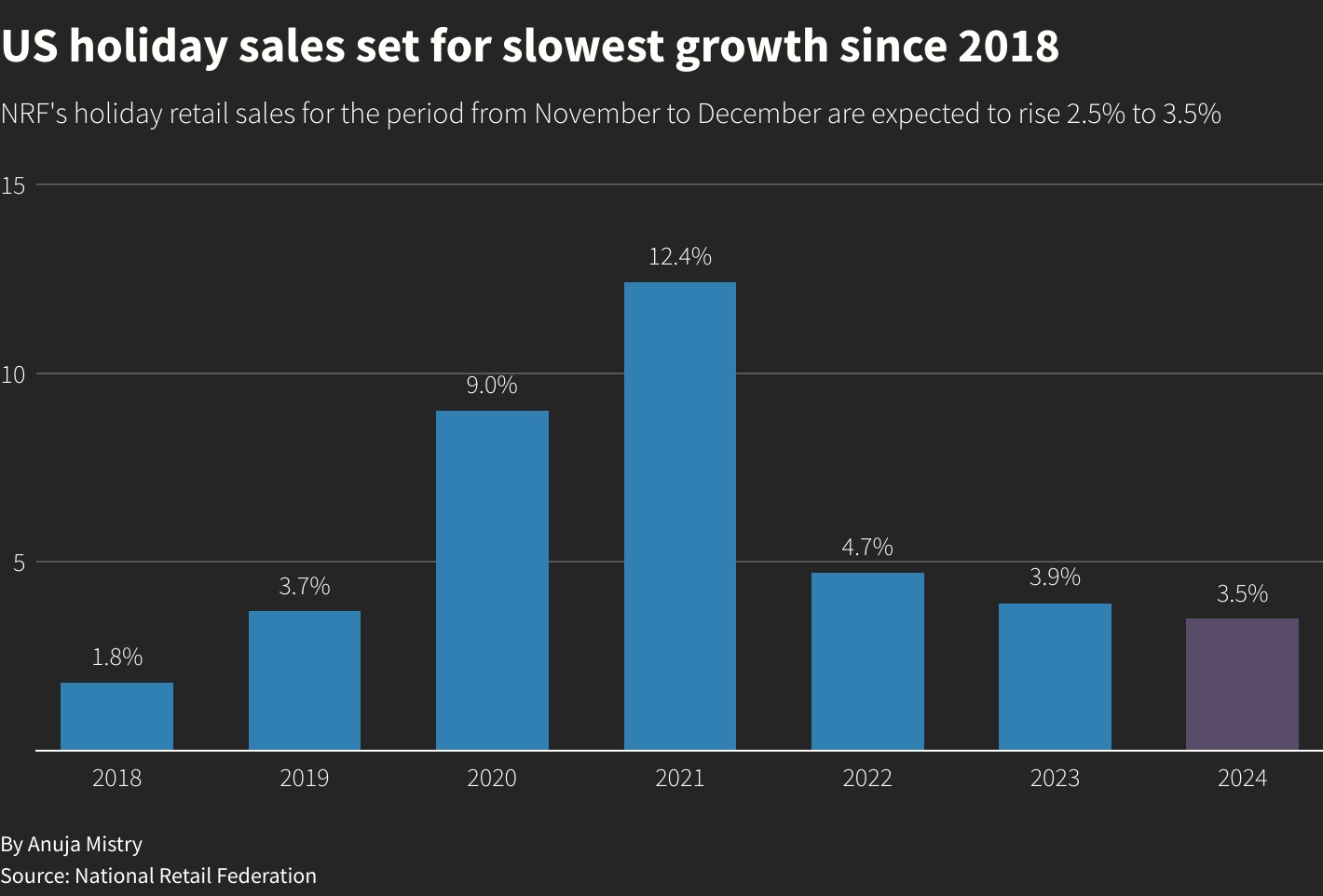
Reuters, US holiday sales to grow up to 3.5% in 2024, NRF forecasts
Demand is strong but growth is slow, so merchants will need to fight harder for their share of a highly competitive market. Every advantage counts, and maximizing page speed and site performance can make a meaningful difference. Here’s how you can prepare your site to meet customer expectations this season and position your business for a successful Black Friday, Cyber Monday, and beyond.
BFCM and the holiday season: key stats and what they mean
Each holiday season seems to start earlier, with brands rolling out promotions weeks ahead of Thanksgiving. Yet, despite the early deals, a significant portion of shoppers still hold off on big purchases until Cyber Week, viewing Black Friday and Cyber Monday as the prime time for discounts and exclusive offers. This creates an intense concentration of traffic and potential sales in a short timeframe, particularly during Black Friday and Cyber Monday (BFCM), which remain high-stakes events for ecommerce, driving substantial sales and heightened visibility for online businesses.
With 72% of shoppers preferring to shop online rather than in-store, ecommerce retailers must be ready to handle increased traffic and provide seamless, conversion-driving experiences. Over peak season, Contentsquare saw traffic surge 32.7% over normal levels, and Average Order Value (AOV) rose 7.7%, demonstrating that a well-optimized site can not only capture more shoppers but also encourage them to spend more per visit. For retailers, this means that efficient, fast-loading sites are essential to capitalize on peak traffic and maximize sales during BFCM and the broader holiday season.
Last-minute site checklist for holiday optimization
Before the season kicks off, take time to refine your site’s performance and prepare it for the influx of holiday shoppers. A last-minute checklist can ensure your website provides a streamlined, engaging, and reliable experience:
1. Audit Your Website
A quick audit will reveal any pain points in the user journey, helping you optimize for the specific behaviors of holiday shoppers. While the following points will give you even more precise tips, a general approach to your site audit would be to analyze your pages and links, here are some additional items to consider.
Optimize for high-value traffic Use analytics tools to identify which devices, channels, and regions generate the most traffic and conversions, and ensure your site performs well in those areas. You can use a VPN service to browse your site and view it as your most valuable visitors would.
Keep your redirects on track Make sure your redirects are in order. Analyze your site and spot if any external links lead to 404 pages or landing pages that you no longer use and redirect them to the correct links. Tools like Screaming frog or Ahrefs are a great way to check your overall site health.
Update your content Finally, go over your content to make sure you have properly updated everything before the holidays. Your customers can be particularly upset if they spot mistakes in areas like prices and offers, delivery information, and product descriptions.
2. Simplify the checkout process
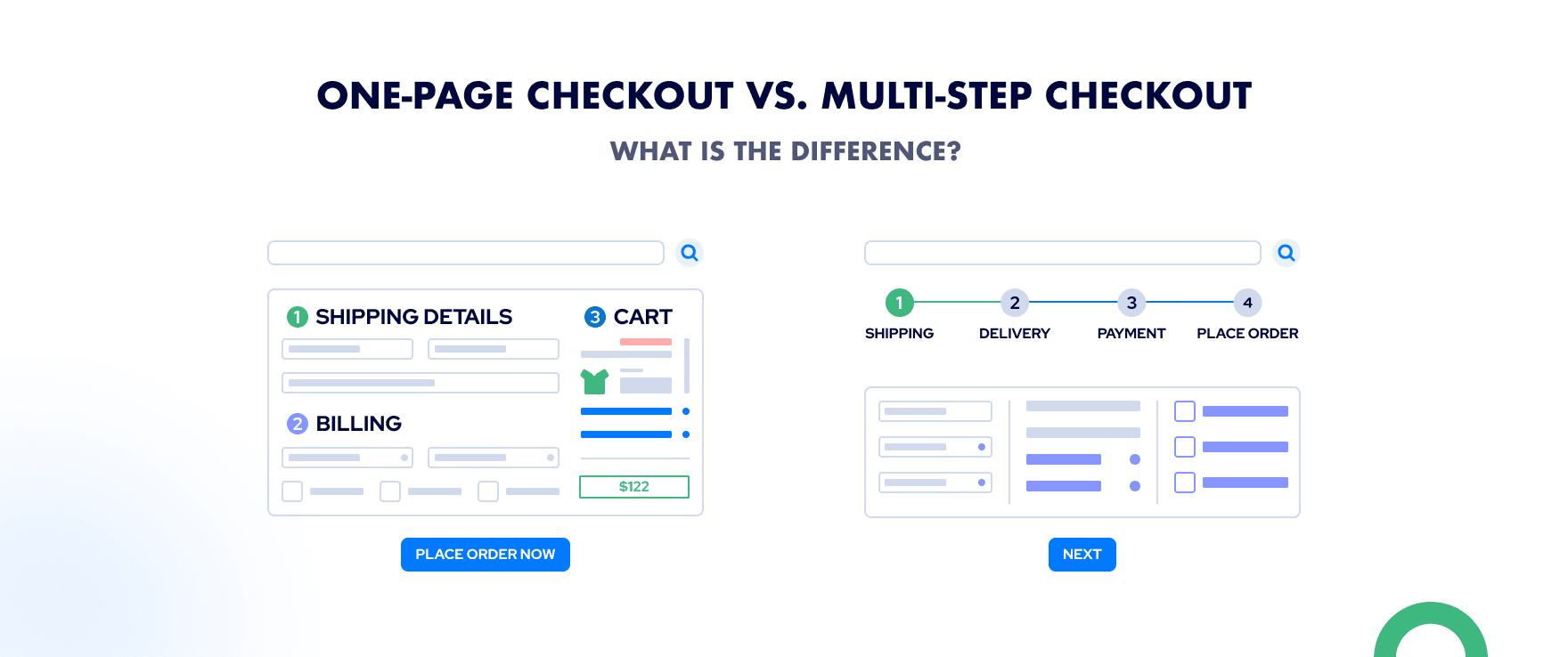
A complicated checkout process is one of the leading causes of cart abandonment, with up to 20% of shoppers dropping off when faced with too many steps. Streamline the process by eliminating unnecessary fields, offering a guest checkout option, and providing multiple payment methods. This reduces friction, particularly for new customers who are eager to complete their purchase quickly.
3. Test the user journey
Long browsing sessions are common during holiday shopping, with holiday buying journeys averaging over 25 pages. Mobile shoppers, in contrast, tend to visit fewer pages before making a purchase. Test the full user journey on both desktop and mobile to ensure seamless navigation, especially during key conversion steps like adding items to your cart, application of the discount codes and filling out the checkout information.
Consider also where your users will navigate from to land on your site. Double check your paid ads, email links and influencer links to make sure they look alright on different browsers like Chrome and Safari, and even on different devices like Android and iPhone.
4. Optimize the mobile experience
Mobile commerce continues to grow, and in 2023 59% of Thanksgiving weekend sales happened on smartphones. Optimizing for mobile devices is essential for reducing bounce rates and creating a satisfying shopping experience. While mobile optimization should be a year-round priority, here are some quick tips to ensure your site is ready for the upcoming shopping surge:
- Make sure essential elements, like the search bar, promotional banners, and key calls-to-action (e.g., “Add to cart”), are visible without scrolling. This makes it easier for mobile users to engage quickly and boosts conversion rates.
- Ensure that buttons and links are easy to reach with one hand, ideally located within the lower third of the screen. Larger, well-spaced buttons help prevent misclicks and improve overall usability for mobile shoppers.
- Use the right image formats and font sizes for mobile devices. Ensure images are at least 300px wide and 200px high to be clearly viewable on most mobile devices without compromising quality. For font sizes, anything below 16px can be difficult to read, so stick with a minimum of 16px for body text to improve readability.
These quick adjustments can make a significant impact, ensuring your site provides a seamless, engaging experience for mobile users.
5. Choose the right tech stack
The good news? Modern AI tools for ecommerce can automate time-consuming tasks and free you up to focus on strategic holiday preparation. AI-powered solutions like Klevu for intelligent product recommendations, Klaviyo for automated personalized messaging, and chatbots for 24/7 customer support handle the heavy lifting—from answering repetitive questions to suggesting the right products at the right time. This automation means you can spend less time on operational tasks and more time optimizing your promotions, content, and customer experience for the holiday rush.
If you want to give your site traffic a little boost, it’s still not too late to sign up for solutions like UpPromote to increase your reach via influencer marketing, and to switch on Uxify’s agents to keep your site fast through the rush.
6. Make product pages easy to navigate
Shoppers don’t want to hunt for information. Use video lookbooks, quizzes, or comparison tables to guide undecided visitors toward products they’ll love.
Optimized product pages with robust descriptions, user-generated content (UGC), and customer reviews offer the information shoppers need to make informed decisions. Solutions like Yotpo, that offer reviews and loyalty programs, can enhance trust and encourage repeat visits.
7. Monitor and optimize performance
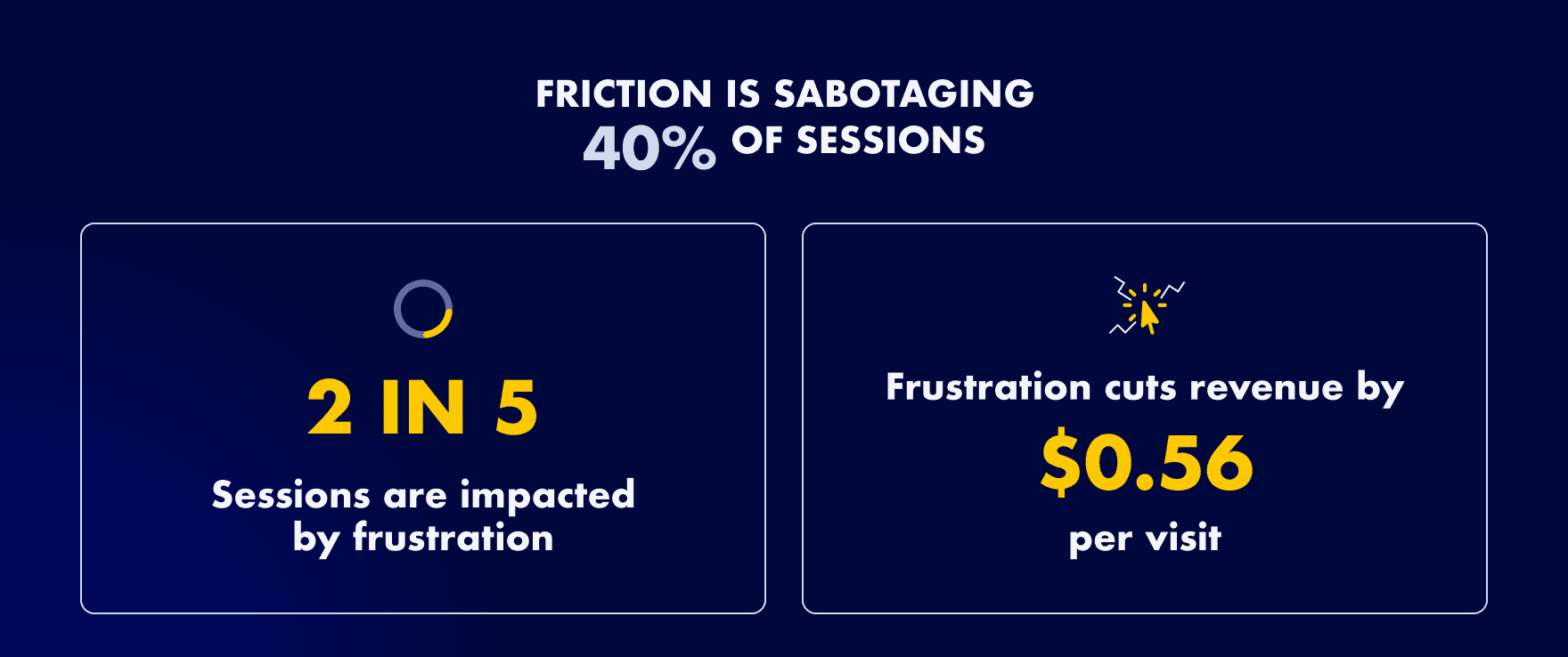
Performance monitoring and optimization is crucial during high-traffic events like BFCM. Contentsquare found that nearly 40% of holiday shopping sessions were impacted by user frustration, with slow page speed responsible for 16% of these issues.
Contentsquare, 3 eCommerce conversion rate optimization strategies
By using all-round performance tools to proactively identify and address performance issues, you can prevent costly downtime, ensure smoother user experiences, and keep shoppers engaged throughout their journey.
Traditional speed optimization techniques
The holiday shopping season can be make-or-break for ecommerce, and the speed of your website plays a crucial role in determining whether customers convert or abandon. Research from Deloitte shows that even a 0.1-second improvement in page load time can increase conversions by up to 8%. Faster load times not only reduce user frustration but also help retailers retain traffic, drive conversions, and offer the smooth experiences holiday shoppers expect. In preparation for the holiday rush, here are traditional speed optimization techniques that can enhance your site’s performance, with suggested tools and best practices for each.
1. Optimize images
Large image files are one of the most common causes of slow page loads. Optimizing images without compromising quality is essential for maintaining a visually appealing yet fast-loading site. Use compression tools like TinyPNG or ShortPixel to reduce file sizes, and consider using WebP format, which provides excellent compression while maintaining quality. For larger catalogs, Cloudinary is a powerful tool that can automatically compress and serve images in the optimal formats for each user, ensuring consistent speed across devices.

Best Practices:
- Skip the jpeg or jpg, instead opt in for smarter image formats like WebP or aviv format
- Use responsive image options to serve different image sizes for different devices.
- Implement lazy loading for images below the fold, which loads images only when the user scrolls to them, saving bandwidth and speeding up the initial page render.
2. Decrease code bloat
Third-party apps, plugins, and extra code can add significant weight to your pages, slowing down load times and cluttering the user experience. Evaluate each app and script to determine whether it directly enhances the user experience or aids conversions. Use tools like Google Tag Manager to manage and consolidate scripts or delay their execution, and consider a custom-coded solution to replace bulky plugins when possible.
Best Practices:
- Do an app audit and remove unnecessary plugins, apps, or scripts, especially those with overlapping functionality.
- Use asynchronous loading for scripts that aren’t essential to the main content load (above-the-fold content) to ensure they don’t block rendering.
3. Freeze code and theme updates
During the peak shopping season, stability is paramount. Avoid making updates to your codebase or theme that could introduce new bugs or performance issues. GitHub and Bitbucket allow you to create version-controlled code freezes, so your development team can avoid unintended changes that might disrupt the holiday shopping experience.
Best Practices:
- Implement a “code freeze” period of two to four weeks before Black Friday to prevent accidental site disruptions.
- If critical updates are necessary, use a staging environment to test changes before deploying to production.
4. Use a CDN and caching solution (non-Shopify sites)
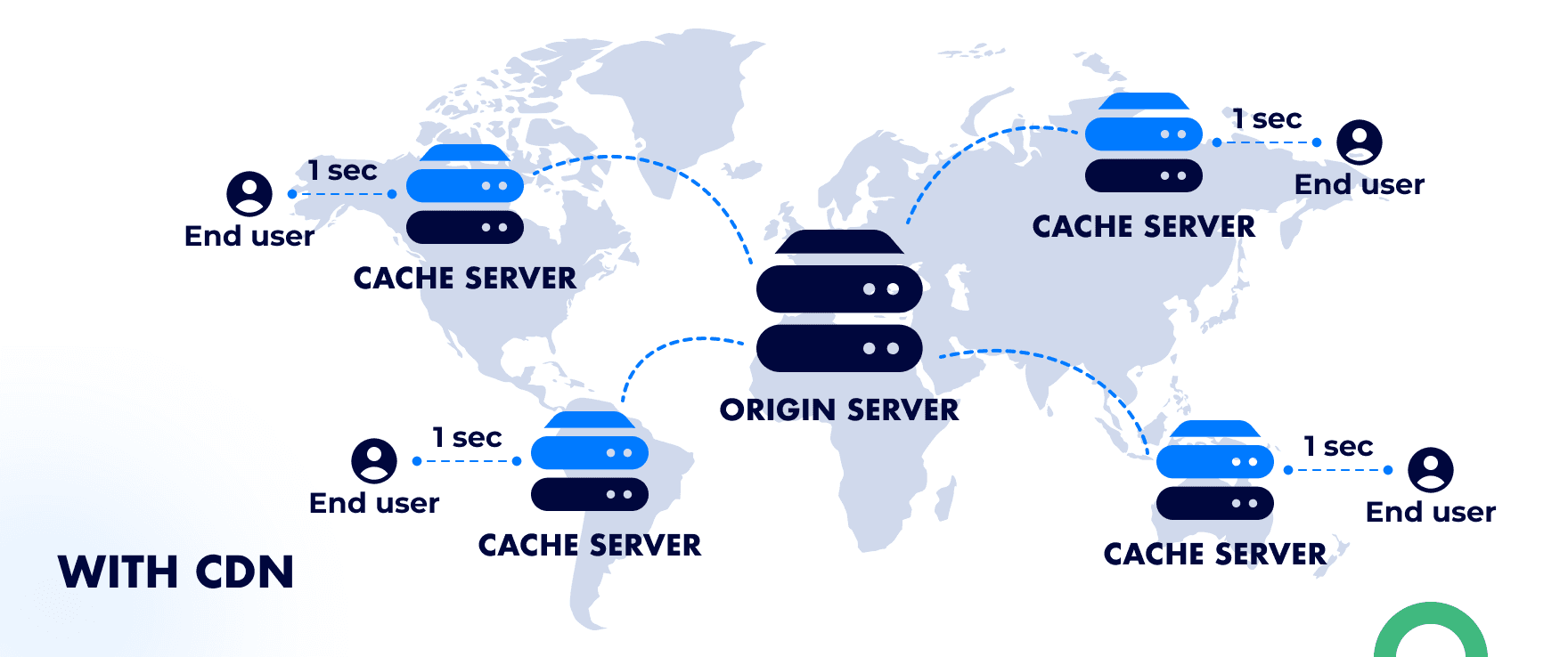
A CDN distributes site content across global servers, reducing load times by serving users from a nearby location. Caching stores frequently accessed data locally, speeding up repeat visits. Together, they ease server load, enhance user experience, and support higher conversions, especially during peak holiday traffic. Platforms like Shopify and BigCommerce include integrated CDN services, but if you’re on WooCommerce, choosing a host like WP Engine or Kinsta, which includes CDN, can boost performance. Other alternatives are Cloudflare or solutions like NitroPack which combine CDN and caching together.
Best Practices:
- Use a combination of edge caching and browser caching to store site assets locally on the user’s device, reducing the need to reload static elements.
- Configure your caching policy to refresh only when content is updated, which reduces unnecessary requests to your server, while making sure your site visitors are always seeing the latest version of your site.
- Regularly review and update your cache policy, particularly as you roll out new promotions or product updates during the holiday season.
These traditional optimization techniques are the foundation of a high-performance ecommerce site, especially during the critical holiday shopping period. By streamlining images, minimizing code bloat, and maintaining a stable codebase, you’ll be well-equipped to handle traffic surges and deliver a fast, engaging experience that meets and exceeds customer expectations.
Going beyond fast: achieving instant page loading with Navigation AI
The items in the list above are essential, and most ecommerce businesses already treat them as standard practice. They’re a good foundation, but they won’t set you apart in a crowded holiday market, and they don’t adapt once the rush starts. A promotion goes live, traffic shifts to a new collection, marketing adds one more tracking tag, and the site you tested in October isn’t the site shoppers get on Black Friday.
That’s the part we built agents for. Each Uxify agent owns one job and keeps doing it while your team is busy running the sale. Two of them matter most for peak traffic: Navigation AI for how fast pages arrive, and INProve for how fast the page answers a click.

The role of speculative loading
Speculative loading is a browser feature. Through the Speculation Rules API, a page tells Chrome which URLs to prefetch or prerender before the visitor clicks. A prerendered page is built in full in the background, so when the click comes, it appears straight away. For a holiday shopper moving from a gift guide to a product to the cart, that turns every wait into an instant page load. The catch is that the browser only prerenders what the rules tell it to, and someone has to decide which pages those are.
Navigation AI by Uxify
Navigation AI is the agent that makes that decision. It watches real sessions on your store, predicts the next click from viewport position, scroll, device and live session signals, and prerenders that page through the Speculation Rules API. The shopper clicks and lands on a page that’s already painted.
It runs on Reality, Uxify’s real-user data layer, which reads 3,000+ signals from real sessions. So it predicts from how your shoppers move this week, not from averages. When a Black Friday banner sends everyone to one collection, its predictions follow. It gets the next click right 72% of the time, and navigations are 55% faster.
INProve for clicks during peak traffic
Fast pages are half of it. The other half is what happens when a shopper taps “Add to cart”, picks a size or applies a discount code. Holiday sites carry more JavaScript than at any other time of year: countdown timers, promo popups, upsell widgets, extra pixels. When one of those scripts is busy, the tap waits. Google measures that wait as Interaction to Next Paint (INP).
INProve owns that wait. It spots main-thread blocking as it happens and yields or reschedules the heavy JavaScript so the shopper’s click, tap or keystroke goes first. The promo script still runs, just not in front of the customer. INP improves by up to 84%, and INProve tracks real-user INP over time, so you can see whether a new campaign tag made things worse.
Results with Navigation AI
Sites running Navigation AI see 30% more pageviews per session and a 1% lift in conversion rate. On Shopify, Ecigone saw engaged sessions grow 22% and repeat traffic grow 9%. On mobile, Strand saw 80% more pageviews per session and 14% more add-to-carts. And eCommerce Fastlane, running Navigation AI and INProve together, saw 26% more pageviews per session and rage clicks more than halved.
You don’t need to watch a dashboard through the rush to know any of this. Both agents report back weekly or monthly with what they did and what it earned. Navigation AI’s report includes how many more product pages each visit reached (one store saw 2.43 more products viewed per visit). Switch them on now rather than in Cyber Week: the full Core Web Vitals effect can take up to 28 days to show in Google’s CrUX data.
The business impact of instant page navigation
Optimizing for instant navigation has far-reaching effects on key business metrics, directly translating into increased traffic, better conversions, and enhanced long-term value.
- Increased traffic: Faster sites keep holiday traffic engaged, as even a 1-second delay can reduce conversions by up to 20%. Instant navigation minimizes drop-offs, capturing more visitors during peak shopping periods like Black Friday and Cyber Monday.
- Improved SEO visibility: Search engines prioritize fast-loading sites, improving rankings and driving organic traffic. This enhanced discoverability helps reduce the need for heavy reliance on paid advertising, especially during competitive holiday seasons.
- Reduced Ad Spend: By boosting organic visibility through improved speed, businesses can save on ad spend, allowing resources to focus on high-intent shoppers rather than broad ad campaigns—a critical advantage as digital marketing costs rise.
- Better User Engagement: Faster load times decrease bounce rates by up to 3.9%, encouraging users to browse more pages and engage longer. This heightened engagement translates into more opportunities for conversion.
- Higher Conversion Rates: Even fractions of a second in load time improvement can increase conversions by up to 8%. Faster navigation creates a seamless path to purchase, reducing friction and making it easy for shoppers to complete their orders.
- Increased AOV and Retention: Quick, responsive experiences foster customer satisfaction, leading to higher Average Order Values (AOV) and retention rates. Happy customers are more likely to return, increasing lifetime value and enhancing profitability over time.

Traditional optimizations get your store ready for the holidays. Agents keep it fast while the season is happening. Navigation AI prerenders the page each shopper is most likely to open next, INProve keeps the promo scripts out of the way of their clicks, and both switch on from the same Uxify snippet with nothing to configure. Turn them on before the rush, and let their reports tell you what the holidays earned.